1. Introdução
Thank you for choosing the Natec Scarab 3 USB 3.1 Gen 1 USB-A + USB-C SD/Micro SD Card Reader. This device is designed to provide fast and reliable data transfer between your memory cards and various devices equipped with USB-A or USB-C ports. Please read this manual carefully before using the product to ensure proper operation and to maximize its lifespan.
2. Produto acabadoview
The Natec Scarab 3 is a versatile card reader featuring both USB-A and USB-C connectors, allowing compatibility with a wide range of devices. It supports various SD and Micro SD card formats.
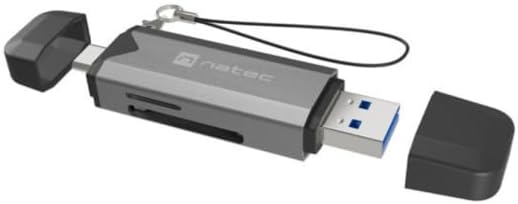
Figura 1: Natec Scarab 3 USB 3.1 Gen 1 USB-A + USB-C SD/Micro SD Card Reader. The image shows the card reader with its USB-A and USB-C connectors, and slots for SD and Micro SD cards. Both protective caps are removed, revealing the connectors.
Principais características:
- Conectividade Dupla: USB-A and USB-C 3.1 Gen 1 interfaces.
- Transferência de dados em alta velocidade: Up to 5000 Mbit/s (5 Gbps).
- Ampla compatibilidade com cartões: Supports MicroSD (TransFlash), MicroSDHC, MicroSDXC, SDHC, and SDXC.
- Design compacto: Portátil e fácil de transportar.
3. Configuração
- Desembale o dispositivo: Carefully remove the Natec Scarab 3 card reader from its packaging.
- Identificar conectores: The device has two main connectors: a standard USB-A plug and a reversible USB-C plug, each protected by a cap.
- Conectar ao dispositivo host:
- For devices with a USB-A port (e.g., older laptops, desktop PCs), remove the cap from the USB-A end and insert it into an available USB-A port.
- For devices with a USB-C port (e.g., modern laptops, smartphones, tablets), remove the cap from the USB-C end and insert it into an available USB-C port.
- Instalação do driver: The Natec Scarab 3 is a plug-and-play device. No additional drivers are typically required for most operating systems (Windows, macOS, Linux, Android). Your system should automatically detect and install the necessary drivers upon first connection.
4. Instruções de operação
- Inserir cartão de memória:
- For SD cards (SDHC, SDXC): Locate the SD card slot on the side of the reader. Insert the SD card with the contacts facing down until it clicks into place.
- For Micro SD cards (MicroSD, MicroSDHC, MicroSDXC): Locate the Micro SD card slot, usually adjacent to the SD slot. Insert the Micro SD card with the contacts facing down until it clicks into place.
Observação: Do not force the card. If it does not insert easily, check the orientation. Only one type of card (SD or Micro SD) can be inserted and read at a time.
- Acesso aos dados: Once the card reader is connected to your computer or device and a memory card is inserted, it will appear as a removable drive in your file explorer (e.g., "This PC" on Windows, "Finder" on macOS).
- Transferindo dados: Agora você pode arrastar e soltar. files to and from the memory card, or use copy/paste functions, just like with any other storage device.
- Ejecting Memory Card: Before removing the memory card or disconnecting the card reader, always safely eject the drive from your operating system to prevent data corruption.
- Windows: Right-click on the drive icon in "This PC" and select "Eject".
- MacOS: Drag the drive icon to the Trash, or click the Eject button next to the drive in Finder.
- Disconnecting the Reader: After safely ejecting, you can physically remove the memory card and then disconnect the Natec Scarab 3 from your host device. Replace the protective caps on the connectors when not in use.
5. Manutenção
- Limpeza: Use a soft, dry, lint-free cloth to clean the exterior of the card reader. Do not use liquid cleaners or aerosols.
- Armazenar: When not in use, store the card reader with its protective caps on in a cool, dry place, away from direct sunlight and extreme temperatures.
- Evite danos físicos: Do not drop the device or expose it to excessive force. Avoid inserting foreign objects into the card slots or USB ports.
- Proteção contra umidade: Mantenha o dispositivo longe de água e outros líquidos.
6. Solução De Problemas
- Problem: The card reader is not detected by the computer.
- Solução:
- Ensure the card reader is fully inserted into the USB-A or USB-C port.
- Tente uma porta USB diferente em seu computador.
- Try connecting the card reader to a different computer to rule out a port issue.
- Reinicie o seu computador.
- Problem: The memory card is not recognized.
- Solução:
- Certifique-se de que o cartão de memória esteja totalmente e corretamente inserido no slot apropriado.
- Check if the memory card is damaged or corrupted by trying it in another device.
- Verify that the memory card format is supported by the reader (MicroSD, MicroSDHC, MicroSDXC, SDHC, SDXC).
- Ensure only one card is inserted at a time.
- Problema: Velocidade de transferência de dados lenta.
- Solução:
- Ensure you are using a USB 3.0/3.1 compatible port on your computer for optimal speeds. Connecting to a USB 2.0 port will result in lower speeds.
- Check the speed class of your memory card. Higher class cards offer faster read/write speeds.
- Evite transferir muitas pequenas quantidades. files simultaneamente; grande files transfere de forma mais eficiente.
7. Especificações
| Marca | Natec |
| Nome do modelo | NCZ-2262 |
| Tipo de interface | USB 3.1 Gen 1 (USB-A, USB-C) |
| Taxa de transferência de dados | Up to 5000 Mbit/s (5 Gbps) |
| Cartões de Memória Compatíveis | MicroSD (TransFlash), MicroSDHC, MicroSDXC, SDHC, SDXC |
| Dimensões do produto (CxLxA) | 74 mm x 20 mm x 11 mm (aproximadamente 2.91 x 0.79 x 0.43 polegadas) |
| Peso do item | Approx. 1.1 pounds (Note: This weight seems unusually high for a card reader, likely a data entry error in source. Actual weight is typically much lower.) |
| Cor | Black, Dark Grey |
| Fabricante | NATEC |
8. Garantia e Suporte
The Natec Scarab 3 USB 3.1 Gen 1 USB-A + USB-C SD/Micro SD Card Reader comes with a 2-year official Natec brand warranty against factory defects, as stated in the product description. Some retailers may offer an extended garantia de três anos. Please refer to your purchase documentation for specific warranty terms applicable to your region and retailer.
For technical support or warranty claims, please contact your retailer or visit the official Natec webSite com informações de atendimento ao cliente.