1. Introdução
The SPROLINK NeoLIVE N5/N5S is a versatile 5-input channel video streaming switcher designed for professional live production. It features a 10.1-inch integrated screen, dual 4K HDMI inputs, and supports multi-view (MV) and program (PGM) outputs. This manual provides detailed instructions for setting up, operating, and maintaining your NeoLIVE N5/N5S switcher.

Figure 1.1: SPROLINK NeoLIVE N5/N5S Video Streaming Switcher (Open View)
This image shows the NeoLIVE N5/N5S switcher in its open configuration, revealing the integrated 10.1-inch display and the control panel with various buttons and faders. The screen displays a multi-view layout, including preview (PVW), program (PGM), and four input channels (IN1-IN4).
2. Principais características
- Rich and Flexible Input Interfaces: Equipped with 4 x 3G-SDI ports and 4 x HDMI ports, offering a total of 8 selectable inputs. HDMI 1 and 2 support 4K input. Supports NDI input (optional) and multi-functional input ports for direct connection to USB devices for media playback, UVC cameras, and SRT/RTMP streams.
- Multiple Outputs and Monitoring Functions: Features dual HDMI outputs and 1 x SDI output, supporting independent PGM and MV outputs. Allows connection of three display terminals simultaneously for multi-view monitoramento.
- Convenient Live Streaming and Recording: Built-in hardware live streaming engine enables direct streaming to platforms like TikTok and Instagram via Ethernet without a computer. Supports recording live audio and video directly to a USB drive or external hard disk.
- Powerful Media Processing: Integrated media player can play videos from storage devices as input sources. Supports importing JPG and PNG images from USB drives, with lower-third dynamic overlay features for enhanced visual effects.
- Professional Audio and Video Processing: Includes a professional audio mixer supporting AFV and MIX audio modes, allowing real-time mixing of HDMI embedded audio and external audio sources. Real-time audio monitoring is available via the headphone jack. Equipped with a virtual chroma key algorithm for news broadcasting and live demonstrations.
- Precise PTZ Camera Control: Supports control of up to four PTZ cameras for smooth multi-camera switching via joystick.
3. Configuração
3.1 Conteúdo da embalagem
Verifique se todos os itens estão presentes na embalagem:
- SPROLINK NeoLIVE N5/N5S Video Streaming Switcher
- Adaptador de energia
- Cabo USB
- Manual do usuário (este documento)
3.2 Conectando o Dispositivo
Before connecting, ensure the device is powered off.

Figura 3.1: Conexões do painel traseiro
This image displays the rear panel of the NeoLIVE N5/N5S, highlighting its various connectivity options including DC 12V IN, LAN, SD card slot, USB, AUX, PGM, IN1-IN4 (HDMI), and MIC 1/2 inputs.
- Conexão de energia: Conecte o adaptador de energia fornecido à porta DC 12V IN no painel traseiro e ligue-o a uma tomada elétrica.
- Entradas de vídeo:
- Connect your video sources (cameras, computers, etc.) to the HDMI (IN1-IN4) and SDI ports. Note that HDMI 1 and 2 support 4K resolution.
- For multi-functional inputs, connect USB devices or UVC cameras to the USB port.
- If using NDI, ensure your network is configured and connect an Ethernet cable to the LAN port.
- Saídas de Vídeo: Connect your monitors or recording devices to the HDMI outputs (PGM, MV) and the SDI output.
- Entradas de áudio: Connect external microphones or audio sources to the MIC 1 and MIC 2 ports.
- Conexão de rede: For live streaming and remote control, connect an Ethernet cable from the LAN port to your network router or switch.
4. Instruções de operação
4.1 Ligar/Desligar
To power on the device, press the power button located on the unit. The integrated screen will illuminate. To power off, press and hold the power button until the device shuts down.
4.2 User Interface and Input Selection
The 10.1-inch flip-up touch screen provides intuitive control over all functions. Use the physical buttons and faders on the control panel in conjunction with the touch screen for seamless operation.

Figure 4.1: Super Source Output Display
This image illustrates the Super Source Output feature, where multiple input sources are combined and displayed on the screen, allowing for complex layouts and monitoring.
Select desired input sources using the dedicated input buttons (1-4 for HDMI/SDI, Media for internal player, etc.) on the control panel. The selected input will appear in the preview (PVW) window on the screen.
4.3 Video Transitions
The NeoLIVE N5/N5S offers various transition effects including FADE, WIPE, DIP, and DVE. Use the T-bar or the CUT/AUTO buttons to switch between PVW and PGM. Adjust transition duration from 0.5 to 1.5 seconds using the dedicated duration button.

Figure 4.2: Multiple Transition Effects
This diagram displays the array of transition effect icons available on the NeoLIVE N5/N5S, including various wipes, fades, and digital video effects (DVEs), allowing for dynamic scene changes.
4.4 Mixagem de áudio
The built-in professional audio mixer supports AFV (Audio-Follow-Video) and MIX audio modes. You can mix HDMI embedded audio with external audio sources connected to the MIC inputs. Monitor the mixed audio via the headphone jack.

Figure 4.3: Built-in Mixer for Real-time Audio Mixing
This image shows the on-screen interface of the audio mixer, displaying individual audio levels for program (PGM), media, and microphone inputs (Mic 1, Mic 2), along with options for AFV and MIX modes.
4.5 Media Playback and Overlays
The integrated media player allows you to play videos directly from connected storage devices (USB drives). You can also import JPG and PNG images for use as graphics or overlays. The lower-third dynamic overlay feature enriches visual effects for titles or information display.

Figure 4.4: Lower Third Dynamic Overlay
This image demonstrates a lower-third graphic overlay, typically used to display names, titles, or other textual information during a live broadcast, enhancing the professional appearance of the production.
4.6 Virtual Chroma Key
Utilize the virtual chroma key algorithm for professional background removal, ideal for news broadcasting or virtual sets. The system supports precise color sampling for accurate keying.

Figure 4.5: Virtual Chroma Key Application
This image illustrates the application of virtual chroma key, where a person filmed against a green screen is composited onto a virtual background, commonly used in news and weather broadcasts.
4.7 Live Streaming and Recording
The built-in hardware streaming engine allows direct streaming via Ethernet to popular platforms without the need for an external computer. Simply configure your streaming key through the web server interface. You can also record your live audio and video directly to a connected USB drive or external hard disk.

Figure 4.6: Dual Channel Live Streaming
This image depicts the dual-channel live streaming capability of the NeoLIVE N5/N5S, showing how it can stream directly to multiple platforms (e.g., TikTok, YouTube, Twitch) and interact with a mobile device for chat or monitoring.
4.8 Controle de Câmera PTZ
The switcher supports precise control of up to four PTZ (Pan-Tilt-Zoom) cameras. Use the integrated joystick and control buttons to smoothly adjust camera positions and zoom levels, facilitating dynamic multi-camera productions.

Figure 4.7: Precise PTZ Camera Control
This image illustrates the PTZ camera control feature, showing a robotic camera and a hand manipulating a joystick, indicating the ability to remotely control camera movements and zoom directly from the switcher.
5. Manutenção
5.1 Limpeza
To maintain the performance and appearance of your NeoLIVE N5/N5S, follow these cleaning guidelines:
- Always power off and disconnect the device before cleaning.
- Use um pano macio e seco para limpar as superfícies externas.
- For the screen, use a microfiber cloth specifically designed for electronics displays. Do not use abrasive cleaners or solvents.
- Keep vents clear of dust and debris to ensure proper airflow.
5.2 Armazenamento
When not in use for extended periods, store the switcher in a cool, dry place, away from direct sunlight and extreme temperatures. It is recommended to store it in its original packaging or a protective case to prevent damage.
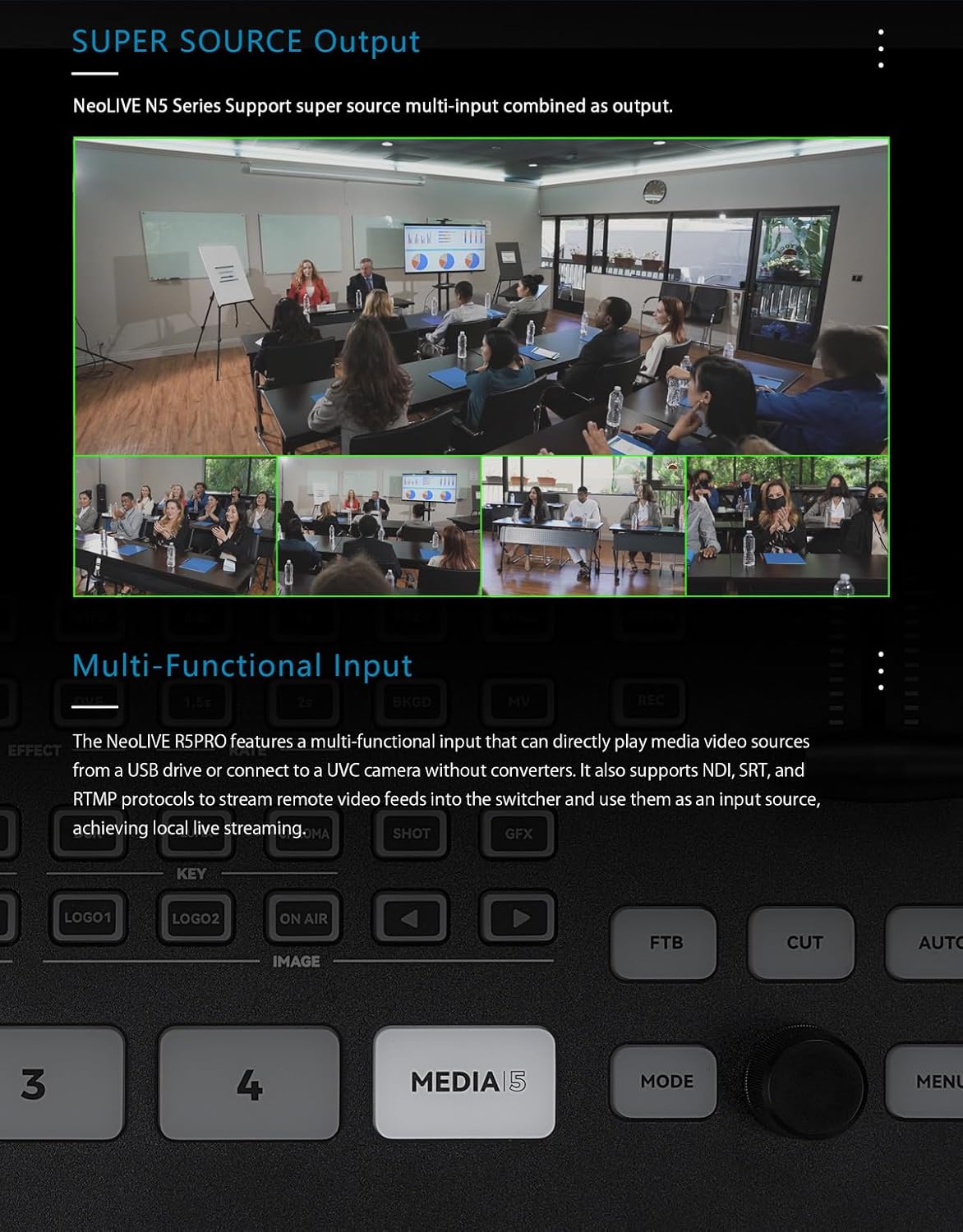
Figure 5.1: NeoLIVE N5/N5S in Carrying Case
This image shows the NeoLIVE N5/N5S switcher securely stored within its grey protective carrying case, emphasizing its portability and ease of storage.
6. Solução De Problemas
This section addresses common issues you might encounter with your NeoLIVE N5/N5S switcher.
| Problema | Possível causa | Solução |
|---|---|---|
| No video signal on input. | Incorrect cable connection, incompatible resolution, source not powered on. | Check all cable connections. Ensure source device is powered on. Verify source resolution is supported by the switcher. Try a different cable. |
| Sem saída de áudio. | Audio levels too low, incorrect audio input selected, output device issues. | Check audio mixer levels on the screen. Ensure correct audio input is selected (embedded HDMI or external MIC). Verify output device (speakers, headphones) is working and connected correctly. |
| Live stream is buffering or dropping frames. | Poor network connection, incorrect streaming settings, insufficient internet bandwidth. | Check your internet connection speed and stability. Reduce streaming bitrate in settings. Ensure no other devices are heavily using network bandwidth. Try a wired Ethernet connection if on Wi-Fi. |
| O dispositivo não liga. | Power adapter not connected, faulty power outlet, power adapter issue. | Ensure the power adapter is securely connected to the device and a working power outlet. Try a different power outlet. Contact support if the issue persists. |
7. Especificações
Technical specifications for the SPROLINK NeoLIVE N5/N5S Video Streaming Switcher.
| Recurso | Detalhe |
|---|---|
| Dimensões do produto | 2.48 x 9.84 x 8.11 polegadas |
| Peso do item | 7.04 libras |
| Número do modelo | Neolive N5 |
| Baterias | 1 bateria de metal de lítio necessária (incluída) |
| Cor | Preto |
| Tipo de conector | HDMI, SDI |
| Dispositivos compatíveis | Camera, Monitor, Personal Computer |
| Interfaces de entrada | 4 x 3G-SDI, 4 x HDMI (HDMI 1 & 2 support 4K), USB, NDI (optional) |
| Interfaces de saída | 2 x HDMI (PGM, MV), 1 x SDI |
| Tamanho da tela | 10.1-inch integrated display |
| Mixer de áudio | Professional audio mixer with AFV and MIX modes |
| Transmissão | Built-in hardware streaming engine via Ethernet |
| Gravação | Direct to USB drive/external hard disk |
8. Garantia e Suporte
SPROLINK provides comprehensive support for its products.
8.1 Informações de garantia
The SPROLINK NeoLIVE N5/N5S comes with a Garantia limitada de 1 anos A garantia é válida a partir da data da compra. Esta garantia cobre defeitos de materiais e de fabricação sob uso normal. Não cobre danos causados por uso indevido, acidentes, modificações não autorizadas ou fatores externos.
8.2 Suporte ao cliente
For technical assistance, troubleshooting, or warranty claims, please contact SPROLINK customer support. Our team is available to assist you with any questions or issues you may encounter.

Figure 8.1: SPROLINK Customer Support
This image shows a group of customer support representatives, symbolizing the availability of 24/7 customer assistance for SPROLINK products.
Please visit the official SPROLINK webPara obter as informações de contato mais atualizadas, consulte o site ou a documentação da sua compra.


