1. Introdução
Obrigado pela compra.asing the iFFALCON 40S55T 40-inch Full HD Google TV. This manual provides essential information for the safe and efficient use of your television. Please read it thoroughly before operating the device and retain it for future reference.
The iFFALCON 40S55T is a tunerless smart TV designed for streaming content, offering a Full HD display, Google TV operating system, Chromecast built-in, and Dolby Audio for an immersive entertainment experience.
2. Informações de segurança
Siga sempre as precauções básicas de segurança ao usar esta televisão para reduzir o risco de incêndio, choque elétrico e ferimentos.
- Não exponha a TV à chuva ou umidade.
- Não abra a TV casing; encaminhe todos os serviços de manutenção para pessoal qualificado.
- Garanta ventilação adequada ao redor da TV.
- Mantenha a TV longe da luz solar direta, fontes de calor e campos magnéticos fortes.
- Use only the power cord and accessories supplied by the manufacturer.
- Desligue a TV da tomada durante tempestades com raios ou quando não for utilizá-la por longos períodos.
3. Conteúdo da embalagem
Verifique se todos os itens estão presentes na caixa:
- iFFALCON 40S55T 40-inch Full HD Google TV
- Controle remoto
- Suporte para TV (2 peças)
- Parafusos para suporte de TV
- Cabo de energia
- Cartão de garantia
- Manual de Instruções (este documento)
4. Configuração
4.1 Montagem do suporte de TV
- Coloque a TV cuidadosamente com a tela virada para baixo sobre uma superfície macia e plana para evitar danos à tela.
- Alinhe cada peça do suporte com os encaixes correspondentes na parte inferior da TV.
- Fixe os suportes utilizando os parafusos fornecidos. Certifique-se de que estejam bem apertados.
4.2 Conexão de energia
Connect the power cable to the TV's power input and then plug it into a wall outlet. The TV will enter standby mode.
4.3 Initial Setup (Google TV & Network)
Upon first power-on, the TV will guide you through the initial setup process for Google TV. This includes:
- Seleção de idioma.
- Conectando-se a uma rede Wi-Fi.
- Signing in with your Google account to access personalized content and apps.
- Aceitar os termos e condições.
4.4 Conectividade
The iFFALCON 40S55T offers various connection options for external devices.

Imagem: Acimaview of the TV's connectivity options, including HDMI, USB, Bluetooth, and Wi-Fi.
- Portas HDMI: Connect external devices like gaming consoles, Blu-ray players, or set-top boxes.
- Porta USB: Para conectar dispositivos de armazenamento USB para reproduzir mídia. files.
- Wi-fi: For wireless internet connection to access streaming services and online features.
- Bluetooth: For connecting wireless headphones, speakers, or other Bluetooth-enabled accessories.
4.5 Tunerless Operation
This TV is designed as a tunerless model, meaning it does not have a built-in tuner for terrestrial (over-the-air) broadcasts. To watch terrestrial, BS, or CS broadcasts, an external tuner is required and must be purchased separately.

Image: The iFFALCON 40S55T TV showcasing its smart features, highlighting its tunerless design and ability to enjoy internet video content without an antenna connection.
5. Operando a TV
5.1 Controle Remoto Sobreview
The remote control provides access to all TV functions, including power, volume, channel navigation, and smart TV features. It also supports voice search via 'Hey Google'.

Image: The TV remote control, featuring quick access buttons for popular streaming services and a dedicated microphone button for voice commands.
- Botão de energia: Liga ou desliga a TV.
- Botões de navegação: Use o direcional e o botão OK para navegar pelos menus.
- Botões de volume/canal: Adjust volume and change channels (if an external tuner is connected).
- Botões de atalho do aplicativo: Direct access to popular streaming services like Netflix, YouTube, etc.
- Botão do microfone: Press and hold to activate 'Hey Google' voice search.
5.2 Recursos do Google TV
Your iFFALCON TV runs on Google TV, providing a personalized and integrated entertainment experience.
- Agregação de conteúdo: Google TV organizes movies, shows, and live TV from all your apps and subscriptions into one place.
- Recomendações personalizadas: Com base em seu viewing history and preferences, Google AI suggests content you might enjoy.
- Pesquisa por voz: Use the 'Hey Google' feature on your remote to quickly find content, get information, or control smart home devices.
- Chromecast integrado: Easily cast content from your smartphone, tablet, or computer directly to your TV screen.

Image: A smartphone screen mirroring content to the iFFALCON TV, demonstrating the Chromecast built-in feature for enjoying mobile content on a larger display.
5.3 Configurações de imagem
The TV incorporates advanced image processing technologies to deliver a superior viewexperiência.
- AI PQ Processor: TCL's proprietary AiPQ Processor intelligently adjusts image quality at the pixel level, enhancing clarity, color, and contrast for a vivid and realistic picture.
- Full HD (FHD): Experience sharp and detailed images with Full High Definition resolution, offering 200% more detail than standard HD screens.

Image: A visual comparison illustrating the enhanced detail and clarity provided by Full HD resolution compared to standard HD.
- HDR10/HLG Support: Enjoy a wider range of colors and contrast with HDR10 and HLG compatibility, revealing stunning detail in both bright and dark scenes.

Image: The TV screen showcasing the vibrant and detailed picture quality achieved with HDR10/HLG technology.
- Micro escurecimento: This technology analyzes the image in hundreds of separate zones to adjust brightness and darkness independently, enhancing contrast and picture quality.

Image: A visual representation of Micro Dimming technology, illustrating how it enhances contrast and picture depth by adjusting brightness in specific areas of the screen.
5.4 Sound Settings (Dolby Audio)
The TV features Dolby Audio for clear, rich, and immersive sound.
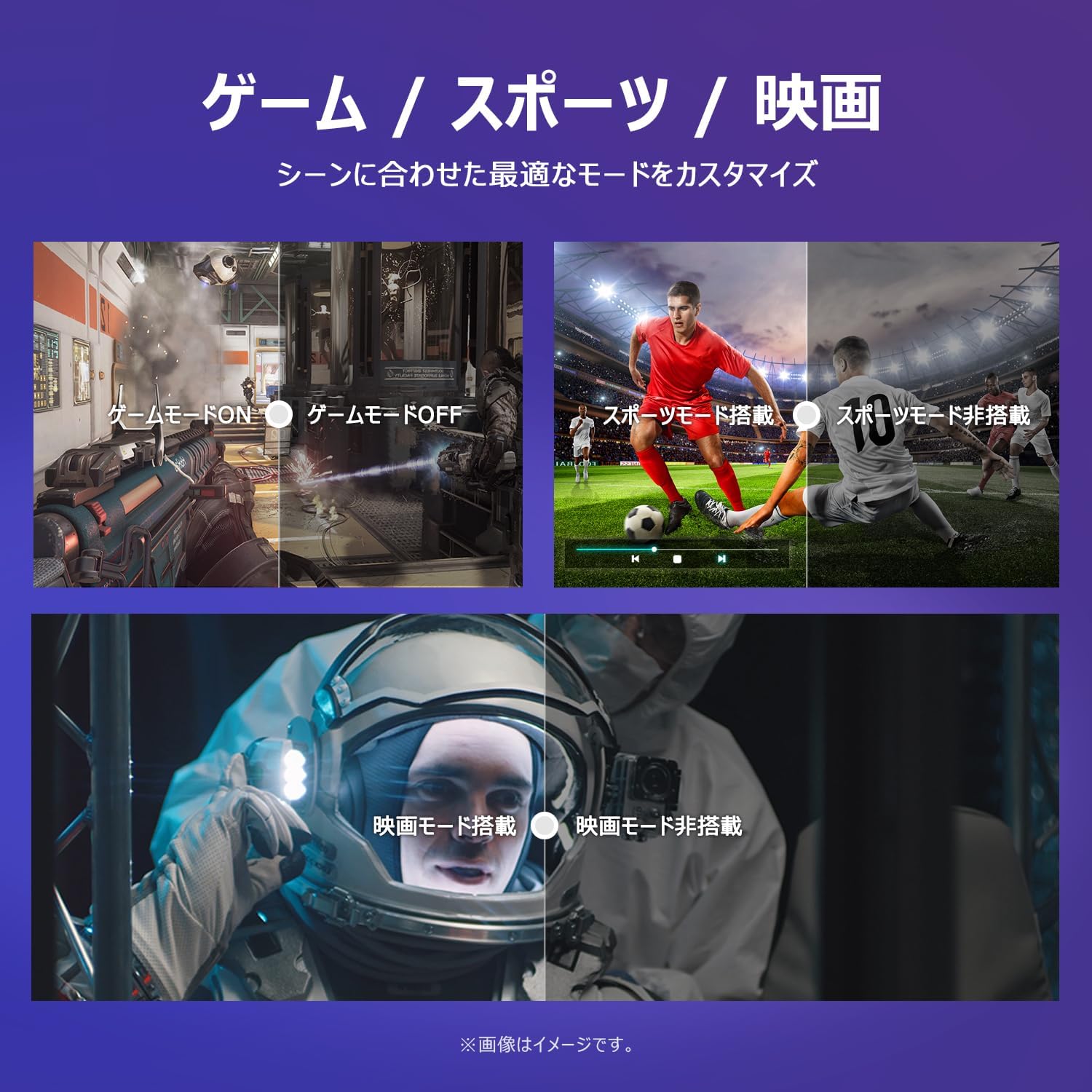
Image: The TV screen with a visual representation of sound, highlighting the immersive audio experience provided by Dolby Audio.
Access the sound settings menu to adjust modes like Standard, Music, Movie, or Custom to suit your preferences.
5.5 modos de jogo
Activate Game Mode for an optimized gaming experience with reduced input lag.
Image: Visual comparisons demonstrating the optimized settings for Game Mode, Sports Mode, and Movie Mode, adapting the TV's performance to different content types.
The TV also offers dedicated Sports Mode and Movie Mode to enhance viewing for specific content types.
5.6 Configurações do sistema
The quick settings menu allows you to customize frequently used system settings and rearrange their order for intuitive and convenient access.

Imagem: A view of the TV's quick system settings interface, illustrating how users can easily access and customize various functions like brightness, picture mode, and network settings.
6. Manutenção
Os devidos cuidados e manutenção prolongarão a vida útil da sua televisão.
- Limpando a tela: Limpe a tela delicadamente com um pano macio e sem fiapos. Para manchas persistentes, use um produto de limpeza específico para telas de TV, aplicando-o no pano e não diretamente na tela.
- Limpando o Casing: Use um pano macio e seco para limpar a TV.asing. Não utilize produtos de limpeza abrasivos ou solventes.
- Ventilação: Certifique-se de que as aberturas de ventilação na parte traseira da TV não estejam bloqueadas para evitar superaquecimento.
- Cabo de alimentação: Verifique regularmente se o cabo de alimentação apresenta danos. Caso esteja danificado, entre em contato com o suporte ao cliente para solicitar a substituição.
7. Solução De Problemas
If you encounter issues with your TV, refer to the following common problems and solutions. If the problem persists, contact customer support.
| Problema | Possível causa | Solução |
|---|---|---|
| Sem energia | Cabo de alimentação desconectado; tomada elétrica não funciona | Ensure power cable is securely plugged in; Test outlet with another device |
| Sem imagem, mas com som. | Fonte de entrada incorreta; problema com dispositivo externo | Pressione o botão 'Input' no controle remoto para selecionar a fonte correta; Verifique as conexões do dispositivo externo. |
| Sem som, mas com imagem. | Volume silenciado ou muito baixo; Problema com o sistema de áudio externo | Unmute or increase volume; Check audio cable connections to external sound system |
| Controle remoto não funciona | Pilhas descarregadas; Obstrução entre o controle remoto e a TV | Substitua as pilhas; Remova quaisquer obstruções; Certifique-se de que o controle remoto esteja apontado para o sensor infravermelho da TV. |
| Não é possível conectar ao Wi-Fi | Senha incorreta; Problema no roteador; TV muito longe do roteador | Verifique a senha do Wi-Fi; Reinicie o roteador; Aproxime a TV do roteador ou use um repetidor Wi-Fi. |
8. Especificações
Detailed technical specifications for the iFFALCON 40S55T TV:

Image: Dimensional drawing of the iFFALCON 40S55T TV, indicating its physical measurements.
| Recurso | Especificação |
|---|---|
| Tamanho da tela | 40 polegadas |
| Tipo de exibição | VA Liquid Crystal |
| Resolução | Full HD (1920 x 1080) |
| Taxa de atualização | 60 Hz |
| Proporção da tela | 16:9 |
| Taxa de contraste | 1000:1 |
| Sistema operacional | Google TV |
| Saída de áudio | 20 Watts (2.1 channels) |
| Portas HDMI | 2 |
| Portas USB | 1 |
| Conectividade sem fio | Wi-Fi, Bluetooth |
| Dimensões do produto (L x A x P) | 89.2 x 55.8 x 18.4 cm (com suporte) |
| Peso do produto | 4.63 kg |
| Wall Mount Compatible | Sim |
| Acessórios incluídos | Stand, Remote Control, Warranty Card, Power Cable |
9. Garantia e Suporte
Your iFFALCON 40S55T TV comes with a manufacturer's warranty. Please refer to the included warranty card for specific terms, conditions, and duration of coverage.
For technical support, troubleshooting assistance beyond this manual, or warranty claims, please contact iFFALCON customer service. Contact information can typically be found on the warranty card or the official iFFALCON website.
Please have your model number (40S55T) and purchase date ready when contacting support.


