Introdução
Obrigado por escolher o Pretoview W50PRO Smartwatch. This manual provides essential information for setting up, operating, and maintaining your device. Please read it carefully to ensure optimal performance and a safe user experience. Keep this manual for future reference.
Conteúdo da embalagem
Verifique se todos os itens estão presentes no seu pacote:
- Pretoview W50PRO Smartwatch
- Pulseira de silicone
- Replacement Nylon Braided Strap
- Cabo de carregamento magnético
- Manual do usuário (este documento)

Image: Package contents and product dimensions.
Produto acimaview
O Pretoview W50PRO Smartwatch features a 1.45-inch HD touchscreen display, function buttons, a powerful flashlight, and a comfortable silicone strap. Its robust design is suitable for various activities.

Imagem: Pretoview W50PRO Smartwatch with its key features labeled.
Configurar
1. Carregando o dispositivo
Before first use, fully charge your smartwatch. Connect the magnetic charging cable to the charging points on the back of the watch and plug the USB end into a power adapter (not included) or a computer's USB port. The watch will display a charging indicator.
- Uma carga completa normalmente leva cerca de 3 horas.
- The 960mAh battery provides up to 30 days of typical use and 100 days of standby time.

Image: Battery capacity and charging information.
2. Instalação do aplicativo
Baixe e instale o "Da Fit" application on your smartphone. You can find it in the App Store (iOS) or Google Play Store (Android).
3. Device Pairing and Bluetooth Calls
To connect your smartwatch and enable Bluetooth calling:
- Download the Da Fit app from your phone's app store.
- Ative o Bluetooth no seu smartphone.
- Open the Da Fit app and add your device.
- Confirm the pairing request on your phone and watch.
- Grant necessary notification permissions within the Da Fit app for calls and messages.
- Once paired, you can make and receive calls directly from your watch.

Image: Connection and calling setup guide.
Instruções de operação
1. Navegação Básica
- Tela sensível ao toque: Deslize para a esquerda/direita ou para cima/para baixo para navegar pelos menus e acessar os recursos. Toque para selecionar.
- Botões de função: Use the physical buttons on the side of the watch for quick access to specific functions or to return to the home screen.
2. Lanterna e Bússola
The W50PRO includes a built-in flashlight and compass for outdoor activities.
- Lanterna: Activate the flashlight feature from the watch's menu. It offers fixed and intermittent modes for various situations.
- Bússola: Access the compass feature from the watch's menu for accurate directional guidance.
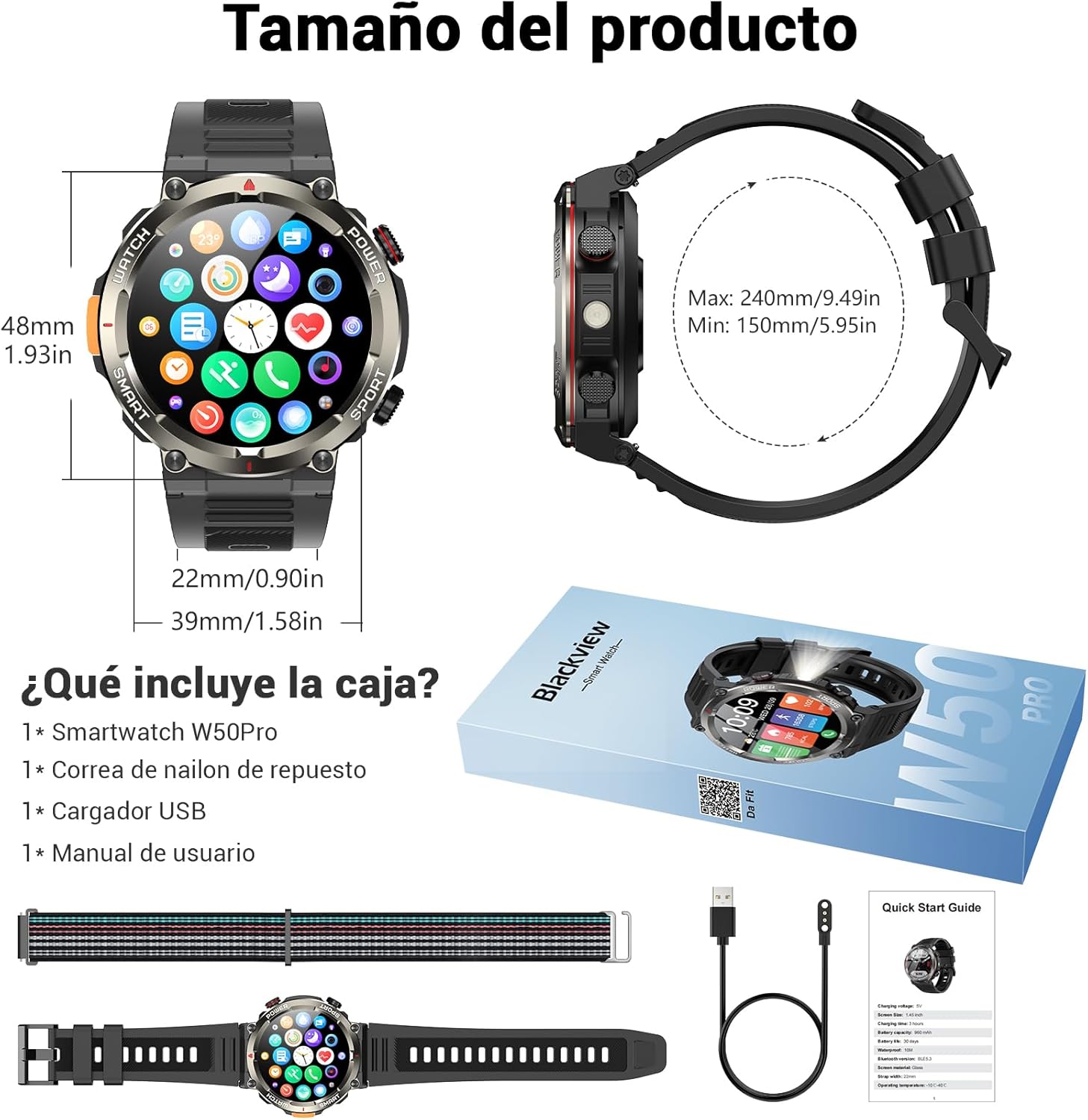
Image: Compass feature for outdoor navigation.

Image: Powerful LED flashlight in action.
3. Chamadas e notificações via Bluetooth
Once paired with your smartphone, the W50PRO allows you to manage calls and notifications directly from your wrist.
- Fazer/Receber Chamadas: Use the integrated speaker and microphone to make or answer calls.
- Notificações: Receive real-time alerts for text messages, emails, and social media apps.
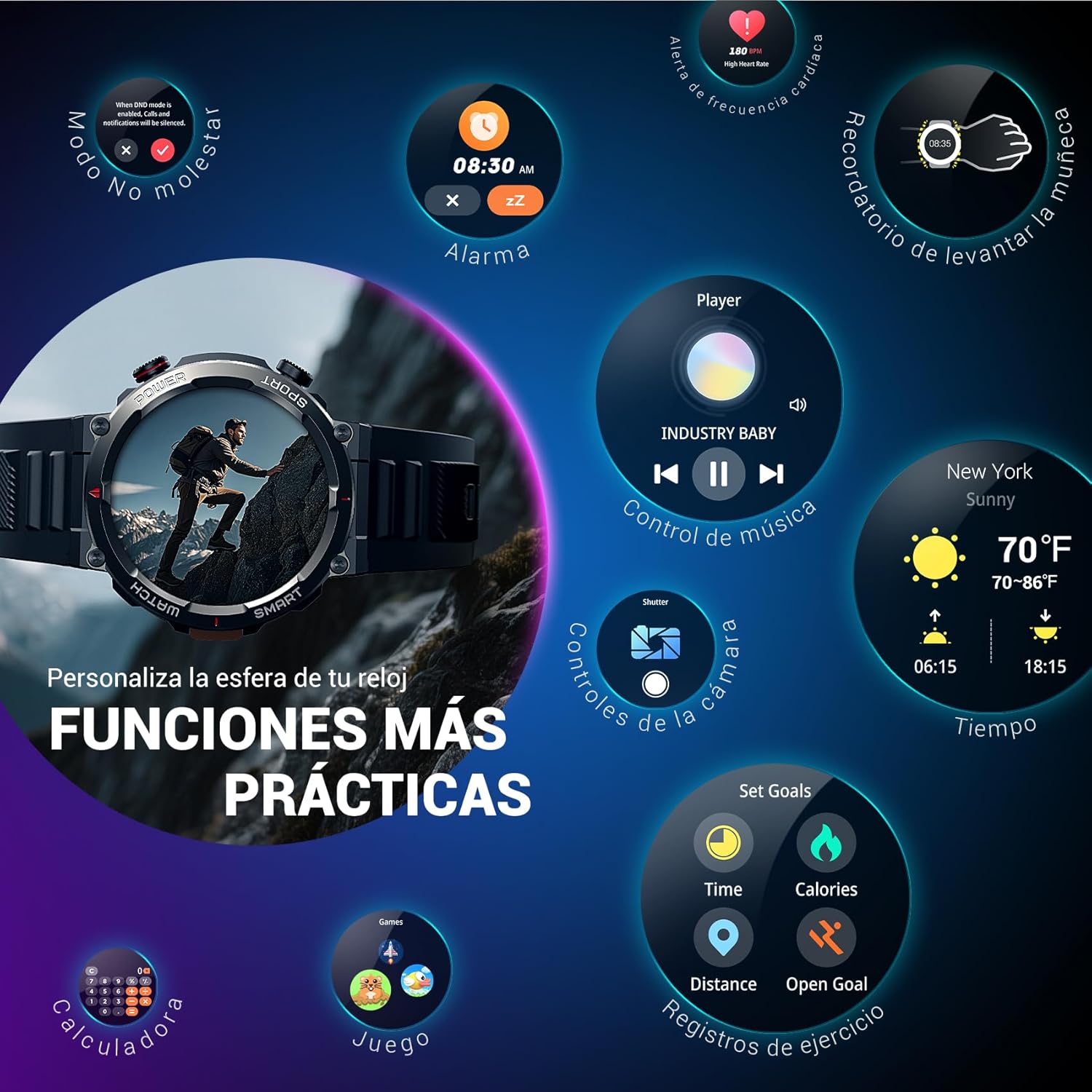
Image: Bluetooth calling and notification features.
4. Monitoramento de saúde
The smartwatch is equipped with high-precision sensors to monitor various health indicators:
- Frequência cardíaca: Monitoramento da frequência cardíaca em tempo real.
- Oxigênio no sangue (SpO2): Monitore seus níveis de oxigênio no sangue.
- Monitor de sono: Monitora a qualidade e os padrões do sono.
- Níveis de estresse: Fornece informações sobre seus níveis de estresse.
All health data synchronizes with the Da Fit app for detailed analysis and trend tracking.

Image: Real-time health monitoring features.
5. Modos esportivos
The W50PRO offers over 100 integrated sports modes, including running, cycling, climbing, rope skipping, football, and basketball. It accurately records exercise time, distance, steps, calorie consumption, and heart rate changes, providing clear and intuitive performance data. Detailed data can be vieweditado no aplicativo Da Fit.

Imagem: Acimaview de mais de 100 modalidades esportivas.
6. Personalizando mostradores de relógio
The Da Fit app provides a wide selection of watch faces to suit various styles. You can also upload personal photos as wallpaper and adjust text color and widget layout to create a unique watch interface.

Image: Customizable watch faces.
7. Outras funções práticas
O Pretoview W50PRO includes additional features for daily convenience:
- Previsão do tempo
- Controle de música
- Controle remoto da câmera
- Alarmes
- Lembrete sedentário
- Lembrete de beber água
- Cronômetro
- Contagem regressiva
- Localizador de Telefone
- Calculadora
- Jogos
- Ajuste de brilho

Image: Multiple smart functions available on the smartwatch.
Manutenção
1. Limpeza
Limpe regularmente seu smartwatch e a pulseira para evitar irritações na pele e manter a funcionalidade do dispositivo. Use um pano macio e seco.amp pano para limpar a tela e casing. For the strap, follow the manufacturer's cleaning recommendations based on the material (silicone or nylon).
2. Resistência à água
O Pretoview W50PRO Smartwatch features an IP68 water resistance rating. This means it is protected against dust ingress and can withstand immersion in water up to 1.5 meters for up to 30 minutes. It is suitable for daily use, such as hand washing or light rain. Avoid using it in hot water, saunas, or during diving, as steam and high pressure can compromise the seals.

Image: Durability features including IP68 water resistance.
3. Cuidados com a bateria
Para prolongar a vida da bateria:
- Evite temperaturas extremas.
- Não deixe a bateria descarregar completamente com frequência.
- Charge the device using the provided magnetic charging cable.
Solução de problemas
Se você tiver problemas com seu Blackview W50PRO Smartwatch, try the following:
- Dispositivo não liga: Certifique-se de que o relógio esteja totalmente carregado.
- Não foi possível emparelhar com o telefone: Check if Bluetooth is enabled on both devices. Restart both the watch and phone. Ensure the Da Fit app has necessary permissions.
- Dados de saúde imprecisos: Certifique-se de que o relógio esteja bem ajustado ao seu pulso. Limpe os sensores regularmente.
- Notificações não recebidas: Verify that notification permissions are granted in the Da Fit app and your phone's settings. Ensure the app is running in the background.
- Vida curta da bateria: Reduce screen brightness, disable unnecessary features, and limit frequent heart rate monitoring.
For persistent issues, refer to the Da Fit app's help section or contact customer support.
Especificações
| Recurso | Especificação |
|---|---|
| Marca | Pretoview |
| Modelo | W50PRO |
| Tamanho da tela | 1.45 polegadas |
| Tipo de exibição | LCD |
| Resolução | 360 x 360 pixels |
| Capacidade da bateria | 960 mAh |
| Vida útil típica da bateria | Até 30 dias |
| Tempo de espera | Até 100 dias |
| Tempo de carregamento | Aproximadamente 3 horas |
| Conectividade | Bluetooth |
| Entrada de Interface Humana | Buttons, Microphone |
| Resistência à água | IP68 |
| Modelos de telefone compatíveis | iOS e Android |
| Dimensões do produto | 8.8 x 2.2 x 18.1 cm |
| Peso do produto | 136 g |
Garantia e Suporte
Para informações sobre garantia e suporte técnico, consulte a documentação incluída na sua compra ou visite o site oficial da Black Friday.view website. Guarde o comprovante de compra para solicitações de garantia.


