1. Terminadoview
The VAIO SX-R Laptop is a high-performance portable computer designed for productivity and creative tasks. It features an Intel Core Ultra 7 processor, a vibrant 14-inch WQXGA touch display, ample memory, and fast storage, all running on Windows 11 Pro.

Figure 1: VAIO SX-R Laptop, open view.
2. Recursos do Produto
- Intel Core Ultra 7 Processor: Equipped with 16 cores and AI-enhanced performance for speed and intelligent task management.
- 14" WQXGA Touch Display (2560x1600): High-resolution screen with wide color gamut and touch capability.
- 32GB LPDDR5 RAM: Provides superior multitasking capabilities with instant responsiveness.
- 1TB PCIe NVMe SSD: Offers massive storage with ultra-fast read/write speeds.
- Windows 11 Pro: Includes enterprise-grade security and productivity features.
- IR Camera & Fingerprint Reader: Enhanced security and convenient login options.
- Carbon Fiber Chassis: Construção leve e durável.
- Water Resistant Keyboard: Designed to withstand accidental spills.

Figure 2: Key features of the VAIO SX-R Laptop.
3. Excesso Físicoview
3.1 Portas e Conectores
The VAIO SX-R Laptop is equipped with a variety of ports for connectivity. Refer to the diagram below for port locations and types.
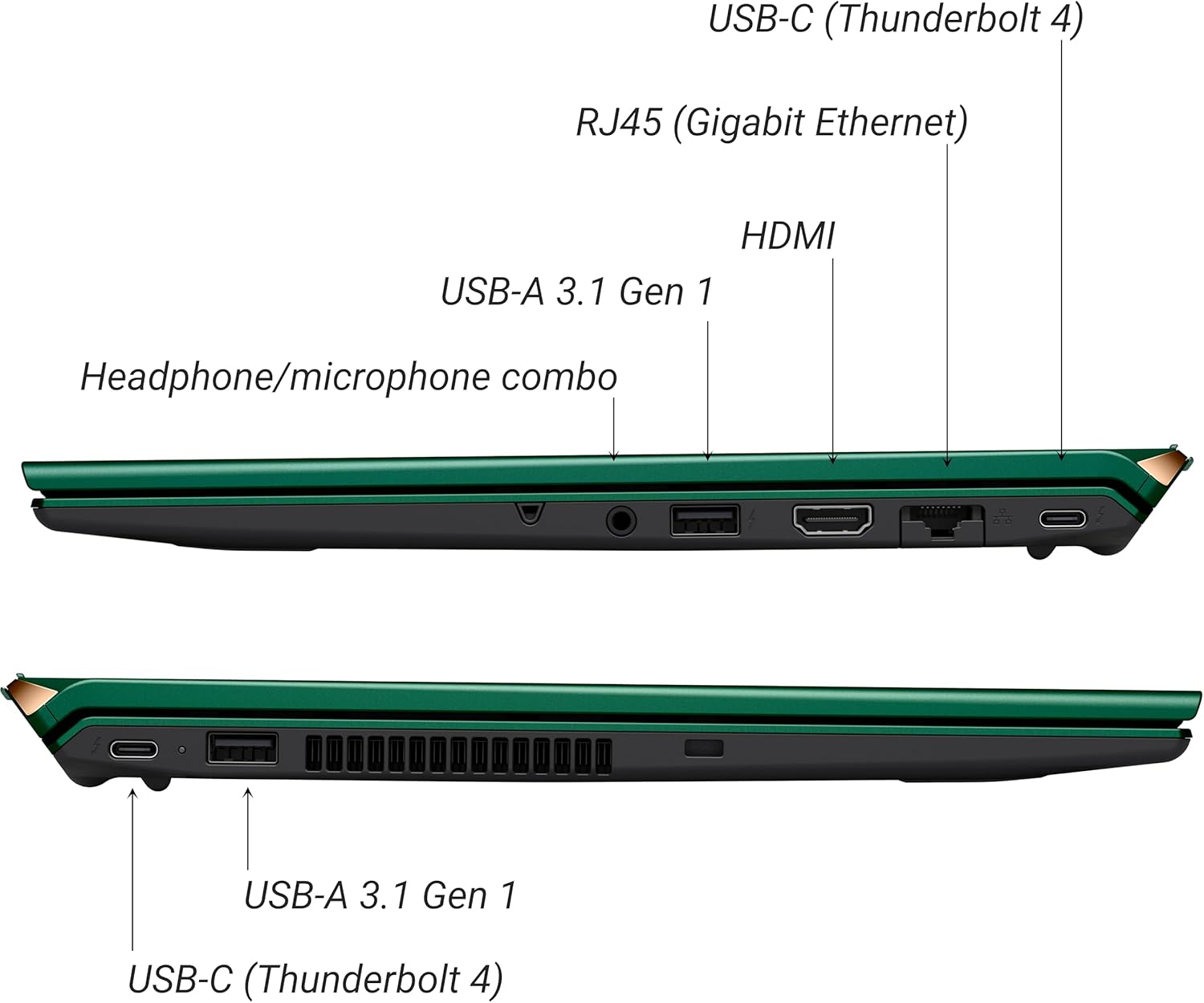
Figura 3: Lateral view of VAIO SX-R Laptop ports.
- USB-C (Thunderbolt 4): High-speed data transfer, video output, and power delivery.
- RJ45 (Gigabit Ethernet): Para conexões de rede com fio.
- HDMI: Para conexão a monitores externos.
- USB-A 3.1 Gen 1: Para conectar dispositivos USB.
- Conector combinado para fone de ouvido/microfone: Para entrada e saída de áudio.
3.2 Teclado e touchpad
The laptop features a full-sized keyboard and a responsive touchpad for navigation and input.

Figura 4: Layout do teclado e do touchpad.
4. Configuração
4.1 Inicialização
- Unpack the VAIO SX-R laptop and all accessories.
- Conecte o adaptador de energia à porta de carregamento do laptop e, em seguida, a uma tomada elétrica.
- Open the laptop lid. The system may power on automatically or you may need to press the power button located on the top right of the keyboard.
- Siga as instruções na tela para concluir a configuração do Windows 11 Pro, incluindo idioma, região, conexão de rede e criação de conta de usuário.
4.2 Conectando a uma rede
- Wi-fi: During initial setup or via Windows settings, select your preferred Wi-Fi network and enter the password. The VAIO SX-R supports Wi-Fi 7 for fast and stable wireless connectivity.
- Com fio (Ethernet): Connect an Ethernet cable from your router or modem to the RJ45 port on the laptop.
5. Instruções de operação
5.1 Ligar/Desligar e Modo de Suspensão
- Ligar: Abra a tampa ou pressione o botão liga/desliga.
- Desligar: Clique no botão Iniciar e, em seguida, em Energia > Desligar.
- Dormir: Feche a tampa ou clique no botão Iniciar e, em seguida, em Ligar/Desligar > Suspender.
5.2 Using the Touch Display
The 14-inch WQXGA display supports touch input. You can interact with the screen using gestures similar to a tablet or smartphone.
5.3 IR Camera and Fingerprint Reader
For enhanced security and convenience, the laptop includes an IR camera for Windows Hello face recognition and a fingerprint reader.
- Windows Hello Face Recognition: Configure this feature in Windows Settings > Accounts > Sign-in options. The IR camera will recognize your face to unlock the device.
- Leitor de impressões digitais: Set up your fingerprint in Windows Settings > Accounts > Sign-in options for quick and secure access.
6. Manutenção
6.1 Cuidados Gerais
- Mantenha o laptop em um ambiente limpo e seco.
- Evite expor o laptop a temperaturas extremas ou luz solar direta.
- Não coloque objetos pesados sobre o laptop.
6.2 Limpeza
- Use um pano macio e sem fiapos para limpar a tela e a parte externa.
- Para manchas persistentes, aplique levementeampMolhe o pano com água ou com uma solução de limpeza de telas.
- Do not spray cleaners directly onto the laptop.
6.3 Cuidados com a bateria
- Para prolongar a vida útil da bateria, evite descarregá-la completamente com frequência.
- Guarde o laptop com uma carga parcial (em torno de 50%) se não for utilizá-lo por longos períodos.
7. Solução De Problemas
7.1 Problemas de energia
- Meu laptop não liga: Verifique se o adaptador de energia está conectado firmemente e se a tomada está funcionando. Tente usar outra tomada.
- A bateria não carrega: Check the power adapter and cable for damage. Ensure the charging port is clean.
7.2 Problemas de exibição
- Nenhuma exibição: Conecte um monitor externo para verificar se o problema está na tela interna do laptop.
- Tela sensível ao toque não responde: Reinicie o laptop. Certifique-se de que os drivers da placa de vídeo estejam atualizados.
7.3 Problemas de conectividade
- Sem conexão Wi-Fi: Check if Wi-Fi is enabled in Windows settings. Restart your router. Update wireless drivers.
- Bluetooth not working: Ensure Bluetooth is enabled and your device is discoverable.
8. Especificações
| Recurso | Detalhe |
|---|---|
| Nome do modelo | VAIO SX-R (VJS4R1X0811G) |
| Processador | Intel Core Ultra 7 (16-Core, AI-Boosted) |
| Sistema operacional | Windows 11 Pro |
| Mostrar | 14 Inches WQXGA Touch (2560x1600) |
| BATER | 32 GB LPDDR5 |
| Armazenar | SSD PCIe NVMe de 1 TB |
| Gráficos | Integrated Intel Arc Graphics |
| Conectividade sem fio | 802.11ax (Wi-Fi 7), Bluetooth |
| Portos | USB-C (Thunderbolt 4) x2, USB-A 3.1 Gen 1 x3, HDMI x1, RJ45 (Gigabit Ethernet) x1, Headphone/microphone combo x1 |
| Câmera | IR Camera (Windows Hello compatible) |
| Recursos de segurança | Fingerprint Reader, IR Camera |
| Duração da bateria | Até 10 horas (em média) |
| Peso | 3.1 libras |
| Dimensões (CxLxA) | 14.2 x 15 x 3.3 polegadas |
9. Durability and Testing
VAIO laptops are engineered with Japanese precision and undergo rigorous quality control to ensure reliability and performance. This includes various tests to withstand daily use.
9.1 Manufacturing and Quality Assurance
Video 1: VAIO Manufacturing and Durability Testing. This video demonstrates the quality control processes and durability tests performed on VAIO laptops, including keystroke testing, dust testing, LCD screen pressure testing, and opening/closure testing.
9.2 Key Durability Features
- Water Resistant Keyboard: The keyboard is designed to resist damage from accidental liquid spills.
- Durabilidade da tela: The display undergoes pressure testing to ensure resilience.
- Teste de queda: The laptop is tested to withstand drops from up to 3 feet.

Figure 5: Water resistant keyboard testing.

Figure 6: Screen durability test in progress.

Figure 7: 3-foot drop test for VAIO laptops.
10. Garantia e Suporte
Your VAIO SX-R Laptop comes with a standard manufacturer's warranty. For specific warranty terms and conditions, please refer to the documentation included with your product or visit the official VAIO support website.
For technical support, troubleshooting assistance, or service requests, please contact VAIO customer support. Information regarding support channels can be found on the VAIO website ou na embalagem do seu produto.
Protection plans are available for purchase to extend coverage beyond the standard warranty. Options include 2-Year and 4-Year Protection Plans, as well as a Complete Protect + Norton 360 monthly plan.


