Introdução
Welcome to the user manual for your new VAIO SX-R Laptop. This document provides essential information to help you set up, operate, maintain, and troubleshoot your device. Please read this manual thoroughly to ensure optimal performance and longevity of your laptop.
Produto acimaview
The VAIO SX-R is a high-performance laptop designed for productivity and creative tasks. It features an Intel Core Ultra 7 processor, a vibrant 14-inch WQXGA Touch Display, ample memory, and fast storage.
Principais características
- Processador: Intel Core Ultra 7 (16-Core, AI-Boosted) for enhanced speed and responsiveness.
- Mostrar: 14-inch WQXGA Touch Display (2560x1600) offering high resolution and wide color gamut.
- Memória: 32GB LPDDR5 RAM for superior multitasking.
- Armazenar: 1TB PCIe NVMe SSD for fast data access and ample armazenamento.
- Sistema operacional: Windows 11 Pro with enterprise-grade security and productivity features.
- Segurança: Integrated IR Camera and Fingerprint Reader for secure login.
- Chassi: Durable Carbon Fiber construction.
Laptop Components and Ports

Figure 1: VAIO SX-R Laptop, illustrating the overall design.
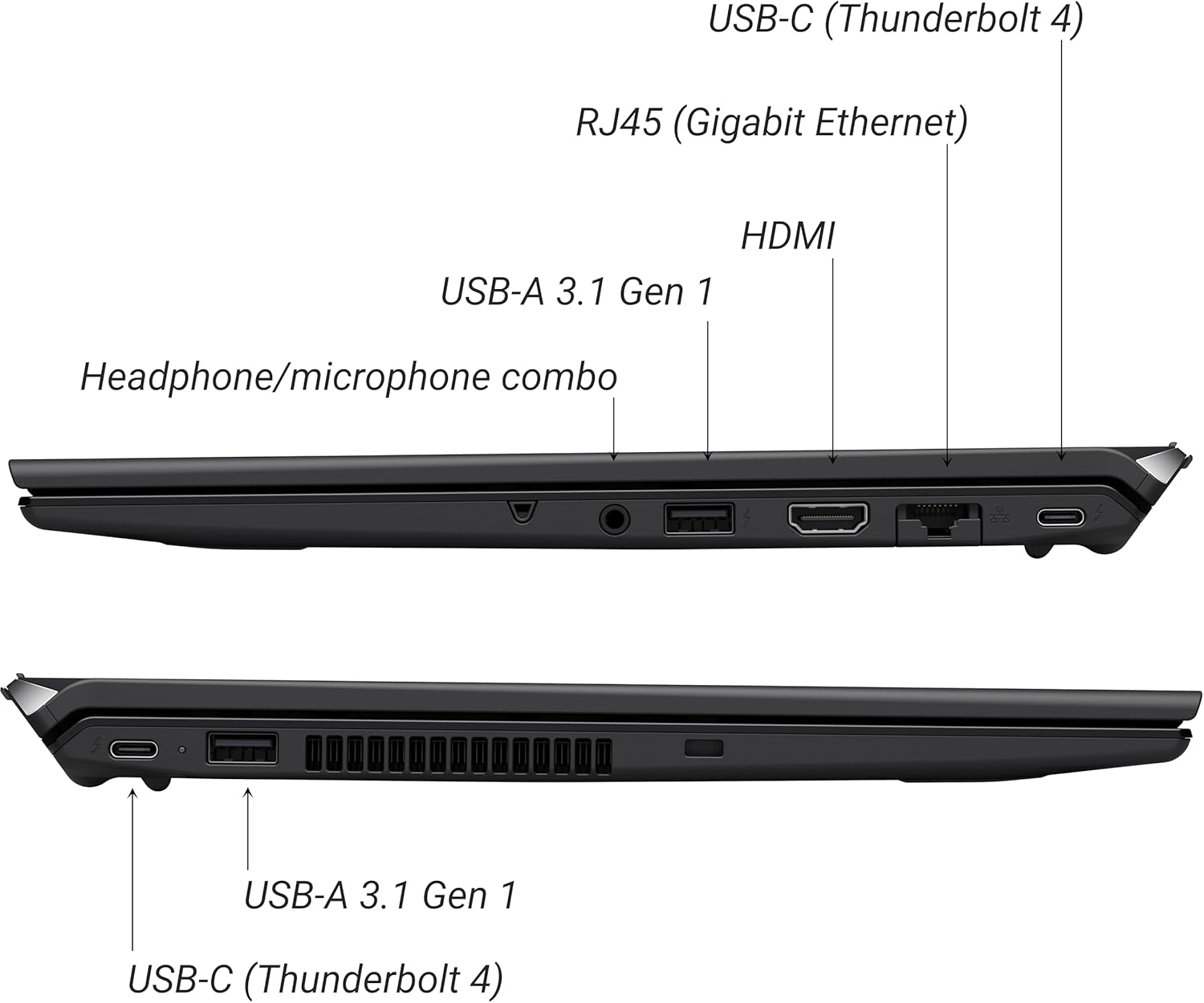
Figure 2: Port layout of the VAIO SX-R Laptop. The left side includes a headphone/microphone combo jack, USB-A 3.1 Gen 1, HDMI, RJ45 (Gigabit Ethernet), and USB-C (Thunderbolt 4). The right side features another USB-C (Thunderbolt 4) and USB-A 3.1 Gen 1 port.
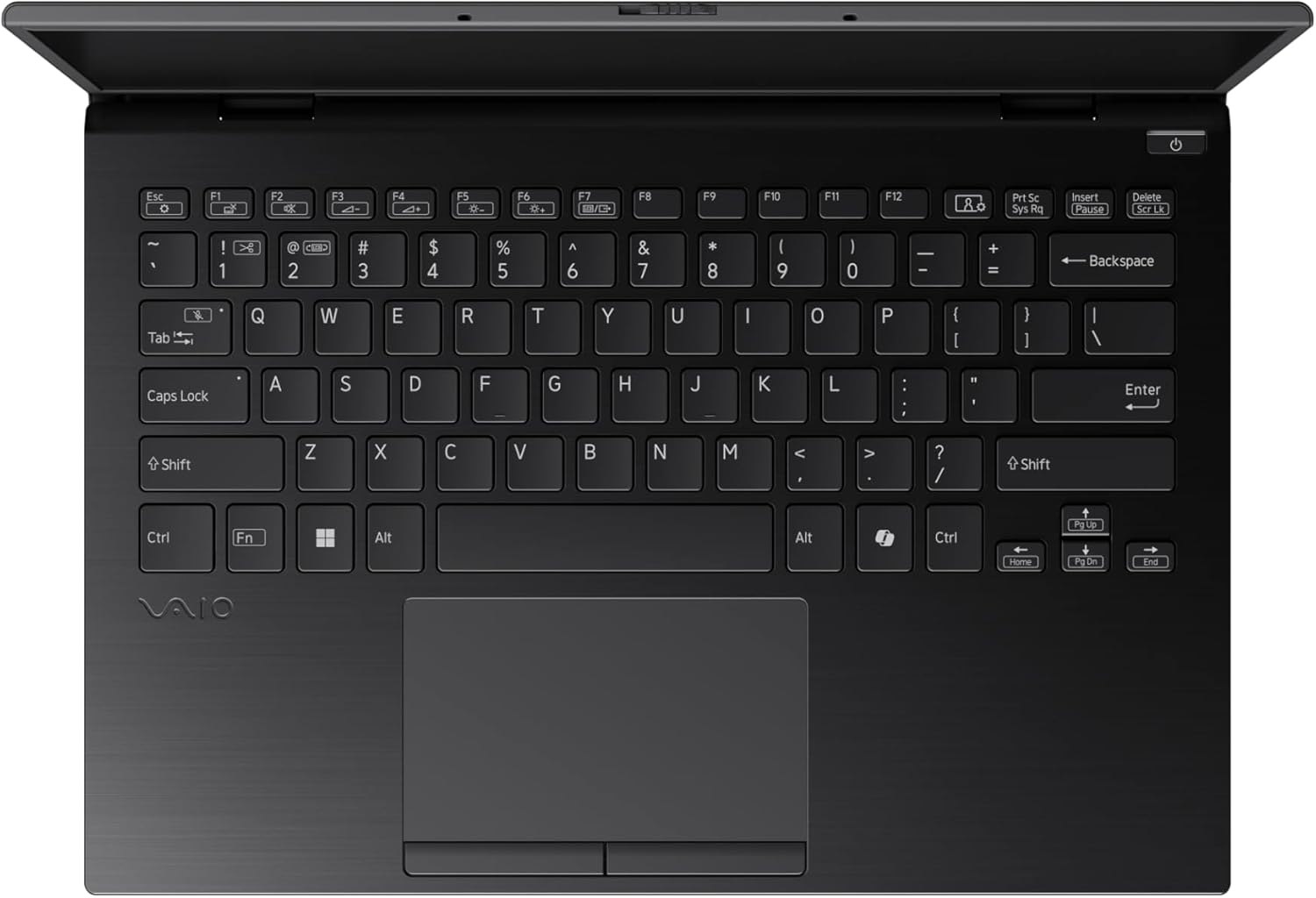
Figure 3: The VAIO SX-R Laptop keyboard and touchpad, featuring a backlit keyboard and integrated fingerprint sensor.
Configurar
1. Ligação inicial
- Conecte a energia: Conecte o adaptador CA à porta de alimentação do laptop e, em seguida, a uma tomada de parede.
- Abra o laptop: Abra cuidadosamente a tampa do laptop.
- Ligar: Press the power button, typically located on the top right of the keyboard deck. The power indicator light will illuminate.
2. Configuração do Windows 11 Pro
Follow the on-screen instructions to complete the initial Windows 11 Pro setup. This includes:
- Selecione sua região e layout de teclado.
- Conectando-se a uma rede Wi-Fi.
- Aceitar o contrato de licença.
- Criar ou iniciar sessão com uma conta Microsoft.
- Setting up your PIN, fingerprint, or facial recognition (IR Camera).
3. Conectando Periféricos
You can connect external devices such as mice, keyboards, external monitors, and USB drives to the available ports as shown in Figure 2.
Operacional
1. Uso Básico
- Teclado: Use the integrated backlit keyboard for typing. Function keys (F1-F12) often have secondary functions accessible via the 'Fn' key.
- Painel tátil: O touchpad de precisão suporta gestos multitoque para navegação.
- Tela sensível ao toque: Interact directly with the 14-inch WQXGA display using touch gestures.
2. Recursos de segurança
- Leitor de impressões digitais: Enroll your fingerprints through Windows Settings > Accounts > Sign-in options for quick and secure login.
- IR Camera: Utilize Windows Hello facial recognition for convenient and secure access. Set this up in Windows Settings > Accounts > Sign-in options.
3. Gerenciamento de energia
- Modo dormir: Close the lid or press the power button briefly to put the laptop to sleep.
- Desligar: Para desligar completamente o laptop, acesse Iniciar > Energia > Desligar.
- Reiniciar: Para reiniciar o sistema, acesse Iniciar > Energia > Reiniciar.
Manutenção
1. Limpeza
- Tela: Use um pano macio e sem fiapos levementeampLimpe com água ou um produto de limpeza para telas. Evite produtos químicos agressivos.
- Teclado e chassi: Use um pano macio. Para sujeira mais difícil, um pano levemente umedecidoamp Pode-se usar um pano com sabão neutro, garantindo que nenhum líquido entre nas aberturas.
- Portas: Use ar comprimido para remover cuidadosamente a poeira das entradas.

Figure 4: The VAIO SX-R features a water-resistant keyboard, designed to withstand minor spills.
2. Atualizações de software
Regularly update your Windows operating system and device drivers to ensure optimal performance, security, and compatibility. Access updates via Windows Settings > Windows Update.
3. Cuidados com a bateria
- Evite temperaturas extremas.
- Não descarregue completamente a bateria com frequência.
- Para armazenamento a longo prazo, carregue a bateria até cerca de 50-60%.
Solução de problemas
Esta seção aborda problemas comuns que você pode encontrar.
1. O laptop não liga.
- Certifique-se de que o adaptador CA esteja conectado firmemente tanto ao laptop quanto a uma tomada elétrica em funcionamento.
- Verifique se a tomada está funcionando conectando outro aparelho.
- Se a bateria estiver completamente descarregada, deixe-a carregar por pelo menos 30 minutos antes de tentar ligá-la.
2. Problemas de exibição
- Nenhuma exibição: Conecte um monitor externo à porta HDMI para verificar se o problema está na tela interna do laptop.
- Flickering/Distorted Display: Update your graphics drivers. Adjust display resolution and refresh rate in Windows Settings > System > Display.
3. Problemas de conectividade Wi-Fi
- Ensure Wi-Fi is enabled in Windows Settings > Network & internet > Wi-Fi.
- Reinicie o roteador e o modem.
- Execute a ferramenta de solução de problemas de rede do Windows.
4. Desempenho lento
- Feche os aplicativos desnecessários que estão sendo executados em segundo plano.
- Check Task Manager (Ctrl+Shift+Esc) for resource-intensive processes.
- Ensure your system is up to date and free from malware.
Especificações
Below are the detailed specifications for the VAIO SX-R Laptop (Model: VJS4R1X0511B).
| Recurso | Especificação |
|---|---|
| Marca | VAIO |
| Nome do modelo | VAIO SX-R |
| Número do modelo do item | VJS4R1X0511B |
| Sistema operacional | Windows 11 Pro |
| Processador | Intel Core Ultra 7 (1.4 GHz) |
| Memória RAM | 32 GB LPDDR5 |
| Disco rígido | SSD PCIe NVMe de 1 TB |
| Tamanho da tela | 14 polegadas |
| Resolução da tela | 2560 x 1600 pixels (WQXGA) |
| Placa gráfica | Intel Integrated Graphics |
| Tipo sem fio | 802.11bgn |
| Portas USB 3.0 | 3 |
| Duração média da bateria | 10 horas |
| Peso do item | 3.1 libras |
| Dimensões do produto | 14.2 x 15 x 3.3 polegadas |
| Características especiais | Backlit Keyboard, Fingerprint Reader, HD Audio, Memory Card Slot, Webcâmera |
Garantia e Suporte
1. Informações de garantia
Your VAIO SX-R Laptop is covered by a manufacturer's warranty. Please refer to the warranty card included with your product packaging for specific terms, conditions, and duration. Keep your proof of purchase for warranty claims.
2. Suporte Técnico
For technical assistance, troubleshooting beyond this manual, or service inquiries, please contact VAIO customer support. You can typically find contact information on the official VAIO website or in the documentation provided with your laptop.
- Suporte online: Visit the official VAIO support webSite com perguntas frequentes, downloads de drivers e opções de contato.
- Suporte por telefone: Refer to your product documentation for regional support phone numbers.


