CAMECHO CAMECHO 4G+64G Android 13 Car Stereo for Subaru Outback 2010-2014

Manual do Usuário do Som Automotivo CAMECHO Android 13

For Subaru Outback 2010-2014 (Model: B0F5HGF2WD)

1. Produto acabadoview

This manual provides instructions for the CAMECHO 4G+64G Android 13 Car Stereo, a 9.7-inch touchscreen in-dash GPS head unit designed for Subaru Outback models from 2010 to 2014. It features Wireless/Wired CarPlay, Wired Android Auto, Bluetooth, DSP, GPS, WiFi, 32-band EQ, and AHD backup camera support.

Note: This car radio is for the basic vehicle version only. If your car radio system includes Harman Kardon, this unit will not be compatible.

2. Conteúdo da embalagem

Verifique se todos os itens estão presentes na embalagem:

Package contents and dimensions of the CAMECHO car stereo
Figure 2.1: Package contents and dimensions of the CAMECHO car stereo. Includes the head unit, various cables (power, RCA, camera, USB), GPS antenna, microphone, and backup camera.

3. Guia de instalação

3.1 Verificação de compatibilidade

Ensure your Subaru Outback (2010-2014) is the basic version without a Harman Kardon sound system for proper fitment and functionality.

Installation comparison showing car dashboard before and after CAMECHO car stereo installation, highlighting compatible and incompatible setups.
Figure 3.1: Visual comparison of a Subaru Outback dashboard before and after installing the CAMECHO car stereo. Also shows examples of incompatible wiring harnesses.

3.2 Traseira View Fiação da câmera

The double DIN car stereo is equipped with an AHD, night vision, and waterproof backup camera. The rear image will automatically display on the touchscreen when the vehicle is in reverse.

Diagram showing the wiring for the rear view camera, including connections to the reversing light and monitor.
Figure 3.2: Detailed wiring diagram for the rear view camera, illustrating connections for power and video signal. The diagram shows connecting red cable 1 to the positive reversing light, black cable 2 to the negative reversing light, and the video cable to the monitor.
Illustration of the reversing assist feature with the AHD backup camera, showing night vision, waterproof, and wide-angle capabilities.
Figure 3.3: Demonstration of the reversing assist function, displaying the backup camera view on the car stereo screen. Icons indicate AHD, waterproof, night vision, and wide-angle features.

4. Instruções de operação

4.1 CarPlay sem fio/com fio e Android Auto

The head unit supports both wireless and wired Apple CarPlay and Android Auto. This allows users to control navigation, make phone calls, play music, and send/receive messages using voice commands or the touchscreen interface.

Note: Mirror Link functionality may not support all Samsung and Huawei devices.

Interface showing wireless and wired CarPlay and Android Auto functionality, including voice control examples.
Figure 4.1: Display of the car stereo interface demonstrating wireless and wired CarPlay and Android Auto. Shows various app icons and voice command prompts like 'Hey Siri, Navigate to the beach!' and 'OK Google, play pop music'.
Video 4.1: This video demonstrates the wireless CarPlay and Android Auto connection process, showing how to pair a smartphone with the car stereo for seamless integration of navigation, music, and communication features.
Video 4.2: This video illustrates the Android Auto functionality on the car stereo, demonstrating how to connect an Android phone and use features like navigation, music playback, and hands-free calling.

4.2 Link alternativo

Mirror Link allows you to display your smartphone screen directly on the car stereo. This feature supports both Android and iOS devices.

CarPlay, Android Auto, and Mirror Link features displayed on the car stereo screen.
Figura 4.2: Overview of CarPlay, Android Auto, and Mirror Link capabilities, showing how they integrate with the car stereo for enhanced connectivity.
Mirror Link functionality for Android and iOS devices, showing screen mirroring of phone content to the car stereo.
Figura 4.3: Detalhado view of Mirror Link for Android and iOS, illustrating how content from a smartphone is mirrored onto the car stereo display.

4.3 Bluetooth Hands-Free Calling & Music

The car radio supports Bluetooth for hands-free calling and music playback. It can automatically load your phonebook for convenience. An external microphone is included for clearer call quality.
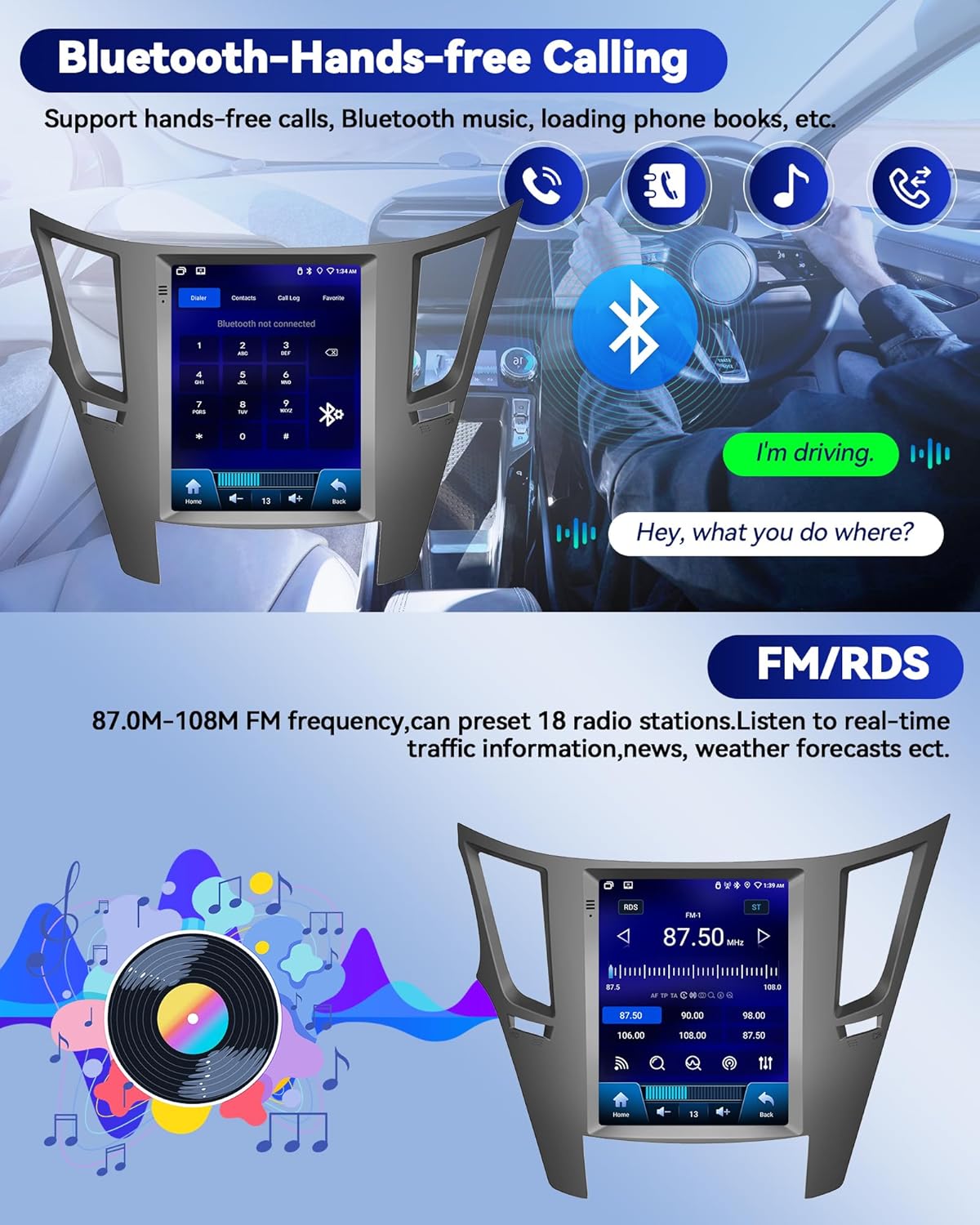
Bluetooth hands-free calling and FM/RDS radio interface on the car stereo.
Figure 4.4: Display showing Bluetooth hands-free calling features and the FM/RDS radio interface. The Bluetooth section includes a dial pad and call options, while the FM/RDS section shows radio frequency tuning.

Rádio 4.4 FM/RDS

Enjoy FM/RDS radio with the ability to preset 18 radio stations. Stay informed with real-time traffic information, news, and weather forecasts.

FM/RDS radio interface showing various frequency options and music playback.
Figure 4.5: The FM/RDS radio interface, displaying available frequencies and controls for station selection. The image shows a range of FM frequencies from 87.5 to 108.0 MHz.

4.5 Configurações de DSP e EQ

Elevate your audio experience with advanced DSP audio technology and a 32-band EQ for customized sound. Explore various audio modes and adjustments for an immersive and tailored audio experience.

Multi-theme UI options and DSP/EQ settings for excellent sound quality.
Figura 4.6: Exibição mostrandoasing multiple UI themes and the DSP/EQ settings interface. The EQ section allows for detailed audio customization with a 32-band equalizer.
EQ adjustment interface with various sound modes like Jazz, Pop, Rock, and Custom.
Figure 4.7: The EQ adjustment screen, offering presets such as Jazz, Pop, Rock, and a custom mode for fine-tuning audio frequencies.

4.6 Navegação GPS e conexão Wi-Fi

The car stereo has a built-in GPS receiver and WiFi connectivity. This enables both online and offline navigation, internet browsing, and access to various applications like GPS Maps, YouTube, TikTok, and Spotify. Stay connected while driving with incoming and outgoing calls, address book sync, and mobile phone music playback.

Online and offline GPS navigation interface with map display and app icons.
Figure 4.8: The GPS navigation interface, showing a map with route information and icons for various navigation apps. This demonstrates both online and offline navigation capabilities.
WiFi connection interface with various application icons, indicating internet access.
Figure 4.9: The WiFi connection screen, displaying available networks and various app icons, signifying the ability to access online content and applications.

4.7 Controle do Volante (SWC)

The multimedia player supports the steering wheel control function, allowing you to manage song switching and volume directly from your steering wheel for safer driving.

Steering wheel control functionality for answering calls, switching music, and adjusting volume.
Figure 4.10: Illustration of steering wheel controls, showing how to answer calls, change tracks, and adjust volume without taking hands off the wheel.
Steering wheel control setup interface on the car stereo.
Figure 4.11: The steering wheel control setup screen, allowing users to program and customize button functions for convenience and safety.
Video 4.3: This video demonstrates the multifunctional display of the car radio, showcasing various features and settings accessible through the touchscreen interface.

5. Especificações

RecursoDetalhe
Peso do item4.13 libras
Dimensões do produto10 x 6 x 3 polegadas
Tamanho da tela9.7 polegadas
Comando de vozTela sensível ao toque
MarcaCAMECHO
Tipo de serviço do veículoCarro
Recurso especialAndroid 13 4G+64G, CarPlay & Android Auto & Mirror Link, FM/RDS & EQ, GPS & WIFI, SWC & AHD Backup camera
Tecnologia de ConectividadeBluetooth, USB, Wi-Fi
Tipo de mapaMundialmente
Modo de saída de áudioEstéreo
Tipo de montagemSuporte para painel

6. Solução De Problemas

For common issues, please refer to the following:

7. Garantia e Suporte

7.1 Informações de garantia

The product comes with a 1-year warranty. For detailed information regarding warranty claims and coverage, please contact customer support.

7.2 Suporte ao cliente

For online help and user manual inquiries, you can contact CAMECHO customer service. Look for the 'Ask a question' button on the product page or contact them via email.

Instructions on how to contact CAMECHO customer service via the 'Ask a question' button on Amazon.
Figure 7.1: Guide on how to access customer support by navigating to the seller's page and using the 'Ask a question' feature.

Documentos relacionados - CAMECHO 4G+64G Android 13 Car Stereo for Subaru Outback 2010-2014

Préview CAMECHO Android Car Stereo for Skoda Octavia 2007-2014: User Manual & Installation Guide
Comprehensive user manual and installation guide for the CAMECHO Android Car Stereo system designed for Skoda Octavia 2007-2014. Covers installation, wiring, functions, Carplay, Android Auto, and troubleshooting.
Préview Manual de instruções do aparelho de som automotivo Android para Kia Sporttage 2010-2016
Manual do usuário completo para instalação e operação de um sistema de som automotivo Android para Kia Sporttage 2010-2016, abrangendo instalação, fiação, funções básicas, solução de problemas e conectividade Carplay/Android Auto.
Préview Manual do usuário e guia de instalação do som automotivo Android CAMECHO Universal Double Din
Este manual do usuário fornece instruções completas para a instalação e operação do CAMECHO Universal Double Din Android Car Stereo. Ele aborda diretrizes de segurança, diagramas de fiação, recursos de conectividade como CarPlay e Android Auto, funções básicas e dicas de solução de problemas.
Préview Sistema de som automotivo Android para Kia Optima K5 (2010-2013): Guia de instalação e do usuário
Manual do usuário e guia de instalação completos para o aparelho de som automotivo Android projetado para os modelos Kia Optima K5 de 2010 a 2013. Abrange configuração, fiação, recursos como CarPlay e Android Auto, e solução de problemas.
Préview CAMECHO Android 11 Som Automotivo para Ford Mustang (2010-2014) - Manual de Instruções
Manual de instruções completo para o sistema de som automotivo CAMECHO com Android 11, projetado para os modelos Ford Mustang (2010-2014). Os recursos incluem tela sensível ao toque de 10.1 polegadas, 2 GB de RAM, 32 GB de ROM, GPS, Wi-Fi, Bluetooth, áudio HiFi, CarPlay, Android Auto e suporte para câmera de ré. Abrange instalação, fiação, segurança e solução de problemas.
Préview Manual do usuário do sistema de som automotivo Android para Audi A3 S3 RS3
Instale e opere o seu aparelho de som automotivo Android para Audi A3 S3 RS3 com este manual do usuário completo. Abrange instalação, fiação, CarPlay, Android Auto, funções básicas e solução de problemas.