Introdução
Thank you for choosing the Kiwi KAP 6730 Air Purifier. This manual provides essential information for the safe and efficient use of your device. Please read it thoroughly before operation and retain it for future reference.
The Kiwi KAP 6730 is designed to improve indoor air quality using advanced filtration technology, including a medical-grade H13 HEPA filter, to capture various airborne particles and odors.
Instruções importantes de segurança
Sempre siga as precauções básicas de segurança ao usar aparelhos elétricos para reduzir o risco de incêndio, choque elétrico e ferimentos.
- Leia todas as instruções antes de usar o aparelho.
- Certifique-se de que a fonte de alimentação corresponda ao voltage especificado na etiqueta do aparelho.
- Não opere o aparelho com o cabo ou plugue danificado.
- Mantenha o cabo de alimentação longe de superfícies aquecidas.
- Não mergulhe o aparelho, o cabo ou a ficha em água ou outros líquidos.
- Desligue o purificador de ar da tomada antes de limpá-lo ou realizar qualquer manutenção.
- Não bloqueie as entradas ou saídas de ar.
- Este aparelho é somente para uso interno.
- Mantenha fora do alcance de crianças.
Produto acimaview
The Kiwi KAP 6730 Air Purifier features a compact design with an intuitive control panel and multi-stage sistema de filtração.

Imagem: Principal view of the Kiwi KAP 6730 Air Purifier, highlighting the circular control panel with various function icons including power, fan speed, timer, and Wi-Fi connectivity. The top grille for air output is also visible.

Imagem: An exploded diagram of the Kiwi KAP 6730 Air Purifier, illustrating its internal components. The image shows the outer casing, the fan assembly, and the cylindrical multi-layer filter system, with arrows indicating airflow and the capture of dust and pet hair by different filter stage.
Principais características:
- Medical-grade H13 HEPA filter for effective air purification.
- Multi-stage sistema de filtração.
- Intuitive control panel.
- Design compacto e leve.
- Smart connectivity (Wi-Fi enabled).
Configurar
Desembalando
- Retire cuidadosamente o purificador de ar da embalagem.
- Remove all packaging materials, including any protective films or bags.
- Verifique se houve danos durante o transporte. Se houver danos, não utilize o produto e entre em contato com o suporte ao cliente.
Filter Installation (if not pre-installed)
The air purifier comes with a multi-layer filter. Ensure it is properly installed before first use.
- Vire o purificador de ar de cabeça para baixo.
- Gire a tampa da base no sentido anti-horário para destravá-la e removê-la.
- Retire a embalagem plástica do filtro.
- Insert the filter into the air purifier, ensuring it sits securely.
- Replace the base cover and twist clockwise to lock it into place.
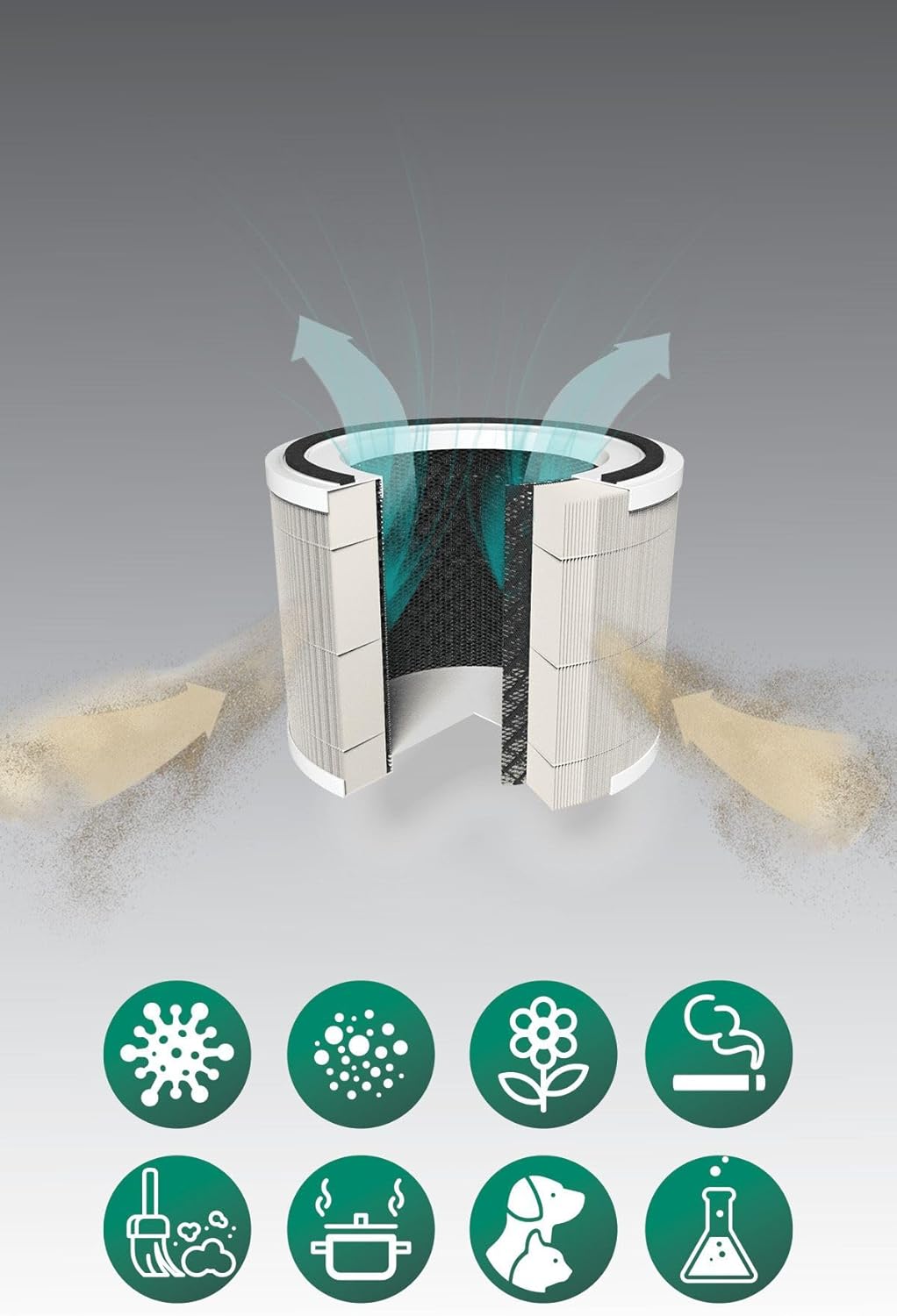
Imagem: A cutaway diagram illustrating the multi-layer filter system of the Kiwi KAP 6730 Air Purifier. Arrows show air entering and exiting the filter. Below the filter, icons represent various airborne pollutants that the system is designed to filter, including bacteria, dust, pollen, smoke, pet dander, cooking odors, and chemical fumes.
Colocação
- Coloque o purificador de ar em uma superfície firme e nivelada.
- Ensure there is at least 15-30 cm (6-12 inches) of space around all sides for optimal airflow.
- Evite colocar perto de fontes de calor, luz solar direta ou em ambientes fechados.amp ambientes.
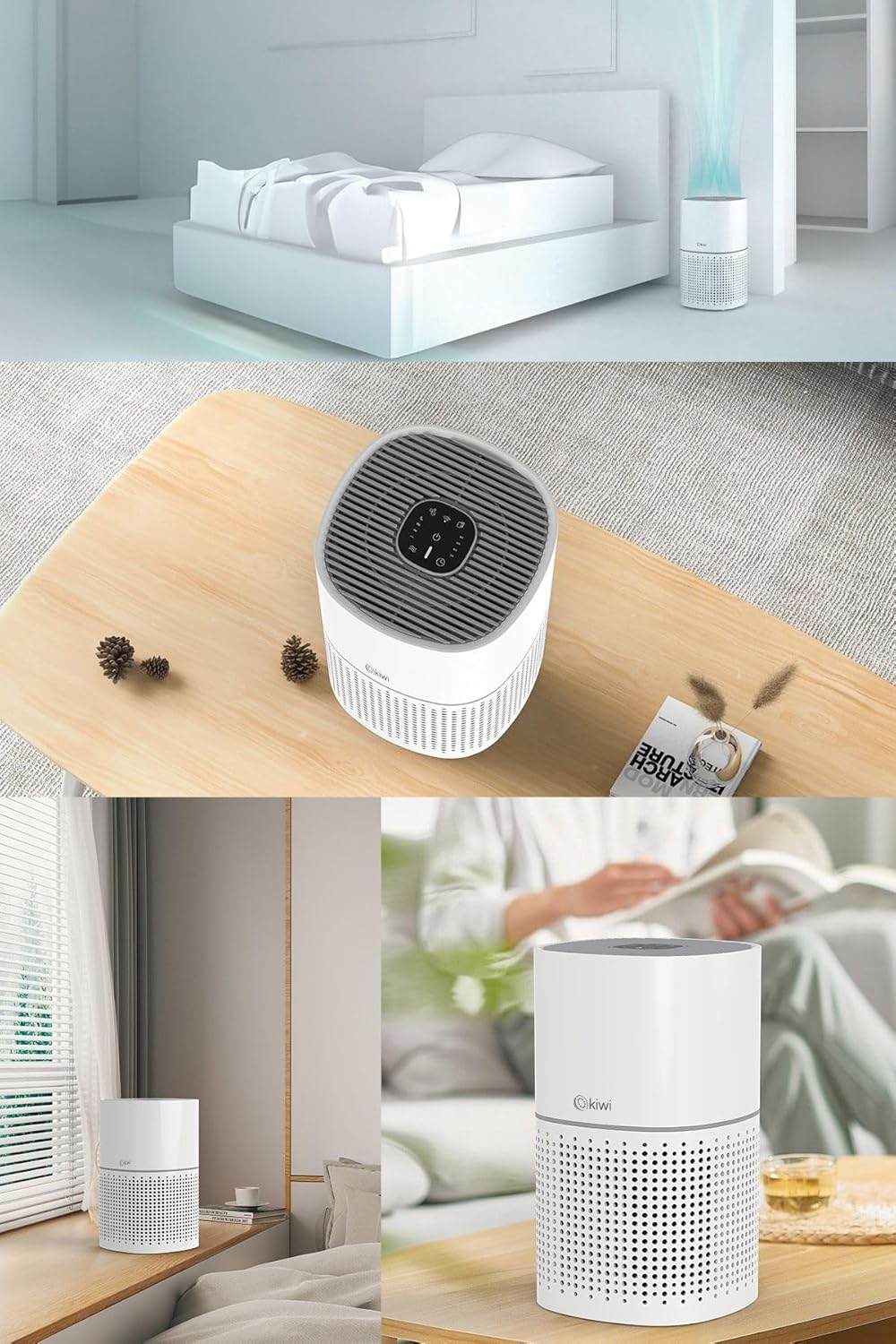
Imagem: A collage of images showing the Kiwi KAP 6730 Air Purifier in different home environments. It is depicted on a bedside table in a bedroom, on a wooden table in a living area, and on a windowsill, demonstrating its compact size and versatility for placement.
Conexão de energia
Conecte o cabo de alimentação a uma tomada elétrica adequada.
Operação
Funções do painel de controle
The control panel is located on the top of the air purifier.
Imagem: Um detalhado view of the circular control panel on the top of the Kiwi KAP 6730 Air Purifier. Icons for power, fan speed, timer settings (1H, 2H, 4H, 8H), sleep mode, and Wi-Fi connectivity are clearly visible, along with an indicator light.
- Botão de energia (⏻): Pressione para ligar ou desligar o purificador de ar.
- Botão de velocidade do ventilador (💨): Press to cycle through different fan speeds (e.g., Low, Medium, High, Auto).
- Botão do temporizador (⏱): Set the operating time (e.g., 1 hour, 2 hours, 4 hours, 8 hours). The unit will automatically turn off after the set time.
- Botão do modo de suspensão (🌙): Activates sleep mode, reducing fan speed and dimming indicator lights for quiet operation.
- Wi-Fi Button (📶): Press and hold to activate Wi-Fi pairing mode for smart control via a mobile application.
- Indicador de reinicialização do filtro: Illuminates when the filter needs replacement. Press and hold after filter replacement to reset.
Smart Control (App)
The Kiwi KAP 6730 can be controlled via a dedicated mobile application. Follow the app's instructions for pairing and remote control.

Imagem: The Kiwi KAP 6730 Air Purifier positioned in a room, with a hand holding a smartphone in the foreground. The smartphone screen displays a mobile application interface, indicating that the air purifier can be controlled remotely via a smart app, showing air quality readings and control options.
Manutenção
A manutenção regular garante o desempenho ideal e prolonga a vida útil do seu purificador de ar.
Limpeza do Exterior
- Sempre desconecte o purificador de ar antes de limpá-lo.
- Limpe as superfícies exteriores com um pano macio, damp pano.
- Não utilize produtos de limpeza abrasivos, ceras ou solventes.
- Certifique-se de que não entre água no interior do aparelho.
Substituição do filtro
The filter life depends on air quality and usage. The filter replacement indicator will illuminate when a new filter is needed (typically every 6-12 months).
- Desligue o purificador de ar.
- Vire o purificador de ar de cabeça para baixo.
- Gire a tampa da base no sentido anti-horário para destravá-la e removê-la.
- Remova o filtro antigo e descarte-o corretamente.
- Unpack the new filter and insert it into the air purifier.
- Replace the base cover and twist clockwise to lock it into place.
- Plug in the air purifier. Press and hold the Filter Reset button (often the Wi-Fi or a dedicated filter icon) for 3-5 seconds until the indicator light turns off.
Observação: Only use genuine Kiwi replacement filters to ensure proper performance and maintain warranty validity.
Solução de problemas
| Problema | Possível causa | Solução |
|---|---|---|
| O purificador de ar não liga. | Não está conectado à tomada; Tomada com defeito; Botão liga/desliga não pressionado. | Verifique se o cabo de alimentação está firmemente conectado. Tente outra tomada. Pressione o botão liga/desliga com firmeza. |
| Fluxo de ar ou eficiência de purificação reduzidos. | Blocked air inlets/outlets; Dirty filter; Filter packaging not removed. | Check for obstructions and clear them. Replace the filter if the indicator is on or if it appears dirty. Ensure all filter packaging is removed. |
| Ruído incomum. | Filter not installed correctly; Foreign object inside; Unit not on a level surface. | Check filter installation. Unplug and inspect for foreign objects. Place on a stable, level surface. |
| O indicador de substituição do filtro permanece aceso após a troca do filtro. | Reinicialização do filtro não realizada. | Press and hold the Filter Reset button for 3-5 seconds until the light turns off. |
| Não consigo conectar ao Wi-Fi/aplicativo. | Incorrect Wi-Fi password; Router too far; App not updated; Wi-Fi pairing mode not activated. | Ensure correct password. Move unit closer to router. Update app. Press and hold Wi-Fi button to activate pairing mode. Consult app instructions. |
Especificações
| Recurso | Detalhe |
|---|---|
| Modelo | CAP-6730 |
| Marca | KIWI |
| Cor | Branco |
| Tipo de filtragem | H13 HEPA Filter (Medical Grade) |
| Fonte de energia | Elétrico com fio |
| Peso do produto | 2 quilogramas |
| Conectividade | Wi-Fi (Smart App Control) |
| Dimensões (aprox.) | Design compacto |
Garantia e Suporte
For warranty information and customer support, please refer to the warranty card included with your product or visit the official KIWI website.
You can also contact customer service for assistance with troubleshooting or replacement parts.
KIWI Official Website: www.kiwi.com.tr (Nota: Este é um espaço reservado. URL, please refer to your product documentation for the correct support website.)


