Introdução
This user manual provides comprehensive instructions for the setup, operation, maintenance, and troubleshooting of your Pisichen 21.5-Inch Touchscreen Monitor. Please read this manual thoroughly before using the product to ensure proper functionality and to prevent damage.
The Pisichen 21.5-inch touch monitor is designed to enhance your work efficiency and provide an interactive experience with its responsive 10-point capacitive touchscreen. It features a Full HD 1920x1080 resolution display, built-in speakers, and versatile connectivity options including HDMI, VGA, and USB for touch functionality.
Principais características
- Sensitive 10-Point Capacitive Touchscreen: Offers seamless and responsive interaction, allowing direct engagement with content and simultaneous multi-finger input.
- Stunning FHD 1080P Display: A 21.5-inch Full HD (1920x1080) resolution screen with a 1000:1 contrast ratio, 250cd/㎡ brightness, 170° viewing angle, and 60Hz refresh rate for clear and smooth visuals. Includes low-blue-light and eye-care technology.
- Ampla compatibilidade de dispositivos: Equipped with USB2.0 (for touch), HDMI, VGA, and DC ports for easy connection to PCs, laptops, PS3/4, and gaming consoles.
- Modos de exibição versáteis: Supports duplicate, extend, and second-screen modes to enhance productivity and workspace.
- Built-in Speakers and VESA Mounting: Integrated speakers provide audio, and the 75x75mm VESA mount allows for flexible installation options.
Conteúdo da embalagem
Please verify that all items are present in the package before proceeding with the setup.

The package includes the Pisichen 21.5-inch touchscreen monitor, a user manual, an HDMI cable, a USB cable, and a power adapter, ensuring it is ready for immediate use.
- Pisichen 21.5-Inch Touchscreen Monitor
- Adaptador de energia
- Cabo HDMI
- USB Cable (for touch function)
- Manual do usuário
Instruções de configuração
1. Conectando o monitor
The monitor offers various connection options to suit your needs. Ensure all connections are secure before powering on the device.

Detalhado view of the monitor's input/output ports, including HDMI, VGA, headphone, DC power, and USB 2.0 touch ports.
- Conexão de energia: Connect the provided power adapter to the DC power port on the monitor and then plug it into a wall outlet.
- Conexão de vídeo (HDMI): Use the HDMI cable to connect the monitor's HDMI port to the HDMI output port on your computer, laptop, or gaming console.
- Conexão de vídeo (VGA): Alternatively, use a VGA cable to connect the monitor's VGA port to the VGA output port on your computer or laptop.
- Touch Function Connection: To enable the touch function, connect the included USB cable from the monitor's USB 2.0 touch port to an available USB port on your computer. This step is crucial for touch signal transmission.
- Saída de áudio (opcional): If you prefer external audio, you can connect headphones or external speakers to the headphone jack. The monitor also has built-in speakers.
2. Opções de montagem
The Pisichen monitor supports both desktop placement and VESA wall mounting for flexible setup.
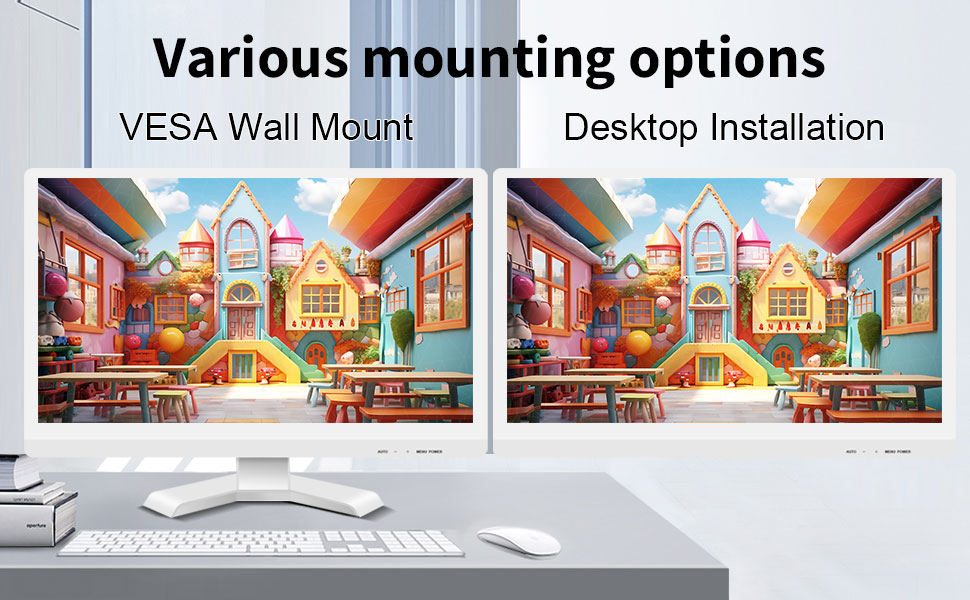
The monitor can be set up on a desktop stand or mounted on a wall using a VESA compatible bracket.
- Instalação na área de trabalho: Attach the provided stand to the monitor base and place it on a stable, flat surface.
- Suporte de parede VESA: The monitor features a 75x75mm VESA mounting pattern. Use a compatible VESA bracket (not included) to mount the monitor on a wall or an adjustable arm. Ensure the mount can support the monitor's weight (9.88 pounds).

Traseira view of the monitor highlighting the VESA 75x75mm mounting pattern and overall dimensions.
Instruções de operação
1. Ligar / desligar
Locate the power button on the monitor. Press it to turn the monitor on or off. The power indicator light will illuminate when the monitor is on.
2. Using the Touchscreen Function
Once the USB cable is connected to your computer, the 10-point capacitive touch function will be active. You can interact with the screen using your fingers or a passive capacitive stylus.

The monitor supports direct touch interaction for intuitive control.
- Toque único: Equivalente a um clique do mouse.
- Toque e segure: Equivalente a um clique com o botão direito do mouse.
- Arrastar: Move items by touching and dragging.
- Ampliar com os dedos: Use two fingers to zoom in or out on content.
- Multitoque: The monitor supports up to 10 simultaneous touch points, enabling collaborative work or complex gestures.

The 10-point multi-touch feature allows for multiple users or complex interactions simultaneously.
Nota importante: The touch functionality is disabled on Mac OS, iPad OS, and iOS. This monitor only supports passive capacitive styluses.
3. Modos de exibição
O monitor suporta vários modos de exibição quando conectado a um computador:
- Modo duplicado: Displays the same content on both your primary screen and the Pisichen monitor.
- Modo de extensão: Expande sua área de trabalho para ambas as telas, proporcionando mais espaço de trabalho.
- Modo somente para segunda tela: Displays content only on the Pisichen monitor, turning off your primary screen.
You can typically switch between these modes through your operating system's display settings (e.g., Windows Display Settings).
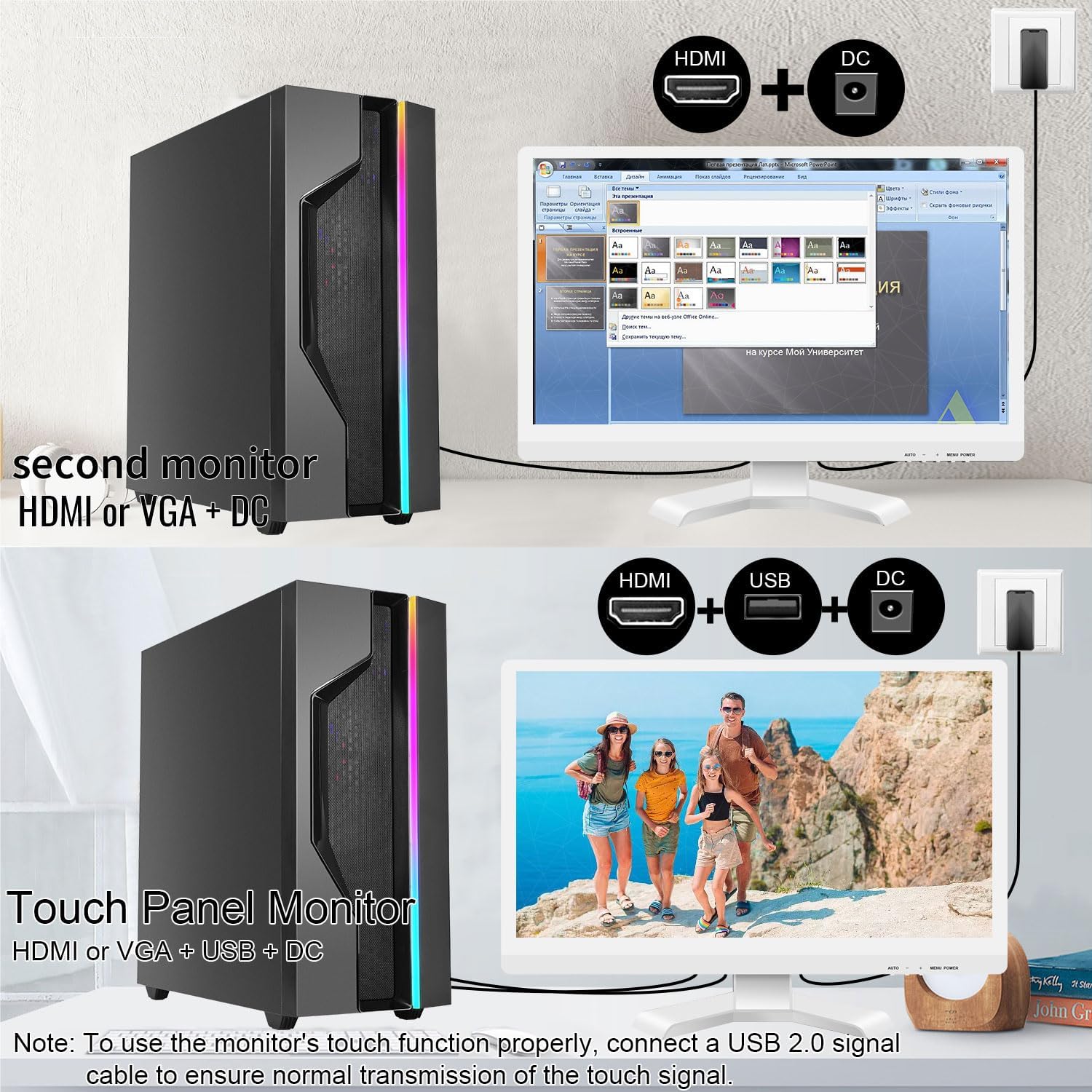
Illustrations of connecting the monitor as a secondary display or as a touch-enabled display.
4. Menu de exibição na tela (OSD)
The monitor features an OSD menu for adjusting display settings. Use the buttons located on the monitor's frame (usually on the bottom right) to navigate and select options.
- Botão de menu: Abre o menu OSD.
- Botões para cima / para baixo: Navegue pelas opções do menu.
- Botão Enter/Selecionar: Confirma uma seleção ou entra em um submenu.
- Botão de saída: Sai do menu ou OSD atual.
Common OSD settings include brightness, contrast, color temperature, input source selection, and aspect ratio.
Manutenção e Cuidados
- Limpando a tela:
Always power off the monitor and unplug it before cleaning. Use a soft, lint-free cloth lightly dampened with water or a non-abrasive, monitor-specific cleaning solution. Do not spray liquid directly onto the screen. Avoid using alcohol, ammonia, or abrasive cleaners, as they can damage the screen surface.
- Limpando o Casing:
Limpe o monitor casing with a soft, dry cloth. If necessary, a slightly damp Pode-se usar pano, mas certifique-se de que não entre umidade nas aberturas ou entradas de ar.
- Armazenar:
When not in use for extended periods, store the monitor in a cool, dry place, away from direct sunlight and extreme temperatures. If possible, use the original packaging for protection.
- Ventilação:
Ensure the monitor's ventilation openings are not blocked. Proper airflow is essential to prevent overheating.
- Manuseio:
Manuseie o monitor com cuidado. Evite deixá-lo cair ou submetê-lo a impactos fortes. Não coloque objetos pesados sobre o monitor.
Solução de problemas
| Problema | Possível causa | Solução |
|---|---|---|
| Sem imagem na tela |
|
|
| Tela sensível ao toque não responde |
|
|
| A imagem está desfocada ou distorcida. |
|
|
| Não há som nos alto-falantes integrados |
|
|
Especificações
| Número do modelo | 21.5INTS-White-NEW |
| Tamanho da tela | 21.5 polegadas |
| Resolução | 1920 x 1080 pixels (FHD 1080p) |
| Proporção da tela | 16:9 |
| Brilho | 250 Candela (cd/㎡) |
| Taxa de contraste | 1000:1 |
| Viewângulo de engate | 170° |
| Taxa de atualização | 60Hz |
| Tecnologia Touch | Toque capacitivo de 10 pontos |
| Portas de entrada | HDMI, VGA, USB 2.0 (for touch), DC Power |
| Áudio | Built-in Speakers, Headphone Jack |
| Compatibilidade de montagem VESA | 75x75mm |
| Dimensões do produto (C x L x A) | 0.78 x 20.4 x 14.9 polegadas |
| Peso do item | 9.88 libras |
| Fabricante | Shenzhen Konowa Electronics Co., LTD |
| País de origem | China |
Garantia e Suporte
For warranty information and technical support, please refer to the official Pisichen webou entre em contato diretamente com o serviço de atendimento ao cliente. Os detalhes geralmente são fornecidos na embalagem do produto ou nos canais de suporte oficiais do fabricante.
Você pode visitar o Pisichen Store on Amazon for more product information and potential support contacts.


