1. Introdução
The TECKNET WiFi Water Leak Detector is designed to provide early warning of water leaks and drips in your home or office. This smart sensor connects directly to your 2.4GHz WiFi network, sending instant notifications to your smartphone via the Tuya Smart App and activating a local 120dB audible alarm. Its advanced 6-point sensing technology helps protect your property from potential water damage.
2. Informações de segurança
- Não exponha o dispositivo a temperaturas extremas ou à luz solar direta.
- Mantenha o dispositivo longe de campos magnéticos fortes.
- Utilize somente pilhas AAA, conforme especificado. Não misture pilhas novas com usadas, nem pilhas de tipos diferentes.
- Descarte as baterias de acordo com os regulamentos locais.
- Não tente desmontar ou reparar o dispositivo sozinho. Entre em contato com o suporte ao cliente para obter assistência.
- Ensure the device is placed on a flat, stable surface where water leaks are most likely to occur.
3. Conteúdo da embalagem
- 1 x TECKNET WiFi Water Leak Detector (Model TK-WA161)
- 2 pilhas AAA
- 1 x Manual do Usuário (este documento)
4. Produto acabadoview
The TECKNET WiFi Water Leak Detector features a compact design with advanced sensing capabilities. It includes:
- 6-Point Precision Detection: Equipped with 2 top and 4 bottom probes for comprehensive water detection.
- 120dB Adjustable Siren: A loud local alarm with adjustable volume levels.
- Conectividade WiFi: Direct connection to 2.4GHz home WiFi, no hub required.
- Notificações do aplicativo: Instant alerts to your smartphone via the Tuya Smart App.
- Bateria de longa duração: Up to 2 years on 2 AAA batteries with low battery alerts.
- Certificação IP67: Designed to withstand water exposure without damage.

Image: The TECKNET Water Leak Detector positioned to detect both dripping and leaking water, highlighting its dual detection capabilities.

Image: The TECKNET Water Leak Detector shown submerged in water, illustrating its IP67 water resistance rating, ensuring no damage after water exposure.
5. Instruções de configuração
5.1. Instalação da bateria
- Localize o compartimento da bateria na parte traseira do dispositivo.
- Use a small tool (like a flathead screwdriver or the provided tool if any) to gently pry open the battery cover.
- Insira as duas pilhas AAA, certificando-se da polaridade correta (+/-).
- Feche bem a tampa da bateria até ouvir um clique.

Image: A visual guide demonstrating the four steps for battery installation: inserting a tool to open, rotating to unlock, inserting AAA batteries, and closing the cover.
5.2. Download do aplicativo e emparelhamento do dispositivo
- Baixe o aplicativo "Tuya Smart" na Apple App Store ou na Google Play Store.
- Cadastre-se ou faça login na sua conta Tuya Smart.
- Certifique-se de que seu smartphone esteja conectado a uma rede Wi-Fi de 2.4 GHz. O dispositivo não é compatível com Wi-Fi de 5 GHz.
- Open the app and tap the "+" icon to add a device.
- Select "Security & Video Surveillance" then "Water Leak Sensor (Wi-Fi)".
- Follow the in-app instructions for Bluetooth-assisted pairing. This typically involves pressing and holding the "TEST" button on the device until the indicator light flashes, then confirming in the app.
- Once successfully paired, you can name the device and assign it to a specific room in the app.
5.3. Localização
Place the water leak detector in areas prone to water leaks or flooding. Common locations include:
- Debaixo das pias da cozinha e do banheiro
- Behind washing machines and dishwashers
- Near water heaters and sump pumps
- In basements, utility rooms, and crawl spaces
- Near air conditioning units or refrigerators with water lines
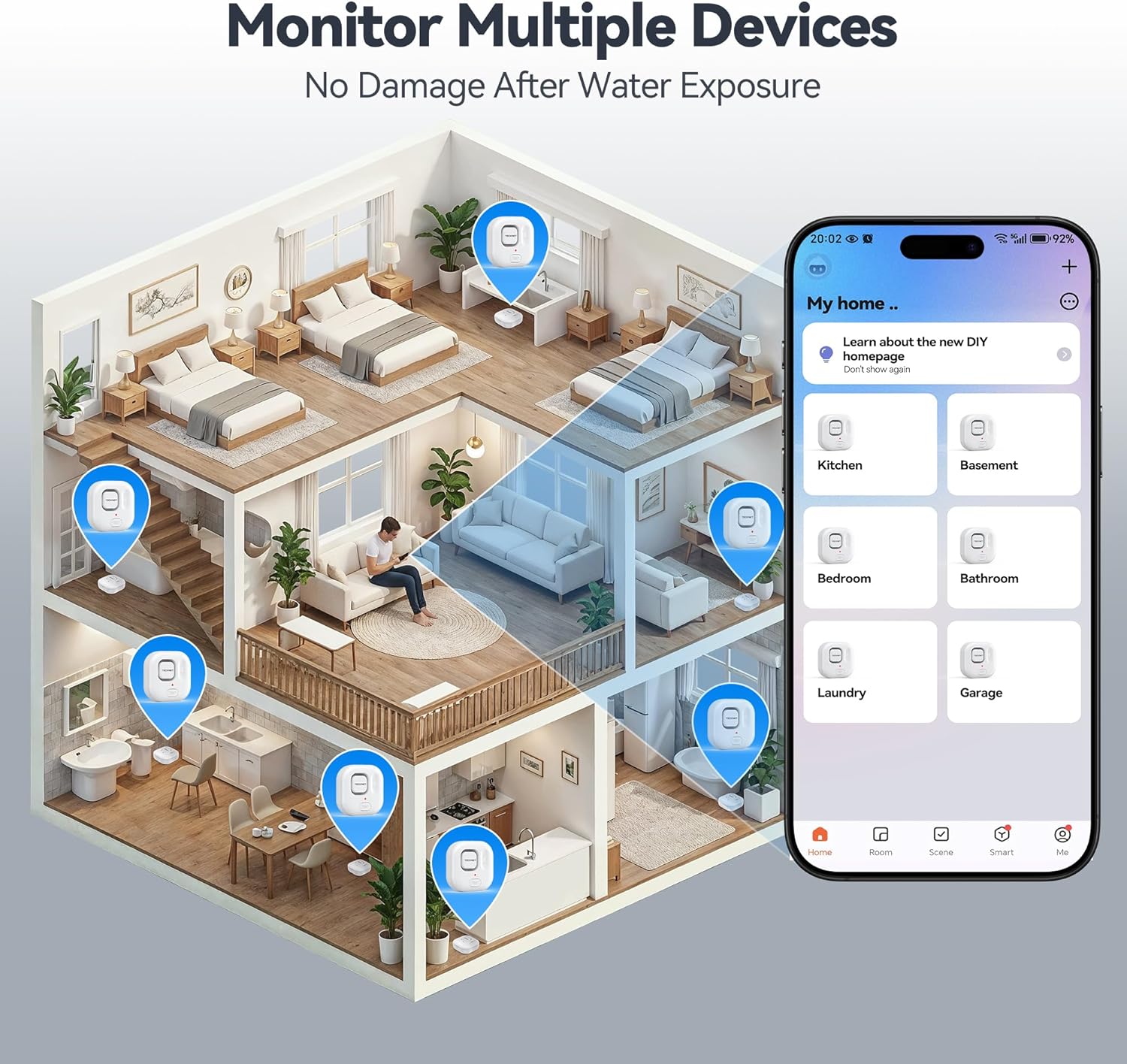
Image: An illustration depicting various locations within a house where TECKNET Water Leak Detectors can be strategically placed, such as kitchens, bathrooms, and basements, alongside the corresponding mobile app interface for monitoring.
6. Instruções de operação
6.1. Leak Detection and Alerts
When the sensor detects water, it will immediately:
- Trigger the built-in 120dB audible alarm.
- Send an instant push notification to your smartphone via the Tuya Smart App.
To silence the alarm, you can press the "TEST" button on the device or disable it through the Tuya Smart App.
6.2. Ajustando o volume do alarme
The alarm volume can be adjusted to 0dB (silent), 40dB, 80dB, or 120dB. This can be done either through the Tuya Smart App settings for the device or by repeatedly pressing the "TEST" button on the device to cycle through the volume levels.
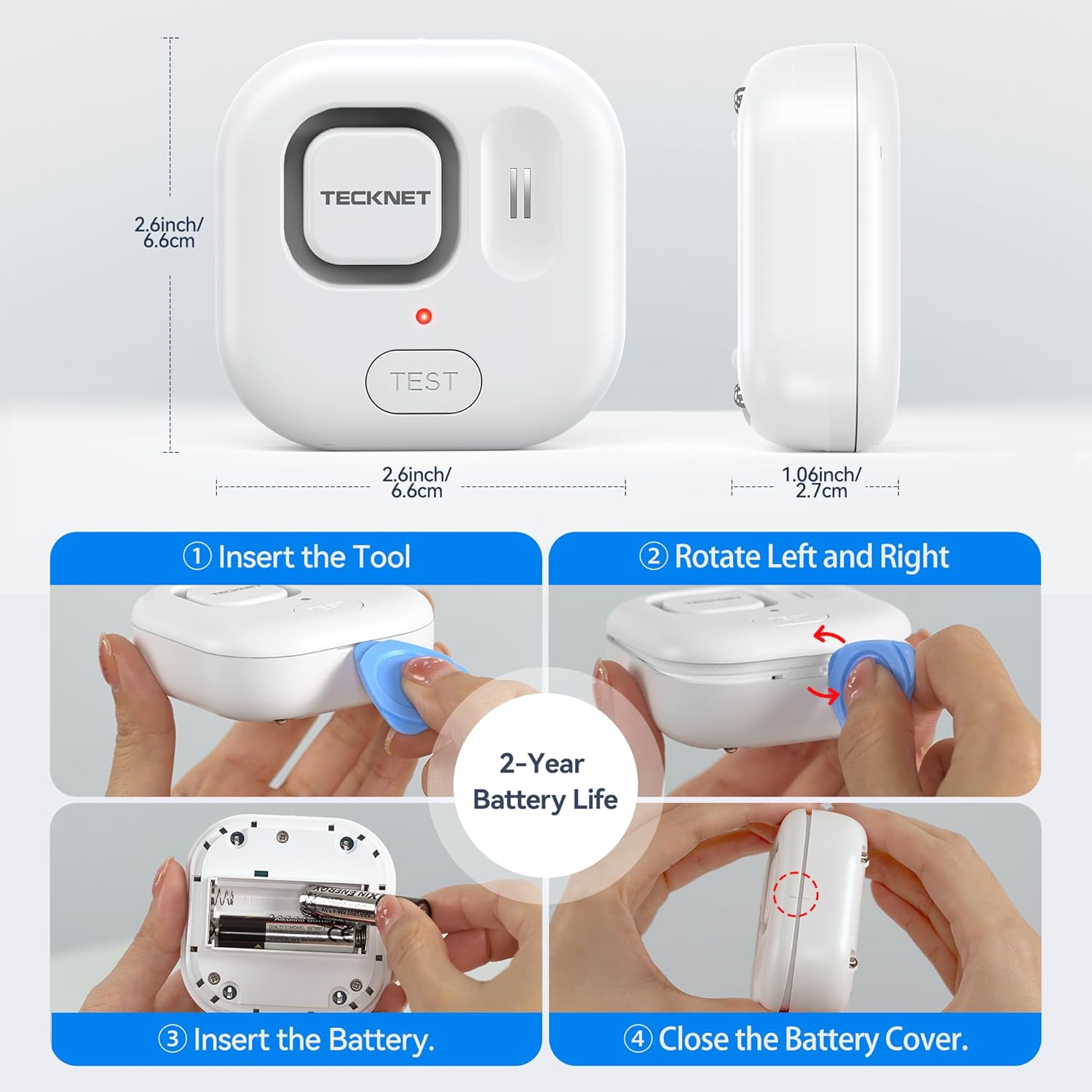
Image: A visual representation of the four adjustable alarm volume settings (0dB, 40dB, 80dB, 120dB) and how they might sound across different floors of a house.
6.3. Testando o dispositivo
It is recommended to test the device periodically to ensure proper functionality. To test:
- Place the sensor on a damp cloth or a small amount of water, ensuring the bottom probes make contact.
- The alarm should sound, and you should receive a notification on your smartphone.
- Dry the sensor thoroughly after testing.
7. Manutenção
7.1. Substituição da bateria
The device is powered by two AAA batteries, offering up to 2 years of battery life. The Tuya Smart App will send a notification when the battery level is low. Replace batteries as described in Section 5.1.
7.2. Limpeza
Wipe the device with a soft, dry cloth. Do not use abrasive cleaners or immerse the device in water (beyond its intended function for leak detection) as this may damage internal components.
8. Solução De Problemas
- O dispositivo não está conectando ao Wi-Fi:
- Certifique-se de que sua rede Wi-Fi seja de 2.4 GHz. O dispositivo não é compatível com redes de 5 GHz.
- Check if your WiFi password is correct.
- Move the device closer to your WiFi router.
- Reinicie o roteador e tente emparelhar novamente.
- Sem notificações do aplicativo:
- Check your phone's notification settings for the Tuya Smart App.
- Ensure the device is connected to WiFi and has sufficient battery.
- Verify your phone has an active internet connection.
- Alarme não soa:
- Verifique o nível da bateria e substitua-a se estiver baixo.
- Ensure the alarm volume is not set to 0dB in the app or via the "TEST" button.
- Test the device with water to confirm sensor functionality.
- Alarmes falsos:
- Ensure the sensor probes are clean and dry.
- Relocate the device if it's in an area with high humidity or condensation that might trigger it.
9. Especificações
| Número do modelo | TK-WA161 |
| Conectividade | WiFi (2.4GHz only), Bluetooth (for setup) |
| Compatibilidade de aplicativos | Tuya Smart (Android & iOS) |
| Volume do alarme | 120dB (adjustable: 0dB, 40dB, 80dB, 120dB) |
| Sensores | 6 probes (2 top, 4 bottom) |
| Fonte de energia | 2 pilhas AAA |
| Duração da bateria | Até 2 anos |
| Dimensões | 1 x 1 x 1 cm (approx. 2.6 x 2.6 x 1.06 inches); 109 g |
| Proteção de entrada | Certificado IP67 |
| Componentes incluídos | WiFi Water Alarm, 2 AAA Batteries |
10. Garantia e Suporte
TECKNET provides a 36-month warranty for this product upon registration. If you encounter any issues or have questions regarding your TECKNET WiFi Water Leak Detector, please contact our professional customer service team. Refer to the TECKNET official webPara obter os detalhes de contato, consulte o site ou a documentação da sua compra.


