Manual do Usuário da Lâmpada Inteligente Colorida THIRDREALITY ZB3
Model: 3RCB01057Z
Marca: THIRDREALITY
1. Introdução
The THIRDREALITY Smart Color Bulb ZB3 is a versatile smart lighting solution designed for seamless integration into your smart home ecosystem. This BR30/E26 flood light offers 650 lumens of brightness, full RGB color capabilities with 16 million options, and tunable white light from 2700K to 6500K. It functions as a Zigbee repeater, enhancing network stability and range. Compatible with various Zigbee hubs and Alexa-enabled devices, this bulb provides smart control and automation for personalized lighting experiences.

Image 1.1: The THIRDREALITY Smart Color Bulb ZB3, showcasing its BR30 shape and colorful top.

Image 1.2: Detailed dimensions of the Smart Color Bulb ZB3, showing its 3.74-inch width and 4.97-inch height.
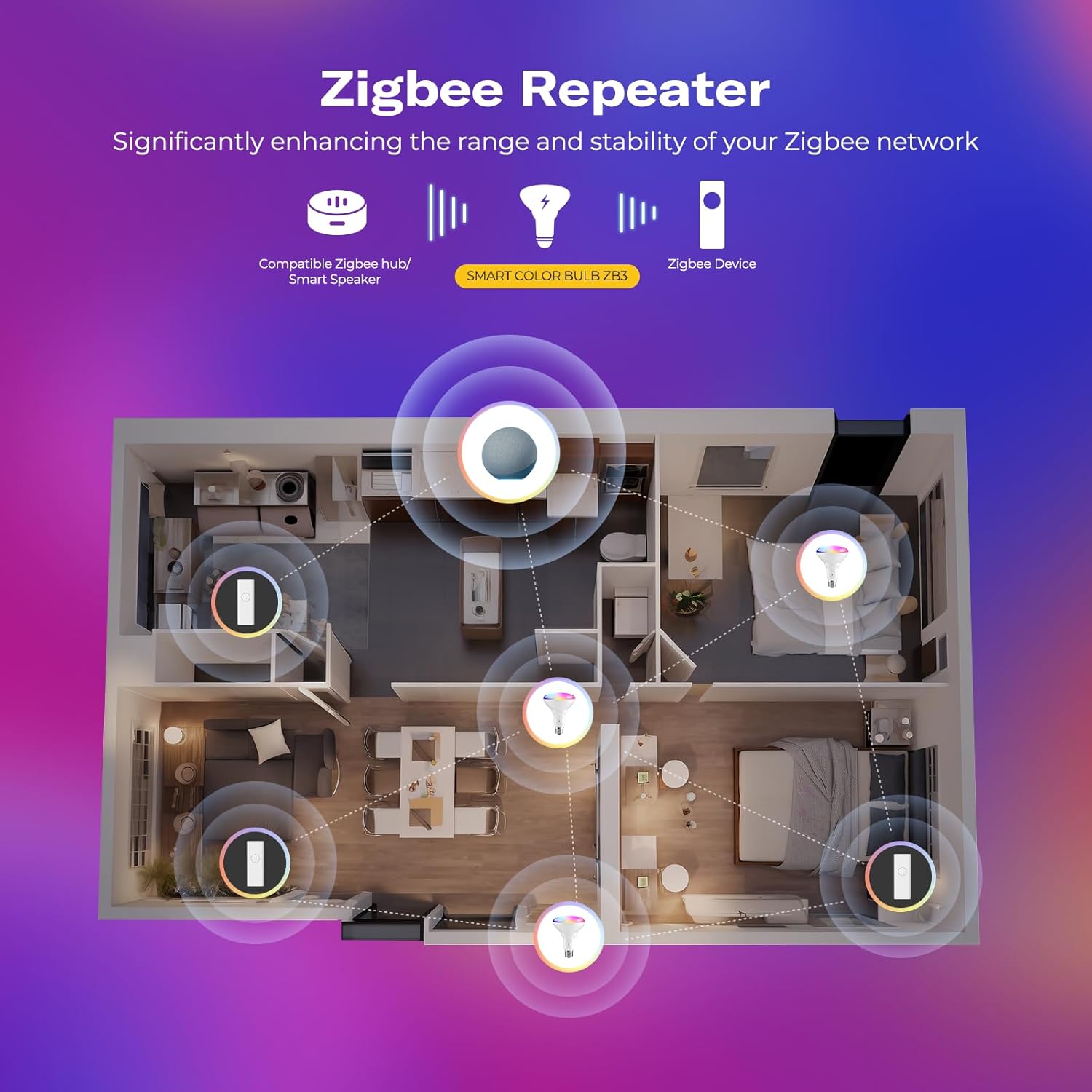
Image 1.3: Diagram illustrating the Zigbee repeater function of the bulb, extending the network range throughout a home.
2. Informações de segurança
Please read and follow all safety instructions carefully before installing and operating your Smart Color Bulb ZB3. Failure to do so may result in electric shock, fire, or other injuries.
- Ensure power is turned off at the switch before installation or removal.
- Do not use with standard dimmer switches. This bulb is dimmable only via a compatible Zigbee hub or app.
- Suitable for dry locations only. Do not expose to water or moisture.
- Não desmonte nem modifique a lâmpada.
- Operar dentro da faixa de temperatura especificada de -20°C a 40°C.
3. O que está na caixa
- Smart Bulb ZB3 x 1
- Manual do usuário x 1
4. Configuração
4.1. Instalação
The THIRDREALITY Smart Color Bulb ZB3 is designed for easy installation into standard E26 base fixtures. It is specifically suitable for 5-inch or 6-inch recessed ceiling cans. Ensure the power to the fixture is turned off before proceeding.
- Unpack the Smart Color Bulb ZB3 from its packaging.
- Carefully screw the bulb into a compatible E26 light socket.
- Turn on the power to the fixture. The bulb should light up.

Image 4.1: The Smart Color Bulb ZB3 installed in a recessed ceiling can, illustrating compatibility with 5-inch or 6-inch cans. Note: Not compatible with dimmer switches.
4.2. Pairing with a Zigbee Hub (e.g., Alexa)
A Zigbee hub is required for smart control features. Compatible hubs include Echo (4th Gen), Echo Plus (1st & 2nd Gen), Echo Studio, Echo Show 8 (3rd Gen), Echo Show 10 (2nd & 3rd Gen), Echo Hub, Eero 6, Eero Pro 6, Home Assistant, SmartThings (2015/2018/Station), Aeotec, Hubitat, Homey Bridge, Homey Pro, and Third Reality Hub Gen2 Plus.
- Ensure your Alexa Speaker firmware is up to date.
- Turn on Bluetooth on your phone and connect to a stable 2.4GHz Wi-Fi network.
- Launch the Alexa App on your mobile device.
- Toque no ícone "+" para adicionar um novo dispositivo.
- Select "Light" from the device categories.
- Choose the "Zigbee" logo when prompted for the device type.
- Follow the on-screen instructions to put your device into pairing mode (typically by powering it off and on again).
- Tap "Discover Devices" in the Alexa app. The app will search for and connect to your Smart Color Bulb ZB3.
- Once discovered, you can assign the bulb to a room or group for easier control.
Video 4.2.1: Official guide on how to connect the Smart Color Bulb ZB3 to Alexa, demonstrating the pairing process through the Alexa app.

Image 4.2.2: A user interacting with Alexa to control the smart bulb, illustrating voice command capabilities.

Image 4.2.3: A comprehensive chart detailing compatibility with various smart home platforms, including those requiring the Smart Bridge MZ1 (sold separately) and directly compatible Zigbee hubs.
5. Operating the Smart Color Bulb ZB3
Once paired, you can control your Smart Color Bulb ZB3 using your smart home app or voice commands.
5.1. Controle de aplicativos
- Ligado/Desligado: Toggle the power of the bulb directly from the app.
- Brilho: Ajuste a intensidade da luz de 1% a 100%.
- Temperatura de cor: Change the white light from warm (2700K) to cool (6500K) to suit your mood or activity.
- Cor RGB: Select from 16 million colors to create vibrant lighting effects for any occasion.
- Cenas e Rotinas: Create custom scenes and automate lighting schedules based on time, motion, or other smart home triggers.
5.2. Controle de voz
With a compatible voice assistant (e.g., Alexa), you can control your bulb hands-free:
- "Alexa, ligue [Nome da Luz]."
- "Alexa, diminua a intensidade da [Nome da Luz] para 50%."
- "Alexa, defina [Nome da Luz] para branco quente."
- "Alexa, change [Light Name] to blue."
6. Manutenção
To ensure optimal performance and longevity of your Smart Color Bulb ZB3, follow these maintenance guidelines:
- Limpeza: Disconnect power before cleaning. Wipe the bulb with a soft, dry cloth. Do not use liquid or abrasive cleaners.
- Manuseio: Manuseie a lâmpada pela base, não pela cúpula de vidro ou plástico, para evitar danos.
- Armazenar: Se for armazenar a lâmpada por um longo período, mantenha-a em local fresco e seco, longe da luz solar direta e de temperaturas extremas.
7. Solução De Problemas
If you encounter issues with your Smart Color Bulb ZB3, refer to the following common problems and solutions:
| Problema | Possível causa | Solução |
|---|---|---|
| A lâmpada não acende. | No power, loose connection, faulty bulb. | Verifique o interruptor de energia e o disjuntor. Certifique-se de que a lâmpada esteja bem rosqueada. Teste a lâmpada em outro soquete que esteja funcionando. |
| Bulb not connecting to hub/app. | Out of range, incorrect pairing steps, hub issues, 5GHz Wi-Fi interference. | Ensure bulb is within 30 feet of the hub. Repeat pairing steps carefully. Power cycle your hub. Confirm your phone is on a 2.4GHz Wi-Fi network during setup. |
| Flickering or inconsistent light. | Incompatible dimmer switch, unstable power, network interference. | Remove any traditional dimmer switches. Ensure stable power supply. Check for other Zigbee devices causing interference. |
| Colors are not accurate or responsive. | App/firmware issue, network lag. | Update the Alexa app and bulb firmware (if available). Check network strength. |
If the problem persists after trying these solutions, please contact THIRDREALITY customer support.
8. Especificações
| Recurso | Detalhe |
|---|---|
| Marca | TERCEIRA REALIDADE |
| Nome do modelo | Smart Bulb ZB3 |
| Número da peça | 3RCB01057Z |
| Tipo de luz | LIDERADO |
| O quetage | 8.5 watts |
| Tamanho do formato do bulbo | BR30 |
| Base de lâmpada | E26 |
| Saída de Lúmen | 650 lúmens |
| Cor clara | Multicolor (RGB) & Tunable White (2700K-6500K) |
| Volumetage | 110 Volts |
| Conectividade | Zigbee 3.0 |
| Características especiais | Energy Efficient, Timer, Tunable, Zigbee Repeater |
| Peso do item | 4.2 onças |
| Dimensões da embalagem | 5.31 x 3.98 x 3.86 polegadas |
| Fabricante | Terceira Realidade, Inc. |
| UPC | 850001595889 |
9. Garantia e Suporte
For detailed warranty information, please refer to the documentation included with your product or visit the official THIRDREALITY website. For additional support, troubleshooting, or to download the full user manual in PDF format, please visit the following link:
Baixar Manual do Usuário (PDF)
You can also visit the official THIRDREALITY store for more information and products: THIRDREALITY Brand Store


