1. Introdução
The SUNLU Filament Dryer SP2 is designed to dry 3D printer filaments and provide sealed storage, improving print quality by removing moisture. This device features a heating element, an HD LCD touch screen for control, and compatibility with various filament types and spool sizes.

Image 1.1: SUNLU Filament Dryer SP2, highlighting its purpose.
2. Informações de segurança
- Certifique-se de que a fonte de alimentação seja compatível com os requisitos do dispositivo.
- Do not touch the heating element or interior surfaces during operation, as they can become hot.
- Mantenha o dispositivo longe de água ou outros líquidos.
- Não bloqueie as aberturas de ventilação.
- Desligue o dispositivo antes da limpeza ou manutenção.
- Mantenha fora do alcance de crianças.
3. Conteúdo da embalagem
Verifique se todos os itens estão presentes na embalagem:

Image 3.1: Detailed packing list for the SP2 FilaDryer Set.
- Drying Chamber x1
- Heating Base x1
- Air Lock x2
- Cabo de alimentação x1
- Spool Roller x1
- Rollers & Bearings x1
- Manual do usuário x1
- Desiccant Box x1
- Dessecante x1
- Hygrometer x1
- PTFE Tube 1m x2
- PTFE Tube 8cm x2
4. Produto acabadoview
The SUNLU Filament Dryer SP2 consists of a detachable drying chamber and a heating base, allowing for both drying and sealed storage. Key components include:
- Tampa superior: Seals the drying chamber.
- Câmara de secagem: Transparent enclosure for filament spools.
- Higrômetro: Displays real-time interior humidity.
- Base de aquecimento: Contains the PTC heating element and control panel.
- Spool Rollers: Support filament spools for smooth rotation.
- PTFE Tubes: Guide filament to the 3D printer.

Imagem 4.1: Explodida view of the SP2 components.
5. Instruções de configuração
- Descompacte: Remova cuidadosamente todos os componentes da embalagem.
- Assemble Rollers: Place the spool rollers and bearings into the designated slots within the drying chamber.
- Inserir dessecante: Place the desiccant into the desiccant box and insert it into its compartment in the drying chamber.
- Conecte a energia: Plug the power cable into the heating base and then into a suitable power outlet.
- Carregar Filamento: Open the top cover and place your filament spool(s) onto the rollers inside the drying chamber. The unit can accommodate up to two 1kg spools or one 3kg spool.
- Route Filament (for printing): If you intend to print while drying, route the filament through one of the PTFE tubes and out through an air lock to your 3D printer.
- Fechar a tampa: Securely close the top cover using the two sliding latches to ensure a tight seal.
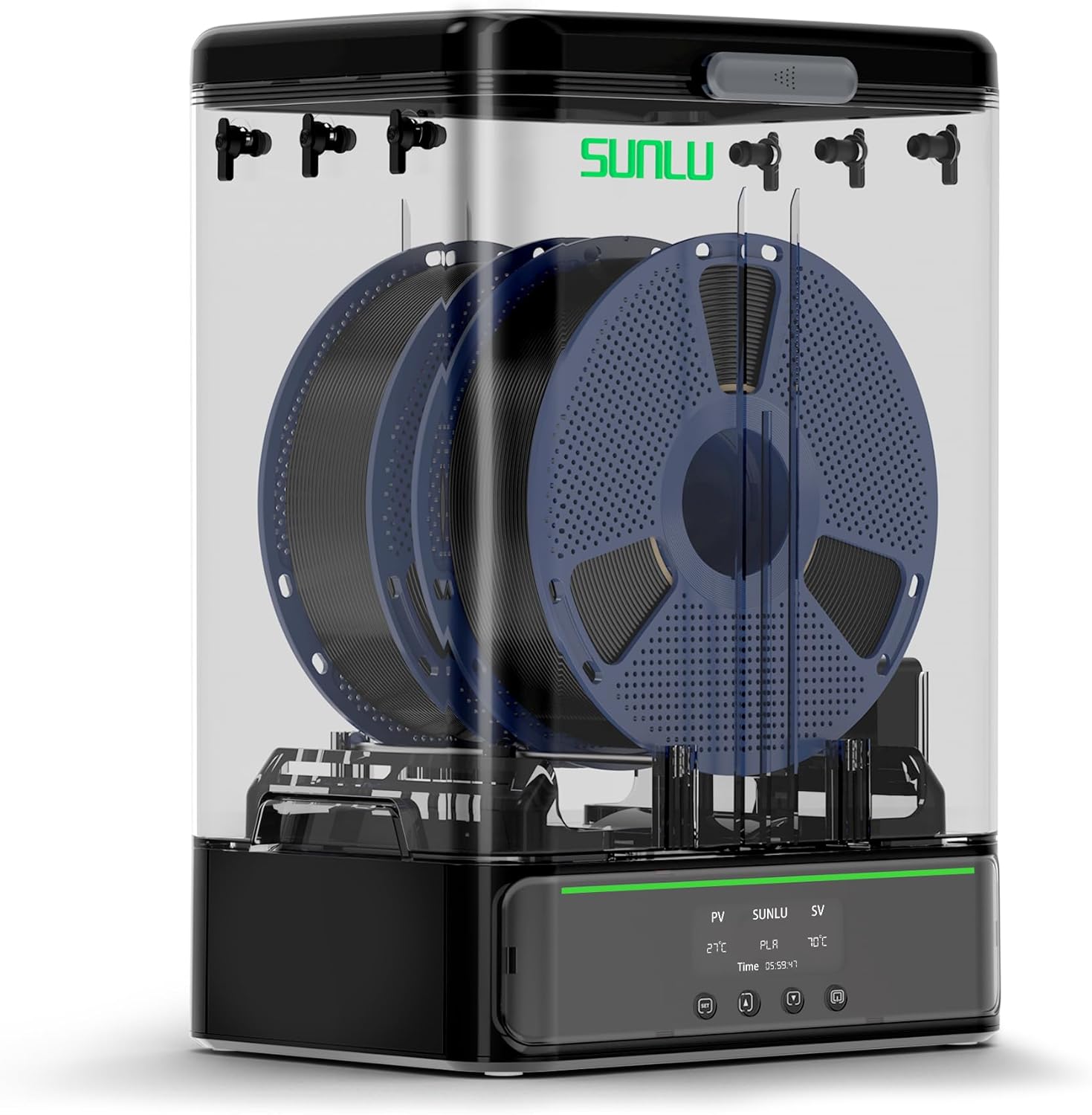
Image 5.1: Fully assembled SUNLU Filament Dryer SP2 with filament spools.
6. Instruções de operação
6.1 Ligar/Desligar
Press the power button on the HD LCD touch screen to turn the device on or off.
6.2 Using the HD LCD Touch Screen
The touch screen allows you to monitor and adjust drying parameters. It displays current temperature (PV), target temperature (SV), selected filament type, and remaining drying time.

Image 6.1: HD LCD Touch Screen interface.
6.3 Ajuste de temperatura e tempo
- Selecione o tipo de filamento: Tap the filament type icon to cycle through presets (PLA, PETG, TPU, ABS, PA, PC, WOOD, PVA, PVB, ASA). Each preset has recommended temperature and time settings.
- Ajustar temperatura: Tap the temperature display (SV) and use the up/down arrows to set the desired drying temperature (range: 35-70°C).
- Ajustar tempo: Tap the time display and use the up/down arrows to set the desired drying duration (range: 0-99 hours).
- The device will begin heating to the set temperature and maintain it for the specified duration.

Image 6.2: Recommended Filament Drying Temperatures and Times.
6.4 Monitoring Humidity
The integrated hygrometer displays the current humidity level inside the drying chamber, allowing you to monitor the drying process. For optimal results, aim for a low humidity percentage.
6.5 Drying and Storage Functionality
The SP2 can be used for active drying or passive sealed storage. The detachable design allows the drying chamber to be lifted from the heating base for convenient storage after drying. The superior sealing mechanism, including silicone holes and sliding latches, helps maintain low humidity for stored filaments.

Image 6.3: Drying and Storage capabilities with various spool sizes.
7. Manutenção
- Limpeza: Wipe the exterior with a soft, dry cloth. Do not use abrasive cleaners or immerse the device in water. Ensure the device is unplugged and cool before cleaning.
- Dessecante: Periodically check the desiccant. If it changes color (indicating saturation), it needs to be recharged or replaced. Follow the desiccant manufacturer's instructions for recharging.
- PTFE Tubes: Inspect PTFE tubes for wear or blockages. Replace if necessary to ensure smooth filament feeding.
8. Solução De Problemas
| Problema | Possível causa | Solução |
|---|---|---|
| Filament still exhibits moisture-related print issues (stringing, poor adhesion). | Insufficient drying time or temperature; saturated desiccant; poor seal. | Increase drying time or temperature; replace/recharge desiccant; ensure top cover is securely latched. |
| Device not heating. | Power cable not connected; device not powered on; internal fault. | Check power connections; press power button; contact support if problem persists. |
| LCD touch screen unresponsive. | Problema temporário de software; problema de energia. | Power cycle the device (turn off, unplug, wait 30 seconds, plug in, turn on). |
| Filament spool not rotating smoothly. | Rollers obstructed or dirty; filament tangled. | Clean rollers; untangle filament; ensure PTFE tubes are clear. |

Image 8.1: Visual comparison of print quality with moist vs. dry filament.
9. Especificações
- Modelo: SUNLU Filament Dryer SP2
- Elemento de aquecimento: PTC de 250 W
- Temperatura máxima: 70°C
- Compatibilidade de filamento: 1.75mm, 2.85mm (PLA, PETG, TPU, ABS, PA, PC, WOOD, PVA, PVB, ASA)
- Capacidade do carretel: Up to 2 x 1kg spools or 1 x 3kg spool. Supports 250g, 500g spools.
- Dimensões do produto (C x L x A): 278 mm x 208 mm x 396 mm (aproximadamente 10.9 x 8.2 x 15.6 polegadas)
- Peso do item: 3.6 kg (7.92 libras)
- Controlar: Tela sensível ao toque LCD HD
- Monitoramento de umidade: Integrated Hygrometer

Image 9.1: Product dimensions of the SUNLU Filament Dryer SP2.
10. Garantia e Suporte
For warranty information and technical support, please refer to the warranty card included with your product or visit the official SUNLU website. You may also contact SUNLU customer service directly for assistance with product operation, troubleshooting, or parts replacement.


