1. Introdução
Thank you for choosing the VAVA 5.5" 720P HD Video Baby Monitor. This manual provides essential information for the safe and effective use of your device. Please read it thoroughly before operation and retain it for future reference.
This monitor offers a secure and clear way to observe your baby with its 5.5-inch 720p display, two-way audio, night vision, and pan/tilt/zoom capabilities. It operates on a dedicated wireless connection, ensuring privacy and reliability.
O que está na caixa
- Babá eletrônica (Unidade dos pais)
- Câmera (unidade do bebê)
- Adaptador de energia CA x2
- Kit de montagem
- Suporte para câmera
- Cabo de alimentação x2
- Guia do usuário

Image 1.1: VAVA 5.5" 720P HD Video Baby Monitor components, including the parent unit (monitor) and baby unit (camera).
2. Informações de segurança
Please observe the following safety precautions to prevent electric shock, injury, or damage to the product:
- Mantenha o monitor e a câmera fora do alcance de crianças.
- Do not place the camera or power cords within 3 feet (1 meter) of the crib.
- Use only the provided AC power adapters.
- Não exponha o produto à água ou umidade.
- Evite colocar o produto perto de fontes de calor ou luz solar direta.
- Ensure proper ventilation; do not cover the product with blankets or other materials.
- Do not attempt to repair or modify the product yourself. Contact customer support for assistance.
3. Produto acabadoview
Unidade dos Pais (Monitor)
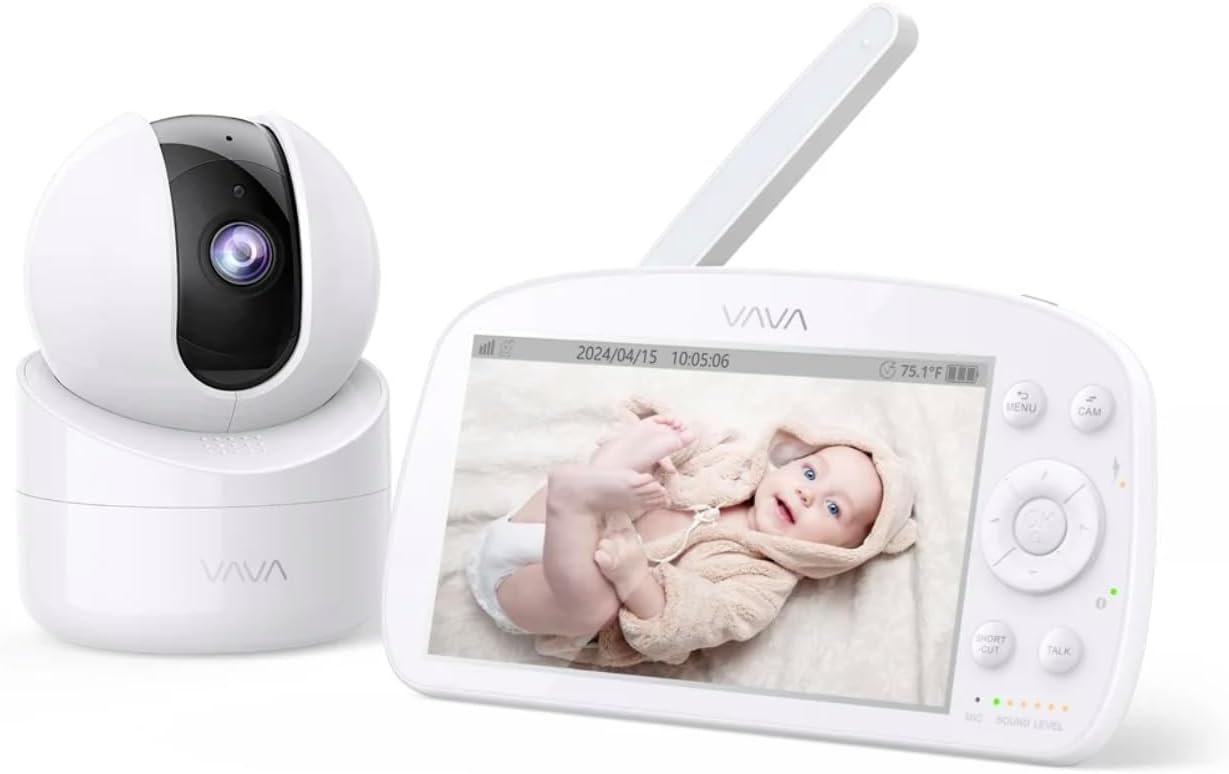
Image 3.1: The VAVA parent unit (monitor) and baby unit (camera) shown together.
The parent unit features a 5.5-inch HD display, control buttons, a microphone, speaker, and an antenna for signal reception.
Unidade do bebê (câmera)

Image 3.2: The VAVA baby unit (camera) with its pan/tilt base, featuring the lens and microphone.
The baby unit includes a 720p camera with infrared LEDs for night vision, a microphone, speaker, and a temperature sensor. It supports pan, tilt, and digital zoom functions.
4. Configuração
4.1 Posicionamento da câmera
Coloque a unidade do bebê (câmera) em um local que proporcione uma visão desobstruída. view of your baby in the crib. Ensure it is at least 3 feet (1 meter) away from the crib to prevent entanglement with cords. The camera can be placed on a flat surface or mounted to a wall using the included mount kit.

Imagem 4.1: Example of camera placement, mounted above a crib for optimal viewindo.
4.2 Ligando
- Connect one AC power adapter to the baby unit and plug it into a power outlet.
- Connect the second AC power adapter to the parent unit and plug it into a power outlet. The parent unit has a built-in rechargeable battery for portable use.
- Press and hold the power button on the parent unit to turn it on. The display will activate.
4.3 Pairing (If Necessary)
The baby unit and parent unit are pre-paired at the factory. If the connection is lost or you are adding an additional camera (up to 4 cameras supported), follow these steps:
- Na unidade principal, pressione o MENU botão.
- Navigate to the camera icon (Pairing) and select it.
- Choose an available camera channel (e.g., CAM 2, CAM 3, CAM 4).
- Press the pairing button on the back of the baby unit within 10 seconds.
- Once paired, the image from the camera will appear on the parent unit display.
5. Instruções de operação
5.1 Controles da Unidade Principal

Image 5.1: The parent unit in use, displaying the live feed from the baby unit.
- Botão MENU: Access settings, pairing, lullabies, and other functions.
- Botões de navegação (para cima/para baixo/para a esquerda/para a direita): Move through menus and control camera pan/tilt.
- Botão OK: Confirme as seleções.
- Botão FALAR: Press and hold to speak to your baby through the camera's speaker (Two-Way Audio).
- Botão ZOOM: Magnify the image (2X-4X digital zoom).
- Modo VOX: Voice Operated eXchange. The screen will turn on automatically when sound is detected from the baby unit. Adjust sensitivity in the menu.
- Canções de ninar: Select and play lullabies from the menu to soothe your baby.
- Visão noturna: Automatically activates in low light conditions, providing a clear black and white image.
- Modo piloto automático: Cycles through connected cameras automatically.
5.2 Camera Control (Pan & Tilt)
Na unidade principal, use os botões de navegação para ajustar remotamente a câmera. viewângulo de abertura:
- Imprensa Para cima/para baixo to tilt the camera vertically.
- Imprensa Esquerda/Direita to pan the camera horizontally.
6. Manutenção
6.1 Limpeza
- Desligue ambas as unidades da tomada antes de limpar.
- Use a soft, dry cloth to wipe the surfaces of the monitor and camera.
- For the camera lens, use a lens cleaning cloth to avoid scratches.
- Não utilize produtos de limpeza abrasivos ou solventes.
6.2 Cuidados com a bateria (unidade principal)
- Para prolongar a vida útil da bateria, evite descarregá-la completamente com frequência.
- Charge the parent unit regularly.
- If storing the unit for an extended period, charge the battery to approximately 50% and store in a cool, dry place.
7. Solução De Problemas
| Problema | Possível causa | Solução |
|---|---|---|
| Nenhuma imagem na unidade principal | Parent unit is off; Camera is off; Out of range; Not paired. | Ensure both units are powered on. Move units closer. Re-pair the camera (see Section 4.3). |
| Baixa qualidade de imagem | Weak signal; Obstructions; Dirty lens. | Move units closer. Remove obstructions. Clean camera lens. |
| Sem som ou som distorcido | Volume too low; Out of range; Interference. | Increase parent unit volume. Move units closer. Avoid placing near other electronic devices. |
| A bateria da unidade dos pais descarrega rapidamente. | High screen brightness; VOX mode off; Old battery. | Reduce screen brightness. Enable VOX mode. Contact support for battery replacement if necessary. |
| A câmera não responde aos comandos de panorâmica/inclinação. | Connection issue; Camera malfunction. | Check connection. Power cycle both units. If issue persists, contact support. |
8. Especificações
| Recurso | Detalhe |
|---|---|
| Nome do modelo | VAVA 5.5" 720P Video Baby Monitor |
| Número do modelo | 83-24011-022 |
| Tamanho da tela | 5.5 polegadas |
| Resolução de vídeo | 720p HD |
| Faixa de transmissão | Até 900 pés (linha de visão) |
| Tecnologia de Conectividade | Wireless (Dedicated 2.4GHz FHSS) |
| Fonte de energia | Corded Electric, Rechargeable (Parent Unit) |
| Características especiais | 2-Way Audio, Night Vision, Pan & Tilt, Zoom (2X-4X), VOX Mode, Lullabies, Temperature Sensor |
| Uso interno/externo | Interior |
| Tipo de montagem | Suporte de mesa |
| Dimensões do produto | 8.46 x 8 x 5 polegadas |
| Peso do item | 2.2 libras |
| UPC | 191280045666 |
9. Garantia e Suporte
9.1 Informações de garantia
VAVA products are designed and manufactured to the highest quality standards. This product is covered by a manufacturer's warranty from the date of purchase. Please refer to the warranty card included in your package or visit the official VAVA website para obter termos e condições detalhados da garantia.
9.2 Suporte ao cliente
If you encounter any issues or have questions regarding your VAVA 5.5" 720P HD Video Baby Monitor, please contact VAVA Customer Support. Our team is available to assist you with troubleshooting, technical support, and warranty claims.
Para obter as informações de contato mais atualizadas, visite: www.vava.com/support