1. Introdução
The ANJIELO SMART Wired Video Intercom System provides enhanced security and communication for your home or office. This system features a 7-inch HD IPS touch screen indoor monitor and a 1080P outdoor doorbell camera. With Tuya Smart app integration, motion detection, and anti-tamper alarm functions, you can monitor your property and communicate with visitors from anywhere. This manual provides detailed instructions for installation, operation, and maintenance of your intercom system.
2. Conteúdo da embalagem
Por favor, verifique se todos os itens estão presentes em sua embalagem:
- 1 x Outdoor Doorbell Camera (1080P FHD)
- 2 x Indoor Monitors (7-inch HD IPS Touch Screen)
- 1 x 32GB Micro SD Card
- Adaptadores de energia para monitores
- Hardware de montagem
- Wiring Cables (for doorbell to monitor connection)
- Manual do usuário
3. Recursos do Produto
The ANJIELO SMART Intercom System offers a range of features for comprehensive security and convenience:
- Monitor interno: 7-inch HD IPS Touch Screen, Acrylic Wire Drawing Panel.
- Integração de aplicativos: Supports Tuya Smart / Smart Life app for remote control and monitoring.
- Comunicação: Room-to-room intercom and hands-free dual-way communication with visitors.
- Monitoring & Control: Door answering, real-time monitoring, and remote unlocking of electric locks.
- Detecção de movimento: Automatically records videos or snapshots when motion is detected or doorbell is pressed.
- Armazenar: Built-in memory for 86 pictures, supports external Micro SD card up to 128GB (32GB included).
- Personalização: Adjustable color, brightness, volume, 6 selectable ringtones, weather/calendar/standby wallpaper settings.
- Segurança: CCTV Anti-tamper Alarm, supports 3 home modes (At home, Leave home, Sleep home).
- Campainha externa: 1080P FHD camera with 140° wide angle, anti-destructive metal material, 2 white LEDs for clear night vision.
- Controle de acesso: Supports IC Card (13.56khz) and dual electric lock unlocking.
- Durabilidade: IP65 weatherproof design, high temperature resistance (-45℃ to +60℃).
- Expansibilidade: Supports up to 2 doorbells, 4 indoor monitors, and 2 external 1080P AHD CCTV cameras.
4. Instruções de configuração
4.1. Fiação do sistema
The indoor monitor and outdoor doorbell require a wired connection using a 4-wire cable. Ensure proper polarity and secure connections.
- Conecte o cabo de 4 fios da campainha externa à porta designada no monitor interno.
- For extended distances (up to 100-200 meters), RVV4 (4-core wire), Cat5, or Cat6 cables can be used.
- Conecte o adaptador de energia ao monitor interno e ligue-o a uma tomada elétrica.
4.2. App Connection (Tuya Smart / Smart Life)
To enable remote monitoring and control, connect the main indoor monitor to your home WiFi network via the Tuya Smart or Smart Life app.
- Baixe o Tuya Inteligente or Vida Inteligente Baixe o aplicativo da loja de aplicativos do seu dispositivo móvel.
- Registre-se ou faça login na sua conta.
- No monitor interno, acesse as configurações de rede para exibir o código QR.
- Open the app on your smartphone or tablet and select the option to add a device by scanning a QR code.
- Scan the QR code displayed on the monitor. Follow the in-app instructions to complete the connection.

Figure 1: Easy internet connection by scanning the QR code on the monitor to bind the app.
4.3. Connecting AHD Cameras (Optional)
The system supports connecting up to two 1080P AHD CCTV cameras for additional surveillance.
- Connect the BNC male connector of the AHD camera to the BNC female connector on the monitor. Tighten securely.
- Connect the 2P wire from the camera's power/video output to the CAM1 or CAM2 port on the monitor.
- Ensure the camera is set to AHD1080/AHD720/TVI720/TVI1080/CVI720/CVI1080/CVBS mode. If using a 1200TVL camera, set it to CVBS.
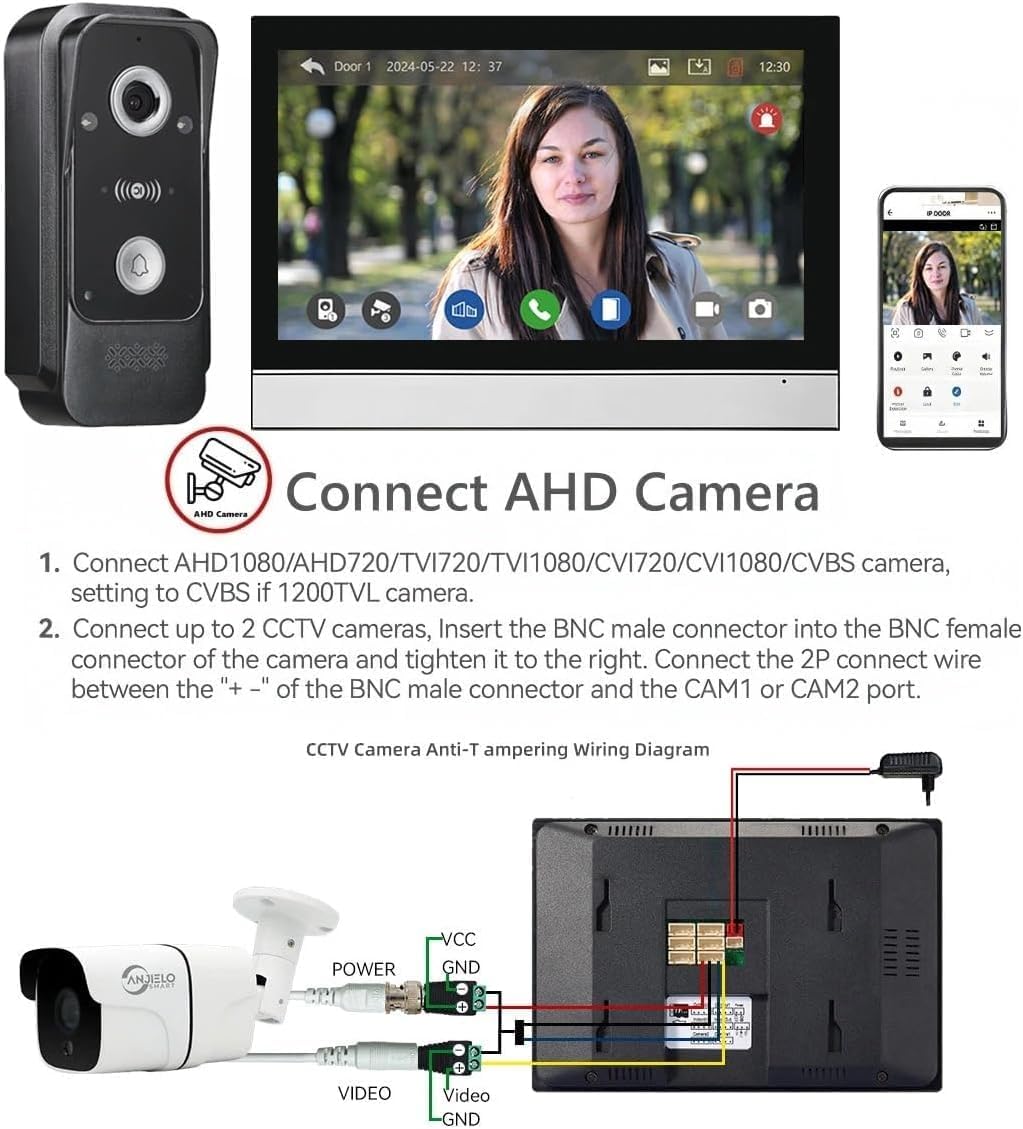
Figure 2: Wiring diagram for connecting an AHD camera to the indoor monitor.
4.4. Expansão do Sistema
The system can be expanded to include multiple door stations, monitors, and CCTV cameras.
- Maximum capacity: 2 outdoor door stations, 4 indoor monitors, and 2 CCTV cameras.
- Each component connects to the main monitor or other extension monitors as per the system diagram.

Figure 3: System capacity diagram showing connections for multiple devices.
5. Instruções de operação
5.1. Answering and Communication
When a visitor presses the doorbell, the indoor monitor will ring and display the visitor's image. You can communicate with them using the two-way audio feature.
- Toque no Responder icon on the monitor to begin a conversation.
- The system supports hands-free dual-way communication.
- You can also communicate with visitors remotely via the Tuya Smart app on your mobile device.

Figure 4: Two-way audio communication with a visitor.
5.2. Destrancamento da porta
The system allows you to remotely unlock connected electric locks.
- During a call or while monitoring, tap the Desbloquear icon on the monitor screen to open the connected electric lock.
- The system supports dual door unlocking for two separate electric locks (e.g., patio gate and main door).
- Unlocking can also be performed via the Tuya Smart app.

Figure 5: One-button operation to switch on the double-lock mode of the indoor unit.
5.3. Detecção e gravação de movimento
The system automatically detects motion and records events, providing continuous surveillance.
- When motion is detected by the outdoor doorbell camera, the system will automatically start recording video or take snapshots.
- These recordings are saved to the inserted Micro SD card (32GB included).
- You will receive alerts on your mobile phone via the Tuya Smart app when motion is detected.
- Review foo gravadotage directly on the monitor or through the app.

Figure 6: Motion detection triggering recording and mobile alerts.
5.4. Visão noturna
The outdoor doorbell camera is equipped with infrared (IR) night vision for clear visibility in low-light conditions.
- The 2 white LEDs automatically activate in dark environments to provide illumination.
- This ensures that details are captured even at night.

Figure 7: IR Night Vision capturing details in darkness.
5.5. Anti-Tamper Alarme
The system includes an anti-tamper alarm feature for enhanced security.
- The CCTV Anti-tamper Alarm function provides an additional layer of security.
- When triggered, the system will alert you, helping to deter unauthorized access or vandalism.
6. Manutenção
A manutenção regular garante o desempenho ideal e a longevidade do seu sistema de intercomunicação.
- Limpeza: Use um pano macio e seco para limpar a tela do monitor e a lente da câmera da campainha. Evite produtos de limpeza abrasivos ou solventes.
- Conexões de cabo: Periodically check all wired connections for tightness and ensure they are free from damage.
- Atualizações de software: Check the Tuya Smart app or ANJIELO SMART website para quaisquer atualizações de firmware disponíveis para o seu sistema.
- Cartão SD: Regularly back up important recordings from the Micro SD card and format it periodically to maintain performance.
- Unidade externa: Ensure the outdoor doorbell is free from obstructions and debris. Its IP65 rating provides protection against weather, but extreme conditions may require additional shelter.

Figure 8: Outdoor doorbell with IP65 weatherproof rating.
7. Solução De Problemas
If you encounter issues with your ANJIELO SMART Intercom System, refer to the following common problems and solutions:
| Problema | Possível causa | Solução |
|---|---|---|
| Nenhuma imagem no monitor | Loose wiring, power issue, camera fault. | Check all 4-wire connections. Ensure monitor and doorbell have power. Restart the system. |
| Sem áudio durante a chamada | Problema com o microfone/alto-falante, volume muito baixo. | Check volume settings on the monitor. Ensure wiring is secure. |
| App cannot connect to monitor | WiFi connectivity issue, incorrect app setup. | Ensure monitor is connected to 2.4GHz WiFi. Re-scan QR code in the app. Check router settings. |
| A detecção de movimento não funciona | Motion detection disabled, sensitivity too low. | Enable motion detection in monitor settings. Adjust sensitivity. Ensure clear view for doorbell camera. |
| Door unlock not functioning | Incorrect wiring to electric lock, lock fault. | Verify wiring to the electric lock. Test the electric lock independently. |
Caso o problema persista após a tentativa dessas soluções, entre em contato com o suporte ao cliente da ANJIELO SMART para obter mais assistência.
8. Especificações
| Recurso | Detalhe |
|---|---|
| Número do modelo | PMIC+AHD7024 |
| Monitor de interior | Tela sensível ao toque IPS HD de 7 polegadas |
| Câmera de campainha externa | 1080P FHD, 140° Wide Angle |
| Conectividade | Wired (monitor to doorbell), Wireless (WiFi for app) |
| Suporte de aplicativo | Tuya Smart / Vida Inteligente |
| Max. System Capacity | 2 Door Stations + 4 Monitors + 2 CCTV Cameras |
| Armazenar | Built-in memory (86 pictures), supports Max. 128GB Micro SD Card |
| Fonte de energia | DC15V 1.2A (for monitor) |
| Consumo de energia | 400mA máx. |
| Duração da conversa | 120 segundos |
| Temperatura de operação | -45℃ to +60℃ (Outdoor Unit) |
| Classificação à prova de intempéries | IP65 (Unidade Externa) |
| Dimensões (Monitor) | 7 x 5 x 0.7 polegadas |
| Peso do item | 1 libra (aproximadamente) |
9. Garantia e Suporte
Os produtos ANJIELO SMART são projetados para oferecer confiabilidade e desempenho. Para obter detalhes específicos sobre a garantia, consulte o cartão de garantia incluído com o seu produto ou visite o site oficial da ANJIELO SMART. website.
If you require technical assistance, troubleshooting, or have questions about your product, please contact ANJIELO SMART customer support. Have your model number (PMIC+AHD7024) and purchase information ready when contacting support.
Suporte ao Cliente ANJIELO SMART:
- Consulte as informações de contato fornecidas na embalagem do seu produto.
- Visite o Loja ANJIELO SMART na Amazon para maiores informações.


