Introdução
Welcome to your new NIMO 15.6" FHD Laptop N151. This manual provides essential information to help you get started, operate, maintain, and troubleshoot your device. Please read through these instructions carefully to ensure optimal performance and longevity of your laptop.
Configurar
1. Desembalagem e inspeção inicial
Retire cuidadosamente todos os itens da embalagem. Certifique-se de que os seguintes componentes estejam presentes:
- 1 x Nimo N151 Laptop
- 1 x Type-C 65W PD Fast Charger
- 1 x Manual do Usuário (este documento)
- Windows 11 Home (pre-installed)
Inspect the laptop for any physical damage. If any components are missing or damaged, contact customer support immediately.
2. Charging the Laptop
Before first use, fully charge your laptop. Connect the provided Type-C 65W PD Fast Charger to the Type-C charging port on your laptop and then to a power outlet. The charge LED indicator will illuminate.

Image: The NIMO laptop connected to its Type-C PD fast charger, illustrating the charging process.
3. Ligando e configuração inicial
Press the power button located on the keyboard. The laptop will boot up and guide you through the initial Windows 11 Home setup process. Follow the on-screen instructions to configure your language, region, network, and user account.
Operando seu laptop
Mostrar
Your NIMO laptop features a 15.6-inch Full HD (1920x1080) Anti-Glare IPS display. This display offers clear visuals and reduced eye strain, suitable for various tasks from work to entertainment.

Image: The NIMO laptop's 15.6-inch FHD IPS display, highlighting its narrow bezels and vibrant visual capabilities.
Keyboard and Fingerprint Sensor
The laptop is equipped with a backlit keyboard for comfortable typing in various lighting conditions and a numeric keypad for efficient data entry. A fingerprint sensor is integrated for secure and quick login.

Image: Close-up of the NIMO laptop's backlit keyboard, showcasing the fingerprint sensor and numeric keypad.
Webcâmera
A 2MP webcam is integrated for video calls and online meetings.
Portas e Conectividade
The NIMO N151 offers a variety of ports for versatile connectivity:
- Portas USB 3.0: Para transferência de dados em alta velocidade.
- Porta USB 2.0: Para conectar periféricos.
- Porta HDMI: Para conexão a monitores externos.
- Portas Tipo C: One for charging (PD Fast Charger) and one for multifunction use.
- Slot para cartão Micro SD: Para expandir o armazenamento ou transferir files.
- Headphone Combo Jack: Para entrada/saída de áudio.
- Slot de bloqueio Kensington: Para segurança física.
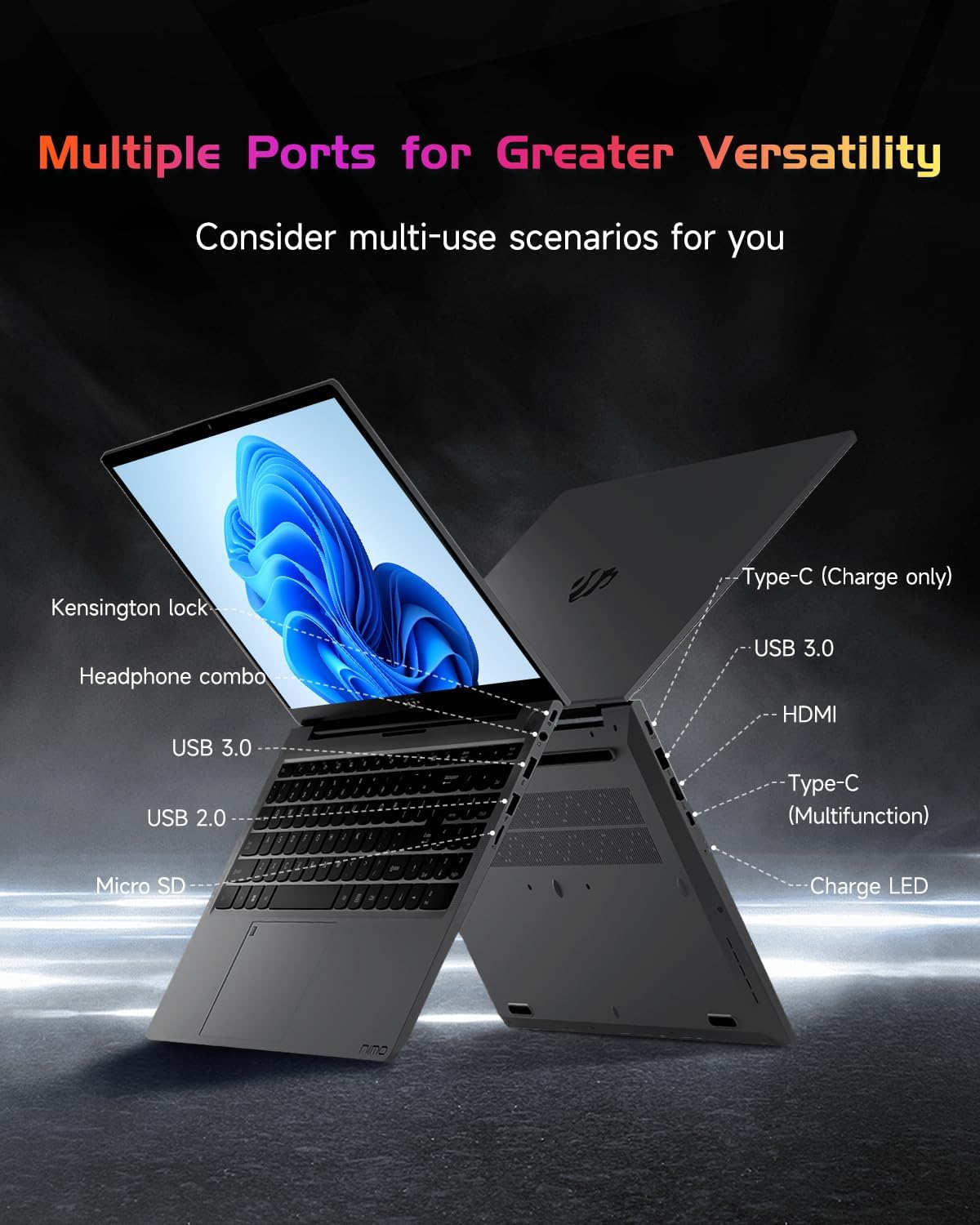
Imagem: O profissional lateralfile of the NIMO laptop, displaying its array of ports for diverse connectivity needs.
Stay connected with integrated Wi-Fi 6 for fast wireless internet and Bluetooth 5.2 for connecting wireless accessories.
Processador e Desempenho
Powered by the Intel Alder Lake-N100 12th Gen processor, the NIMO N151 delivers reliable performance for multitasking, streaming, and everyday computing tasks. It comes with 16GB DDR4 RAM and a 256GB PCIe SSD for fast startups and seamless operation.

Image: A visual representation of the Intel Alder Lake-N100 12th Gen processor, highlighting its role in the laptop's performance.
Sistema operacional
The laptop comes pre-installed with Windows 11 Home, offering a modern and intuitive user experience.
Manutenção
Cuidados Gerais
- Keep the laptop in a clean, dry environment away from extreme temperatures.
- Avoid spilling liquids on the keyboard or screen.
- Use a soft, lint-free cloth to clean the screen and exterior. Do not use harsh chemicals.
- Garanta uma ventilação adequada, não bloqueando as saídas de ar.
Cuidados com a bateria
To prolong battery life, avoid fully discharging the battery frequently. It is recommended to keep the battery charge between 20% and 80% when possible.
Solução de problemas
Problemas e soluções comuns
- O laptop não liga: Ensure the charger is properly connected and the battery has sufficient charge. Try holding the power button for 10-15 seconds to perform a hard reset.
- A tela está em branco: Conecte um monitor externo para verificar se o problema está na tela. Reinicie o laptop.
- Problemas de conexão Wi-Fi: Verifique se o Wi-Fi está ativado nas configurações do Windows. Reinicie o roteador e o laptop.
- Desempenho lento: Close unnecessary applications, check for malware, and ensure Windows is up to date.
For persistent issues, refer to the online support resources or contact NIMO customer service.
Especificações
| Recurso | Detalhe |
|---|---|
| Marca | NIMO |
| Nome do modelo | Nimo N151 |
| Tamanho da tela | 15.6 polegadas |
| Resolução da tela | 1920 x 1080 pixels (FHD) |
| Processador | Intel Pentium Quad Core N100 (up to 3.4 GHz) |
| BATER | 16 GB DDR4 |
| Velocidade da memória | 3200 MHz |
| Disco rígido | SSD de 256 GB (PCIe) |
| Coprocessador gráfico | Gráficos Integrados |
| Sistema operacional | Windows 11 Início |
| Tipo sem fio | 802.11a/b/g/n/ac (Wi-Fi 6) |
| Bluetooth | Bluetooth 5.2 |
| Portas USB 2.0 | 1 |
| Portas USB 3.0 | 3 |
| Duração média da bateria | 5 horas |
| Peso do item | 3.8 libras |
| Dimensões do produto | 14.07 x 8.98 x 0.76 polegadas |
| Características especiais | Backlit Keyboard, Fingerprint Reader, HD Audio, Memory Card Slot, Numeric Keypad |
Garantia e Suporte
Your NIMO laptop is covered by a Garantia do fabricante de 2 ano, ensuring peace of mind for your purchase. Additionally, NIMO offers a 90-Day Hassle-Free Return Policy.
For technical assistance, warranty claims, or returns, please contact NIMO customer support through their official channels. Refer to the contact information provided with your product or on the NIMO website.
Vídeos de produtos
Watch these official videos for a comprehensive overview and demonstration of your NIMO laptop's features.
NIMO 15.6 Laptop Comprehensive Introduction
Video: A detailed introduction to the NIMO 15.6" FHD Laptop, showcasing seu design e principais funcionalidades.
NIMO Laptop: Perfect for Work and Study, Anytime, Anywhere
Video: This video highlights the NIMO laptop's versatility for both work and study environments, emphasizing its portability.
NIMO 15.6 FHD Laptop for Students Home Work
Video: A demonstration of the NIMO 15.6" FHD Laptop's suitability for students and home-based work tasks.
Efficiency Meets Convenience: Nimo Laptop
Video: This video showcases the NIMO laptop's efficiency and convenient features for daily use.
NIMO Laptop UGC
Video: User-generated content featuring the NIMO laptop, demonstrating real-world usage scenarios.
NIMO 15.6 FHD Laptop Promotion Video
Video: A promotional video for the NIMO 15.6" FHD Laptop, showcasing its features and benefits.


