1. Introdução
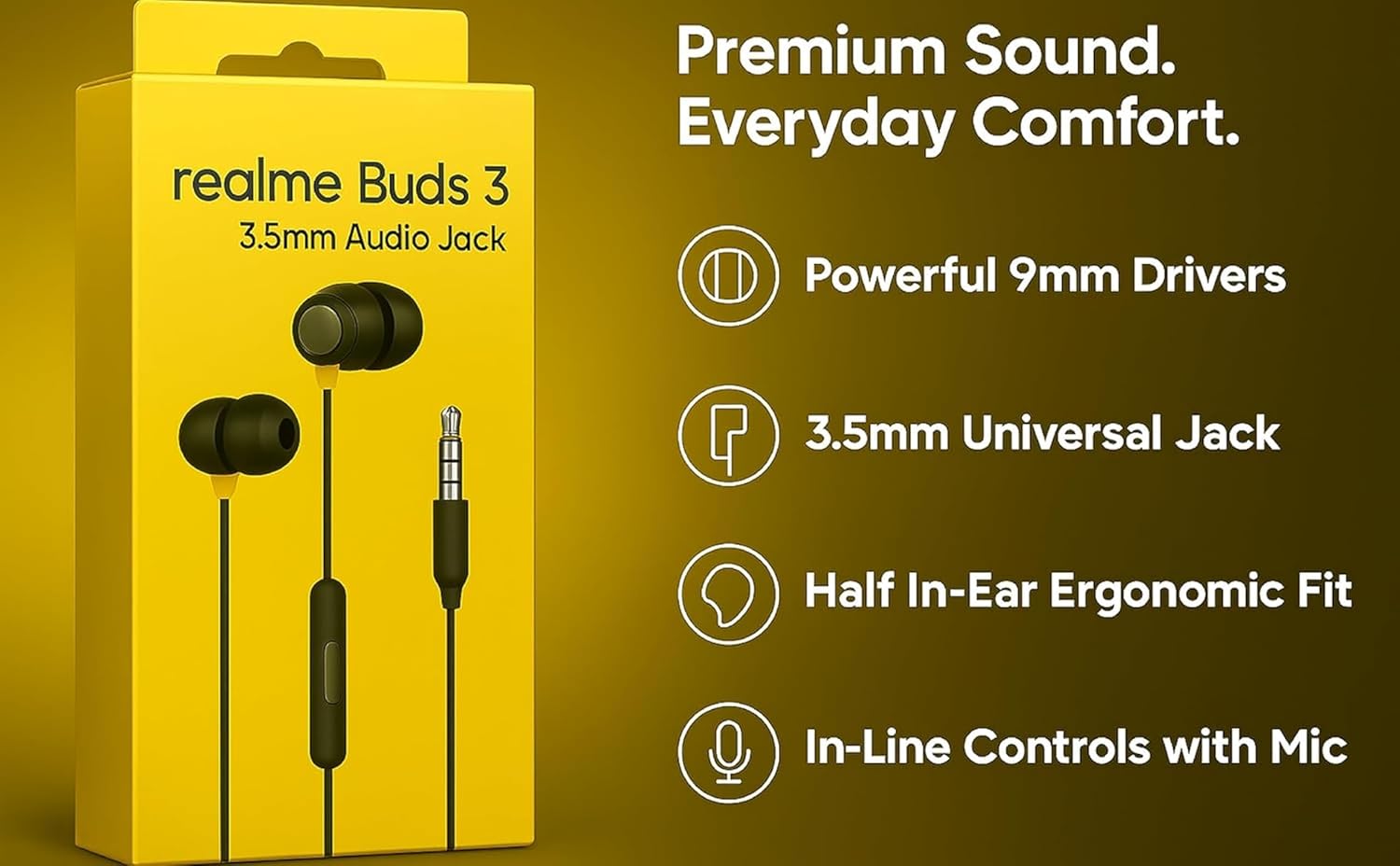
The realme Buds 3 are wired in-ear earphones designed for clear audio and convenient communication. Featuring a 3.5mm jack, 9mm dynamic drivers, and an in-line remote with microphone, these earphones offer a reliable audio solution for various devices.
2. O que está na caixa
Carefully unpack the contents of your realme Buds 3 package. The box should contain the following items:
- 1 x realme Buds 3 Wired Earphones (Black)
- 1 x Guia do usuário
- 1 Pair x Eartip M (pre-installed)
- 1 Pair x Eartip S
- 1 Pair x Eartip L

Vídeo: Unboxing e análiseview of the realme Buds 3 wired earphones, demonstrating the package contents and initial product appearance.
3. Produto acabadoview
The realme Buds 3 are engineered for a balanced audio experience and user convenience.
Principais características:
- Driver dinâmico de 9 mm: Delivers clear audio with rich bass for an engaging listening experience.
- Universal 3.5mm Jack: Ensures broad compatibility with smartphones, laptops, tablets, and other devices with a standard 3.5mm audio port.
- In-line Mic & 3-Button Remote: Provides convenient control over music playback, calls, and voice assistant activation.
- Ajuste confortável: Includes S/M/L silicone ear tips to ensure a secure and comfortable fit, enhancing passive noise isolation.
- Tangle-Resistant Braided Cable: Designed for durability and ease of use, minimizing tangles during storage and transport.
- Design leve: Weighs approximately 40 grams, making them ideal for extended wear and portability.

4. Configuração
Follow these steps to set up your realme Buds 3 earphones:
- Selecione as ponteiras auriculares: The earphones come with S, M, and L size ear tips. The M size is pre-installed. Try different sizes to find the most comfortable and secure fit. A good seal is crucial for optimal sound quality and passive noise isolation.
- Conectar ao dispositivo: Insert the 3.5mm audio jack into the corresponding port on your smartphone, laptop, tablet, or other compatible audio device.
- Posicione os fones de ouvido: Place the earbuds comfortably in your ears. Ensure the left (L) and right (R) indicators on the earbuds match the correct ear.

5. Instruções de operação
The in-line 3-button remote allows for easy control of your audio and calls.
Controles de música:
- Single Press (Center Button): Play / Pause music.
- Double Press (Center Button): Pule para a próxima faixa.
- Triple Press (Center Button): Volte para a faixa anterior.
Gerenciamento de chamadas:
- Single Press (Center Button): Answer an incoming call or end an active call.
- Long Press (Center Button): Rejeitar uma chamada recebida.
Ajuste de volume:
- Press '+' Button: Aumentar o volume.
- Press '-' Button: Diminuir volume.
Assistente de voz:
- Long Press (Center Button, when not in a call): Ative o assistente de voz do seu dispositivo (por exemplo, Google Assistente, Siri).

6. Manutenção
To ensure the longevity and optimal performance of your realme Buds 3, follow these maintenance guidelines:
- Pontas limpas para os ouvidos: Remova regularmente as pontas auriculares de silicone e limpe-as com um pano macio e seco.amp tecido. Certifique-se de que estejam completamente secos antes de recolocá-los.
- Fones de ouvido limpos: Gently wipe the earbuds with a dry, soft cloth to remove any earwax or debris. Avoid using liquids directly on the speaker mesh.
- Armazene adequadamente: When not in use, store the earphones in a clean, dry place. Utilize the tangle-resistant cable design to prevent knots and damage.
- Evite condições extremas: Do not expose the earphones to extreme temperatures, humidity, or direct sunlight. They are not water-resistant.
- Manuseie com cuidado: Avoid pulling the cable forcefully or bending the 3.5mm jack at sharp angles, as this can damage internal wiring.
7. Solução De Problemas
If you encounter issues with your realme Buds 3, refer to the following common solutions:
| Problema | Solução possível |
|---|---|
| Sem som ou volume baixo |
|
| Microfone não funciona |
|
| Poor sound quality (e.g., weak bass) |
|
| Earphones falling out easily |
|
8. Especificações
Detailed technical specifications for the realme Buds 3 (Model RMA2419):
- Nome do modelo: realme Buds 3 (3.5mm)
- Número do modelo: RMA2419
- Tipo de driver de áudio: Driver dinâmico de 9 mm
- Tomada para fones de ouvido: 3.5 mm Jack
- Impedância: 32 Ohms
- Controle de ruído: Cancelamento de ruído passivo
- Tecnologia de conectividade: Com fio
- Tipo de controle: Button Control (3-button remote)
- Característica do cabo: Cabo sem emaranhados
- Material: Plástico
- Peso do item: Aproximadamente 40 gramas
- Dimensões do produto: 136 x 3.76 x 2.2 cm
- Dispositivos compatíveis: Computadores de mesa, laptops, tablets, telefones
- Nível de resistência à água: Não resistente à água
- País de origem: China
9. Garantia e Suporte
Your realme Buds 3 earphones come with a 6-month warranty from the date of purchase, covering manufacturing defects. Please retain your purchase receipt for warranty claims.
Para suporte:
For technical assistance, warranty claims, or further inquiries, please contact realme customer support:
- E-mail: serviço@realme.com
- Ligação gratuita: 1800 102 2777
- Website: www.realme.com
- Fabricante / importador: Realme Mobile Telecommunications (India) Private Limited, 3rd Floor, Tower B, Building Number 8, DLF Cyber City, Gurugram – 122002, Haryana, India.