Introdução
The Fenix PD35R ACE is a high-performance, USB rechargeable LED tactical flashlight designed for various lighting needs, including outdoor activities and law enforcement. It features a powerful 2000 lumen output, a 380-meter beam distance, and Fenix's patented SET output customization system, offering three distinct mode selection profiles. This manual provides detailed instructions for its safe and effective use.
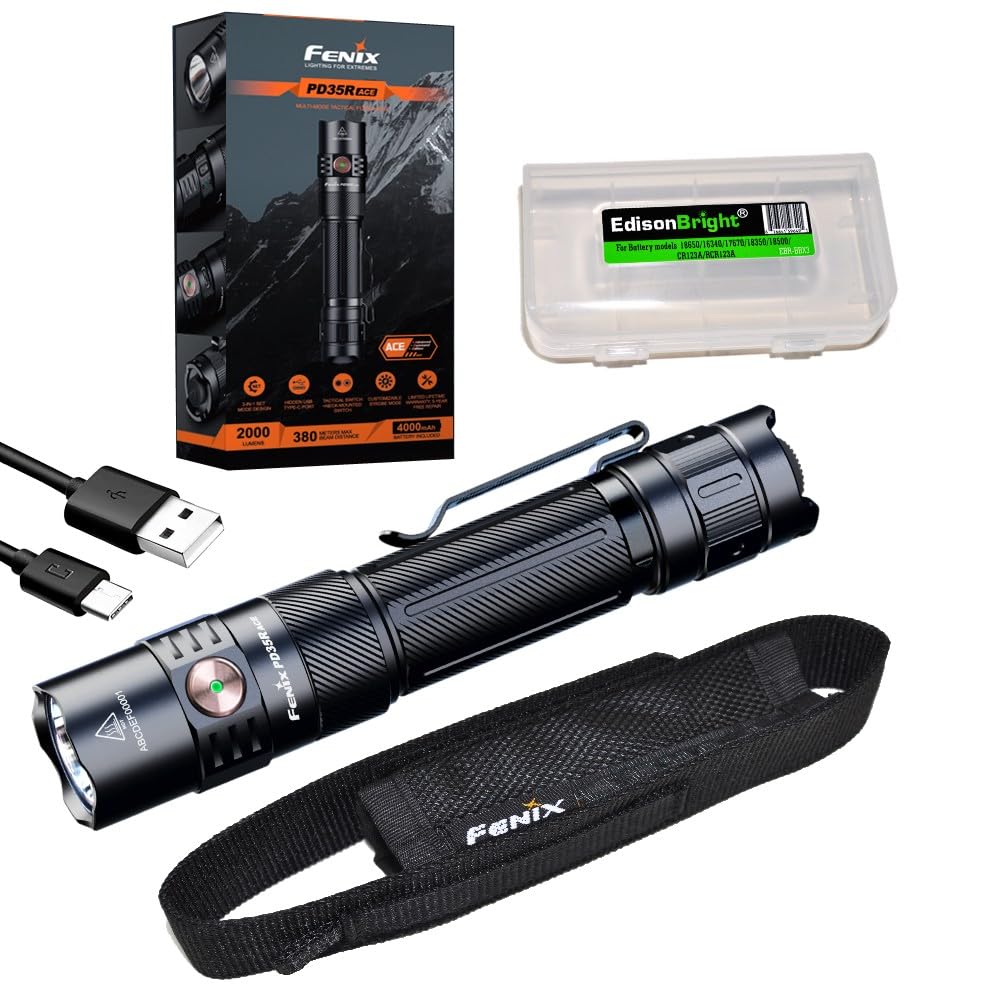
Image: The Fenix PD35R ACE flashlight, highlighting its robust construction and side switch.
O que está na caixa
- Fenix PD35R ACE Flashlight
- Bateria recarregável de íons de lítio (incluída)
- Cabo de carregamento USB Tipo-C
- Coldre
- Cordão
- O-ring de reposição
- EdisonBright Accessory Case
Configurar
Instalação da bateria
- Desaperte a tampa traseira da lanterna girando-a no sentido anti-horário.
- Insert the included Fenix ARB-L18-4000P Lithium-Ion battery with the anode (+) end facing towards the flashlight head.
- Screw the tail cap back on clockwise until it is fully tightened. Ensure a secure connection for proper operation and waterproofing.
Carregamento inicial
Before first use, it is recommended to fully charge the battery. The PD35R ACE features a hidden USB-C charging port.
- Locate the rubber cover on the side of the flashlight head, near the side switch.
- Lift the rubber cover to expose the USB Type-C charging port.
- Connect the USB Type-C cable to the flashlight and the other end to a USB power source (e.g., wall adapter, power bank, computer).
- The charging indicator light will show the charging status. A red light indicates charging, and a green light indicates a full charge.
- Once charging is complete, securely close the rubber cover to maintain the flashlight's waterproof rating.

Imagem: Acimaview of Fenix PD35R ACE features, including the hidden USB-C charging port.
Instruções de operação
The Fenix PD35R ACE utilizes a dual-switch system: a tactical tail switch for momentary/constant on/off and a side switch for output selection and mode switching.
Ligar/Desligar
- Ligado momentaneamente: Half-press the tactical tail switch. Release to turn off.
- Ligado/Desligado constante: Fully press the tactical tail switch until a click is heard to turn the flashlight on or off.
Seleção de saída
With the flashlight on, single-click the side switch to cycle through Eco, Low, Med, High, and Turbo modes.
SET Mode Selection (ACE System)
The PD35R ACE features three distinct SET modes (Tactical Operation, Military and Duty, Outdoor Activity) that customize the available output levels and their order. To switch between SET modes:
- With the flashlight off, press and hold the side switch for 3 seconds. The flashlight will flash to indicate the current SET mode.
- Release the side switch, then quickly single-click it to cycle through the three SET modes.
- Once the desired mode is indicated by its unique flash pattern, press the tactical tail switch to confirm and exit.

Image: The SET 3-in-1 system, illustrating the customizable output options for different operational profiles.
Modos Strobe e SOS
- Estroboscópio: With the flashlight on, press and hold the side switch for 0.8 seconds to activate Strobe mode. Single-click the side switch to return to the previously used general mode.
- SOS: In Outdoor Activity SET mode, cycle through the general modes until SOS is reached.
Carregando
The Fenix PD35R ACE features a convenient USB Type-C charging port. Ensure the flashlight is off during charging for optimal performance.
- Open the rubber cover on the flashlight head to access the USB-C port.
- Connect the provided USB-C cable to the flashlight and a power source.
- O indicador de carga ficará vermelho durante o carregamento e ficará verde quando estiver totalmente carregado.
- Charging time for a fully depleted battery is approximately 3-4 hours, depending on the power source.
- Always close the rubber cover tightly after charging to maintain water resistance.
Manutenção
- Limpeza: Periodically clean the flashlight body with a soft cloth. For stubborn dirt, use a damp pano. Evite produtos químicos agressivos.
- Anéis de vedação: Inspect the O-rings regularly for wear and tear. Replace them if damaged to maintain the waterproof seal. Lubricate O-rings with silicone grease as needed.
- Tópicos: Keep the threads of the tail cap clean and lubricated to ensure smooth operation and good electrical contact.
- Cuidados com a bateria: Store the battery in a cool, dry place. If the flashlight will not be used for an extended period, remove the battery to prevent leakage. Recharge the battery every four months to prolong its lifespan.
Solução de problemas
If your Fenix PD35R ACE flashlight is not functioning correctly, please refer to the following common issues and solutions:
- Flashlight does not turn on or flickers:
- Verifique se a bateria está inserida corretamente, com o polo positivo (+) voltado para a cabeça.
- Ensure the tail cap is fully tightened. Loose connections can prevent power flow.
- The battery may be low on charge. Try charging the battery fully.
- Clean the contact points of the battery and flashlight with an alcohol swab.
- Flashlight won't charge:
- Certifique-se de que o cabo USB-C esteja firmemente conectado tanto à lanterna quanto à fonte de alimentação.
- Experimente um cabo USB-C ou um adaptador de energia diferente para descartar a possibilidade de acessórios defeituosos.
- Verify the charging port is clean and free of debris.
- The battery might be deeply discharged. Allow it to charge for a longer period, or try a different battery if available.
- Output modes are not cycling correctly:
- Certifique-se de que a bateria tenha carga suficiente.
- Refer to the 'Operating Instructions' section for correct mode selection procedures, especially for SET modes.
Especificações
The following table details the performance specifications of the Fenix PD35R ACE flashlight:

Image: Detailed technical specifications for the Fenix PD35R ACE across all output modes.
| Recurso | Detalhe |
|---|---|
| Fonte de luz | LIDERADO |
| Saída Máxima | 2000 Lúmens |
| Distância máxima do feixe | 380 metros (1247 pés) |
| Fonte de energia | 1 x 18650 Lithium-Ion Battery (included) |
| Porta de carregamento | USB Tipo C |
| Resistência à água | IP68 (2 meters submersible for 30 minutes) |
| Resistência ao Impacto | 1.5 metros |
| Material | Alumínio anodizado |
| Dimensões | 5.53 inches (Length) x 1.04 inches (Head Diameter) x 0.93 inches (Body Diameter) |
| Peso | 5.11 onças (incluindo bateria) |
Garantia e Suporte
The Fenix PD35R ACE flashlight comes with a limited warranty. Please refer to the warranty card included with your product for specific terms and conditions. For technical support, service, or warranty claims, please contact your authorized Fenix dealer or visit the official Fenix website para informações de contato.