Introdução
This manual provides detailed instructions for the installation, operation, and maintenance of your Vetroo M06 Micro-ATX/Mini-ITX Gaming PC Case. Please read this manual thoroughly before beginning assembly to ensure proper setup and optimal performance.

Image: The Vetroo M06 Micro-ATX/Mini-ITX Gaming PC Case in black, showcasing its mesh front panel and side window, viewvisto de um ângulo.
Principais características
- Design compacto: Micro-ATX / Mini-ITX form factor with a high-airflow mesh front panel, designed for space-efficient builds.
- Resfriamento otimizado: Supports up to five 120mm fans and a 240mm top-mounted liquid radiator for efficient thermal management.
- GPU Compatibility: Accommodates graphics cards up to 355mm in length.
- Flexible PSU Mounting: Features an adjustable power supply installation area with a maximum length of 160mm.
- Conectividade Moderna: Front panel includes USB Type-C and USB 3.0 ports for convenient peripheral access.
Conteúdo da embalagem
Verifique se todos os componentes estão presentes antes de prosseguir com a instalação:
- Vetroo M06 PC Case
- Caixa de acessórios (parafusos, espaçadores, abraçadeiras)
- SFX PSU Bracket (1x)
- Manual do usuário (este documento)
Especificações
| Recurso | Detalhe |
|---|---|
| Nome do modelo | M06 |
| Tipo de caso | Minitorre |
| Compatibilidade da placa-mãe | Micro-ATX, Mini-ITX |
| Dimensões do produto (C x L x A) | 15.55" x 7.87" x 13.07" (395 mm x 200 mm x 332 mm) |
| Peso do item | 13.37 libras (6.06 kg) |
| Material | Acrylonitrile Butadiene Styrene (ABS), SPCC (0.8mm metal plate) |
| Comprimento máximo da GPU | 355 mm |
| Altura máxima do cooler da CPU | 165 mm |
| Comprimento máximo da fonte de alimentação | 160mm (Adjustable mounting) |
| Suporte dos fãs | Até 5 ventoinhas de 120 mm |
| Suporte para radiador | 1 x 240mm (Top) |
| Portas de E / S frontais | 1 x USB Type-C, 1 x USB 3.0, HD Audio, Power Button, Reset Button |

Image: Diagram illustrating the compact dimensions of the Vetroo M06 PC case, measuring 15.5 inches in depth, 7.8 inches in width, and 13.0 inches in height.

Image: A detailed diagram outlining the compatibility specifications for the Vetroo M06 PC case, including maximum CPU cooler height (165mm), GPU length (355mm), PSU length (160mm), and supported motherboard form factors (M-ATX/ITX).
Configuração e instalação
Before starting, ensure you have a clean, static-free workspace. Refer to your component manuals for specific installation details.
1. Instalação da placa-mãe
- Remove the side panel(s) of the case.
- Install the necessary motherboard standoffs into the case tray according to your motherboard's form factor (Micro-ATX or Mini-ITX).
- Coloque cuidadosamente a placa-mãe sobre os espaçadores, alinhando os furos dos parafusos.
- Prenda a placa-mãe com parafusos.
2. Instalação da GPU
- Remove the appropriate PCIe slot covers from the rear of the case.
- Insert your graphics card into the primary PCIe slot on your motherboard.
- Fixe a placa gráfica à caixa com parafusos.
- Connect any required PCIe power cables from your power supply to the GPU.
3. Instalação da fonte de alimentação
- Determine the desired mounting position for your power supply. The Vetroo M06 supports adjustable PSU mounting.
- If using an SFX power supply, attach the included SFX bracket to the PSU.
- Slide the power supply into its designated bay and secure it with screws from the rear of the case.
- Route the necessary power cables to your components.

Imagem: Uma imagem interna view of the Vetroo M06 PC case highlighting the three adjustable mounting positions for ATX/SFX power supplies, along with an illustration of the included SFX bracket.
4. Storage Installation (HDD/SSD)
- Locate the designated mounting points for 3.5" HDDs and 2.5" SSDs.
- Secure your storage drives using the provided screws.
- Connect SATA data and power cables to each drive.
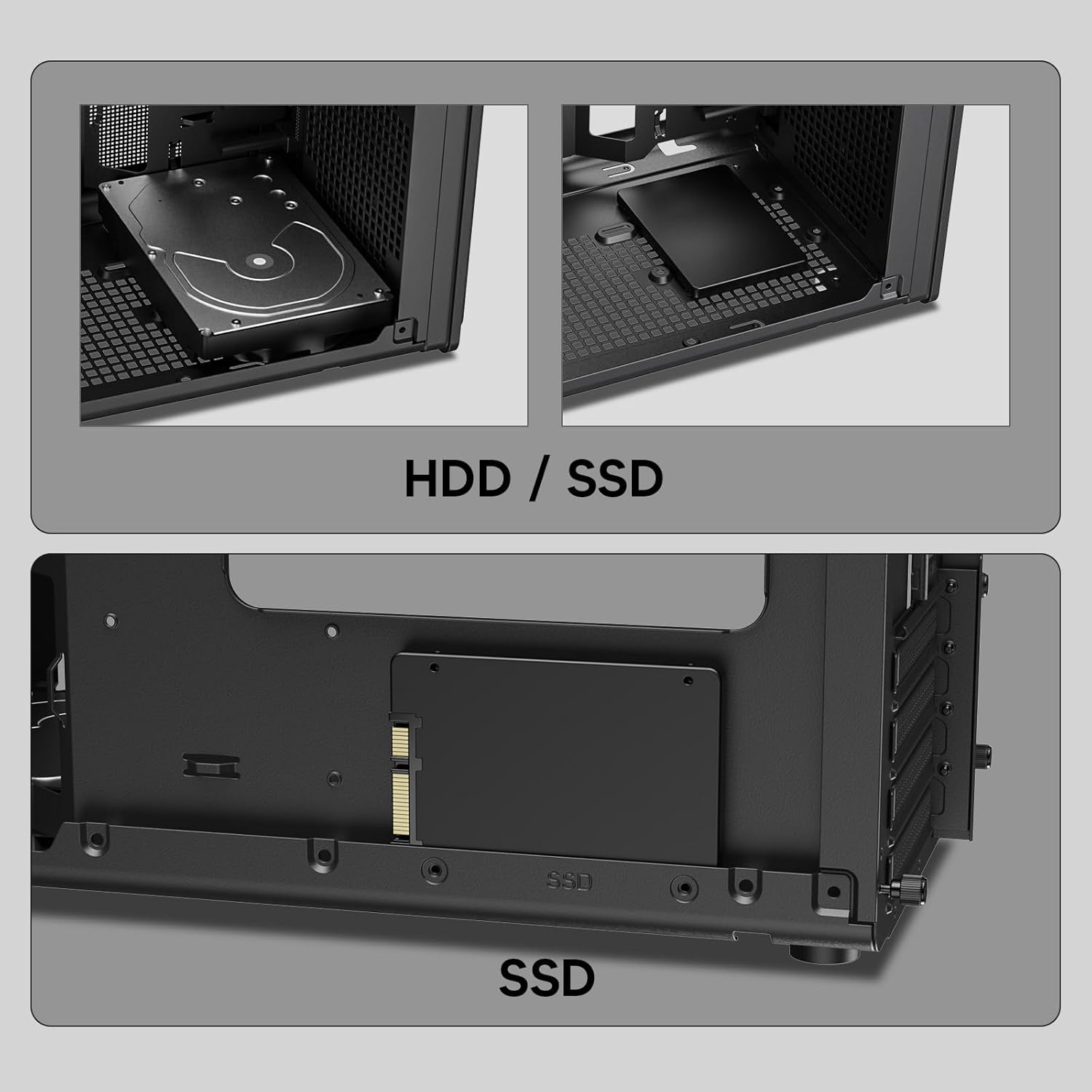
Imagem: Close-up views of the Vetroo M06 PC case interior, demonstrating the mounting options for both 3.5-inch Hard Disk Drives (HDDs) and 2.5-inch Solid State Drives (SSDs).
5. Cooling System Installation (Fans/Radiator)
- Identify the fan mounting locations (up to five 120mm fans).
- Mount fans using appropriate screws, ensuring correct airflow direction.
- For liquid cooling, install a 240mm radiator at the top mounting position, securing it with screws.
- Connect fan and pump cables to your motherboard or fan controller.
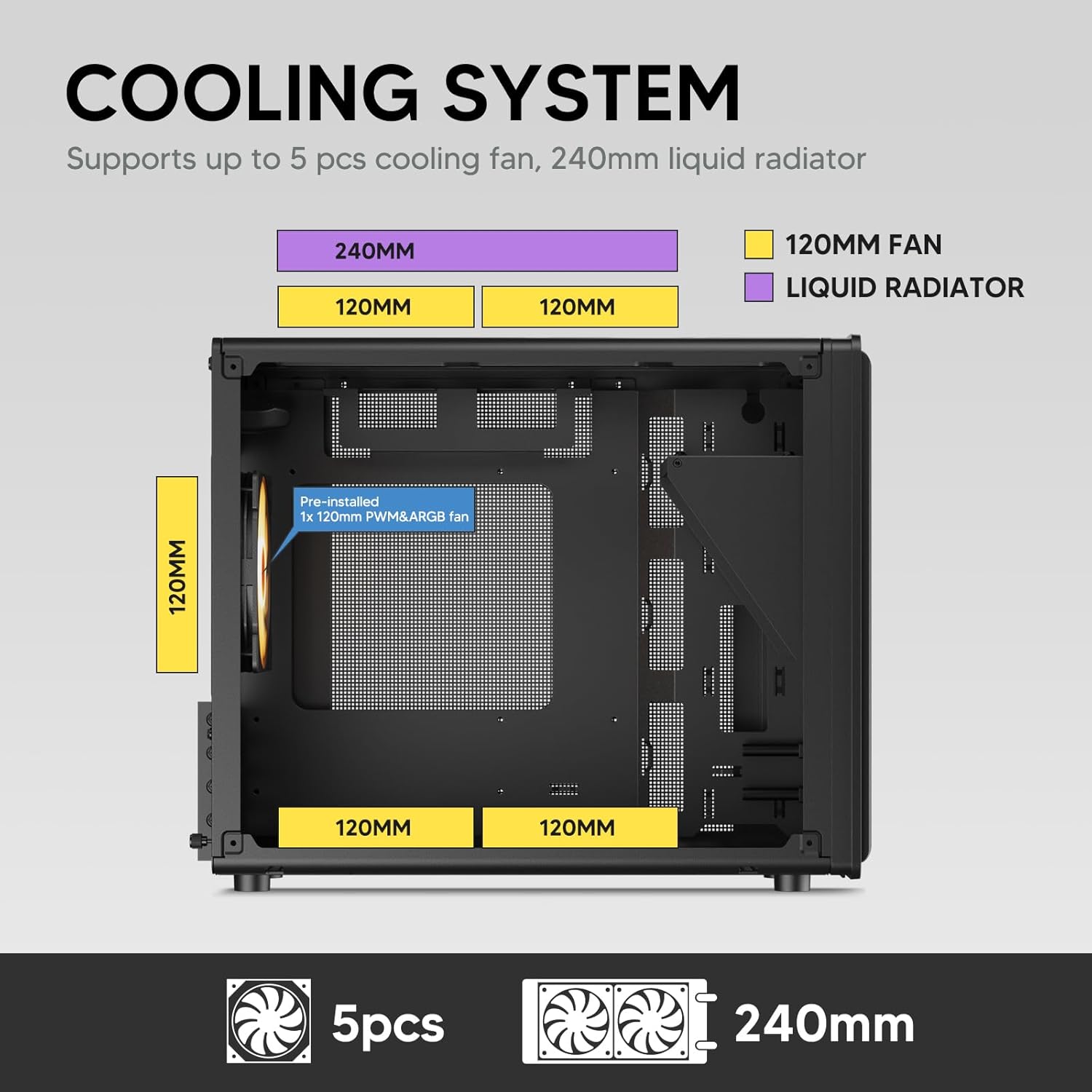
Image: A diagram illustrating the cooling system layout within the Vetroo M06 PC case, detailing the positions for up to five 120mm fans and a 240mm liquid radiator at the top.
6. I/O Panel Connections
- Connect the front panel cables (Power, Reset, USB 3.0, USB Type-C, HD Audio) to the corresponding headers on your motherboard. Refer to your motherboard manual for header locations.

Image: A close-up of the Vetroo M06 PC case's front I/O panel, clearly labeling the Power button, Reset button, USB 3.0 port, HD Audio jack, and USB Type-C port.
Instruções de operação
Once all components are installed and cables are connected, replace the side panels. Connect your peripherals (monitor, keyboard, mouse) and power cable to the PSU. Press the power button on the front panel to start your system.
Gerenciamento de fluxo de ar
The Vetroo M06 case features an excellent airflow design with mesh panels to facilitate optimal cooling. Ensure fans are installed to create a balanced airflow, typically with intake fans at the front/bottom and exhaust fans at the rear/top.

Image: An exploded diagram of the Vetroo M06 PC case, illustrating the intended airflow patterns with blue arrows indicating cool air intake and red arrows showing warm air exhaust through its mesh panels.
Manutenção
A manutenção regular ajuda a prolongar a vida útil dos componentes do seu PC e garante um desempenho ideal.
- Limpeza de pó: Limpe periodicamente os filtros de poeira e os componentes internos usando ar comprimido. Certifique-se de que o sistema esteja desligado e desconectado da tomada antes da limpeza.
- Gerenciamento de cabos: Verify that internal cables are neatly routed and do not obstruct airflow.
- Verificações de componentes: Ensure all screws are tight and components are securely seated.

Image: A close-up shot of the Vetroo M06 PC case, featuring a digital caliper measuring the thickness of the metal plate, which is specified as 0.8mm, highlighting the case's robust construction.
Solução de problemas
Caso encontre algum problema, consulte as seguintes etapas comuns de resolução de problemas:
- Sistema não liga:
- Check all power connections, including the PSU to wall outlet, PSU to motherboard (24-pin and CPU 8-pin), and front panel power switch cable to motherboard.
- Certifique-se de que a chave da fonte de alimentação esteja na posição 'LIGADO'.
- Sem saída de vídeo:
- Verify that your monitor is connected to the graphics card (not the motherboard's integrated graphics ports, unless you are using integrated graphics).
- Reinstale a placa gráfica e os módulos de RAM.
- Problemas de superaquecimento:
- Certifique-se de que todas as ventoinhas do gabinete estejam girando e orientadas corretamente para um fluxo de ar ideal.
- Check CPU cooler installation and thermal paste application.
- Clean any dust buildup from fans and filters.
- Portas USB não funcionam:
- Verify that the front panel USB 3.0 and USB Type-C cables are correctly connected to the motherboard headers.
Garantia e Suporte
Vetroo products are designed for quality and reliability. For warranty information and technical support, please visit the official Vetroo webou entre em contato com o serviço de atendimento ao cliente. Guarde o comprovante de compra para eventuais solicitações de garantia.
Vetroo Official Website: Vetroo Store on Amazon
For further assistance, please refer to the contact information provided with your product packaging or on the official Vetroo support channels.


