1. Introdução
This manual provides detailed instructions for the Loutoc SRC4526 Universal Remote Control, designed for seamless compatibility with Philips Ambilight Smart TVs. Please read this guide thoroughly to ensure optimal use and longevity of your remote control.
1.1 Produto Acimaview
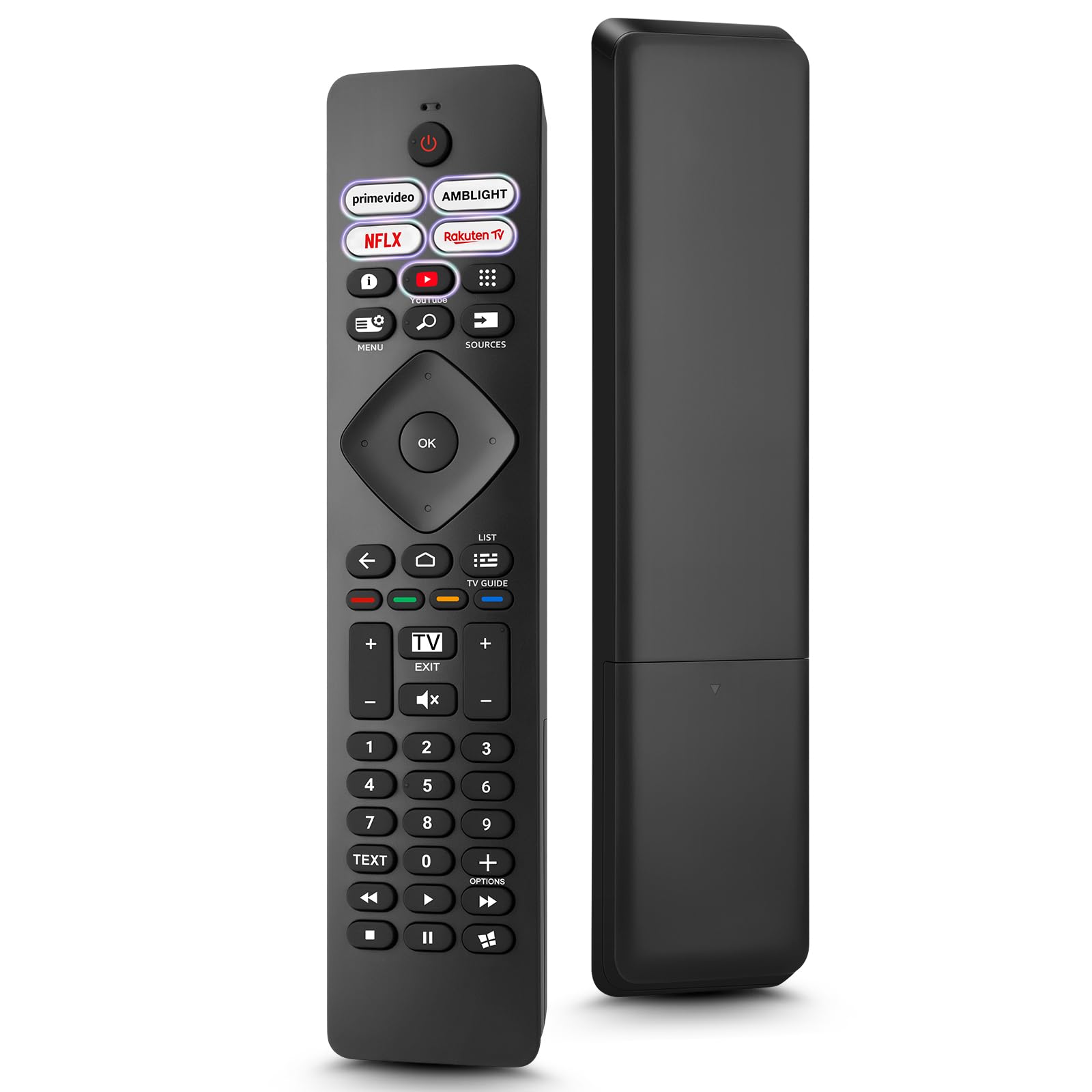
Image: The Loutoc SRC4526 Universal Remote Control, showcasingraças ao seu design ergonômico e à disposição dos botões.
1.2 Principais Características
- Convenient Plug-and-Play: No complex setup or programming required. Simply insert batteries and the remote is ready for use.
- Ampla compatibilidade com TVs: Fully compatible with Philips Ambilight TVs, including 4K Ambilight LED, OLED, FHD, and Full Ultra HD models.
- Dedicated Shortcut Buttons: Features 5 direct access buttons for popular streaming platforms: Ambilight, Video, NFLX (Netflix), Rakuten TV, and YouTube.
- Desempenho confiável: Offers an effective operating range of 8 meters (26 feet) and an ultra-fast response time of 0.2 seconds.
2. Configuração
2.1 Instalação da bateria
The Loutoc SRC4526 remote control requires two AAA batteries (not included) for operation.
- Localize o compartimento da bateria na parte traseira do controle remoto.
- Abra a tampa do compartimento da bateria.
- Insira duas pilhas AAA, certificando-se de que os terminais positivo (+) e negativo (-) estejam alinhados corretamente com os indicadores dentro do compartimento.
- Feche bem a tampa do compartimento da bateria.
2.2 Uso inicial
This remote control is designed for immediate use with compatible Philips Ambilight TVs. No programming or pairing is required. Once batteries are installed, point the remote at your TV and begin operation.
3. Instruções de operação
3.1 Funções do botãoview
Refer to the image below for a visual guide to the remote control's buttons and their corresponding functions.

Image: Detailed diagram of the Loutoc SRC4526 remote control, illustrating each button and its primary function.
| Botão | Função |
|---|---|
| Poder | Switches the TV on or off (Standby mode). |
| Prime Video, Ambilight, Netflix, Rakuten TV | Quickly launches the corresponding application. |
| Menu | Opens the Quick Menu with typical TV functions. Hold to show Gaming control bar. |
| Pesquisar | Opens the Search tab on the Home screen. |
| Fontes | Opens or closes the TV's input sources menu. |
| OK | Confirma uma seleção ou configuração. |
| Arrow/Navigation Keys | Navigates up, down, left, or right through menus and options. |
| Voltar | Retorna à tela ou canal anterior. |
| Lar | Opens the TV's Home menu. |
| Guia de TV | Opens or closes the TV Guide. Long press to open the channel list. |
| Color Keys (Red, Green, Yellow, Blue) | Provides direct selection of on-screen options. The blue key typically opens Help. |
| Volume (+/-) | Ajusta o nível de volume da TV. |
| Canal (+/-) | Switches to the next or previous channel. |
| Saída | Exits current menu/application or returns to live TV. From standby, goes to last viewfonte ed. |
| Mudo | Silencia ou ativa o som da TV. |
| Teclas Numéricas (0-9) | Seleciona canais de TV diretamente. |
| TEXTO | Opens or closes Text/Teletext. |
| Controles de reprodução | Controls media playback: Play, Pause, Stop, Rewind, Fast Forward. |
| Aplicativos | Opens the Apps tab on the Home screen. |
3.2 Ambilight Functionality
For Philips TVs equipped with Ambilight functionality, the dedicated Ambilight button on your remote allows you to control the lighting effects.
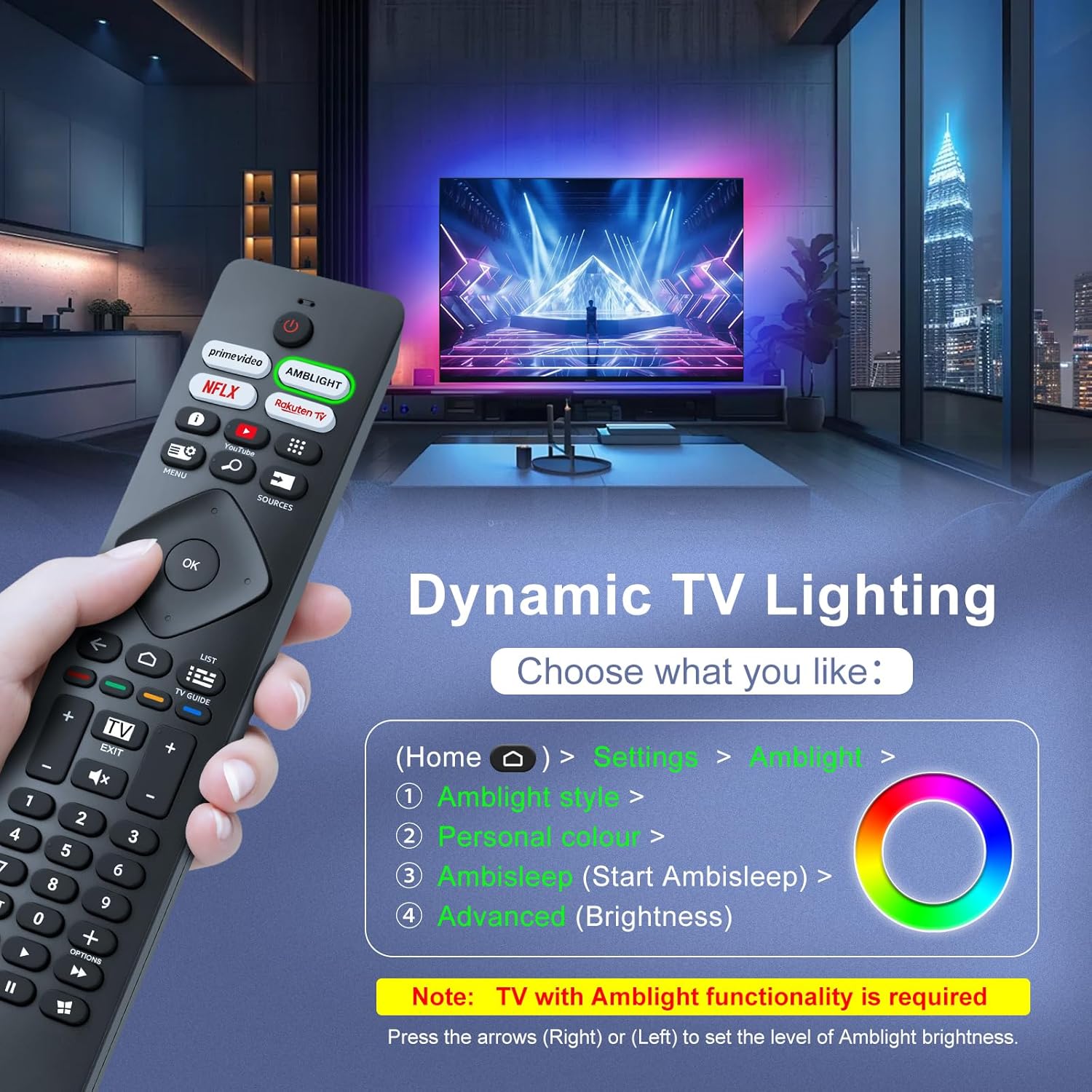
Image: A hand holding the remote control, with an overlay showing Ambilight settings on a TV screen.
After pressing the Ambilight button, you can navigate through the TV's menu to:
- Select different Ambilight display styles.
- Adjust personal color preferences.
- Initiate AmbiSleep mode.
- Adjust Ambilight brightness levels (using the right or left arrow keys).
Note: This feature requires a Philips TV with built-in Ambilight functionality.
4. Manutenção
4.1 Limpeza
To clean your remote control, gently wipe it with a soft, dry cloth. Avoid using liquid cleaners, aerosols, or harsh chemicals, as these can damage the remote's surface or internal components.
4.2 Armazenamento
Store the remote control in a cool, dry place away from direct sunlight and extreme temperatures. If the remote will not be used for an extended period, it is recommended to remove the batteries to prevent leakage.
4.3 Cuidados com a bateria
- Substitua todas as baterias ao mesmo tempo; Não misture pilhas velhas e novas.
- Do not mix different types of batteries (e.g., alkaline and rechargeable).
- Descarte as baterias usadas de maneira responsável, de acordo com os regulamentos locais.
5. Solução De Problemas
5.1 Problemas e soluções comuns
- O controle remoto não está respondendo:
- Verifique se as pilhas estão inseridas corretamente e com a polaridade correta.
- Substitua as pilhas por pilhas AAA novas.
- Certifique-se de que não haja obstruções entre o controle remoto e o receptor infravermelho da TV.
- Certifique-se de estar dentro do alcance operacional efetivo (até 8 metros).
- Botões específicos não estão funcionando:
- Clean the remote control, especially around the non-functioning buttons, to remove any dirt or debris.
- If only Ambilight functions are not working, ensure your Philips TV model supports Ambilight.
5.2 Contate o Suporte
If you encounter persistent issues that cannot be resolved with the troubleshooting steps above, please contact Loutoc customer support directly. We aim to respond to all inquiries within 12 working hours.
6. Especificações
| Recurso | Detalhe |
|---|---|
| Marca | Loutoc |
| Nome do modelo | SRC4526-FBA |
| Número do modelo do item | SRC4526 |
| Cor | Preto |
| Tecnologia de Conectividade | Infravermelho |
| Características especiais | No programming required, Ergonomic, Lightweight |
| Dispositivos compatíveis | Television (Philips Ambilight TVs) |
| Número máximo de dispositivos suportados | 1 |
| Tipo de controlador | Controle de botão |
| Alcance máximo | 8 Metros (26 Pés) |
| Descrição da bateria | AAA (2 required, not included) |
| Fabricante | Loutoc |
| País de origem | China |
| Data de lançamento na Amazon.com.be | 31 de agosto de 2025 |
7. Garantia e Suporte
7.1 Informações de garantia
This Loutoc remote control comes with a manufacturer's warranty of 30 days from the date of purchase. Please retain your proof of purchase for any warranty claims.
7.2 Suporte ao cliente
For any questions, technical assistance, or warranty inquiries, please contact Loutoc customer support. We are committed to providing timely assistance and will respond to your queries within 12 working hours.