1. Introdução
This manual provides essential information for setting up, operating, maintaining, and troubleshooting your new HP 27-inch Touchscreen All-in-One Desktop Computer. Please read this guide thoroughly to ensure optimal performance and longevity of your device.
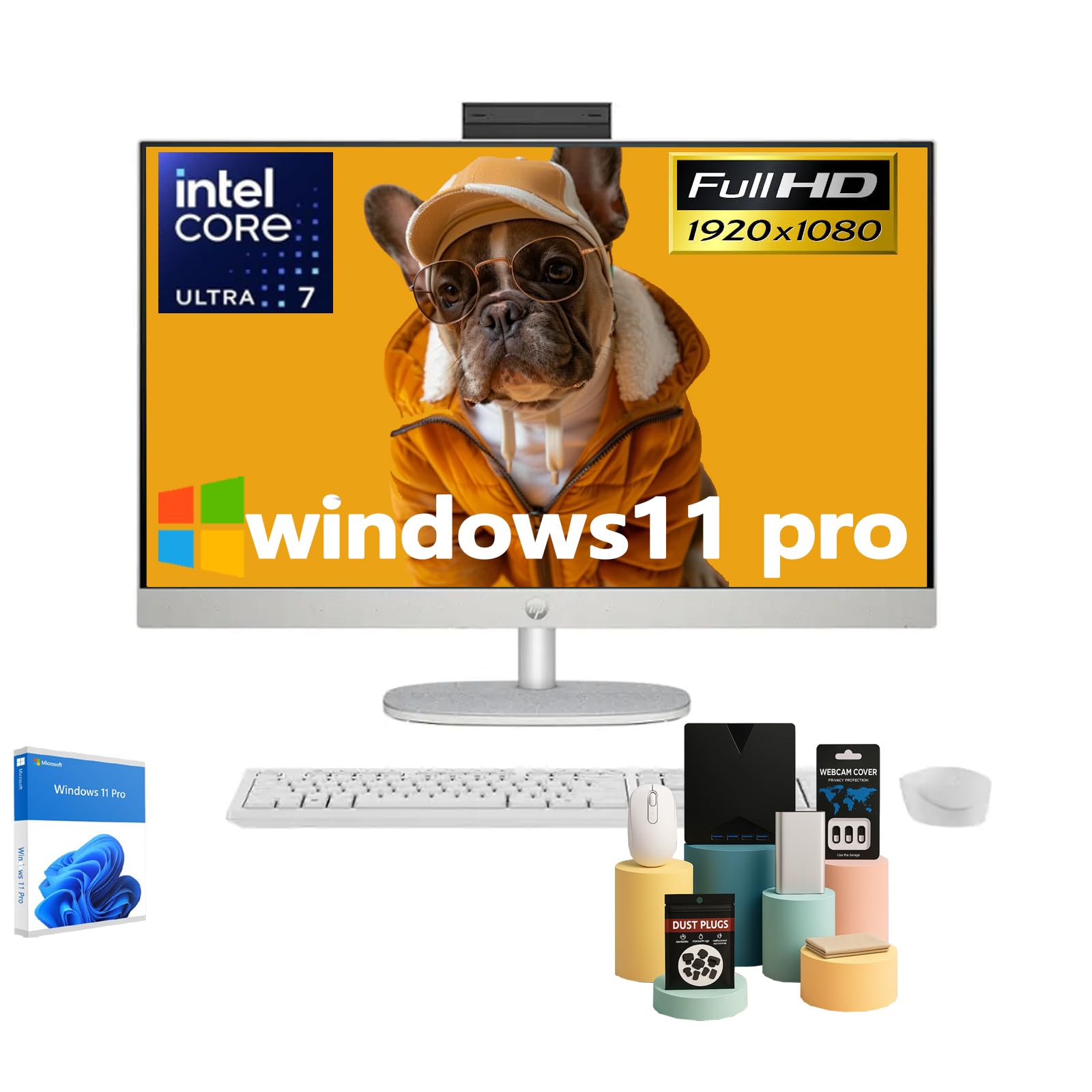
Figure 1: HP 27-inch All-in-One Desktop Computer
2. O que está na caixa
Verifique se todos os itens estão presentes na embalagem:
- HP 27-inch All-in-One Desktop Computer Touchscreen
- Teclado com fio
- Rato com fio
- Adaptador de alimentação AC inteligente de 90 W
- Instruções de configuração

Figura 2: Acessórios e componentes incluídos
3. Configuração
- Unpack the Computer: Carefully remove the All-in-One computer and all accessories from the packaging.
- Place the Computer: Position the computer on a stable, flat surface. Ensure adequate ventilation around the device. The adjustable stand allows for tilting the display to your preferred viewângulo de engate.
- Conecte periféricos:
- Connect the wired keyboard and mouse to the available USB ports on the back of the computer.
- Plug the 90 W Smart AC power adapter into the power port on the back of the computer, then connect it to a power outlet.
- Ligar: Press the power button, typically located on the side or back of the display.
- Configuração inicial do Windows: Follow the on-screen instructions to complete the Windows 11 Pro setup, including language, network connection, and user account creation.

Figure 3: Rear ports for connectivity
4. Operação
4.1 Funcionalidade de tela sensível ao toque
Your HP All-in-One Desktop features a 27-inch Full HD IPS touchscreen. You can interact directly with the display using touch gestures, similar to a tablet or smartphone. This allows for intuitive navigation, scrolling, and selection of items on the screen.
4.2 Integrado WebCâmera e áudio
The computer includes an HP True Vision 1080p FHD IR Tilt Privacy Camera. This pop-up camera can be manually retracted into the display for privacy when not in use. Dual 2W speakers and integrated dual array digital microphones with temporal noise reduction provide clear audio for video calls and multimedia.
4.3 Conectividade
O dispositivo oferece opções de conectividade abrangentes:
- Sem fio: Built-in Realtek Rtl8852Be Wi-Fi 6 (2x2) for high-speed internet and Bluetooth 5.3 for connecting wireless peripherals.
- Portas USB: 2x USB Type-A 5Gbps Signaling Rate, 1x USB Type-C 5Gbps Signaling Rate, and 2x USB 2.0 Type-A for connecting various devices.
- Saída de vídeo: 1x HDMI-out 1.4 port for connecting an external display.
- Rede: 1x RJ45 LAN Ethernet port for wired network connection.
- Áudio: 1x Headphone/Microphone Combo jack.
Vídeo 1: Produto em ExcessoviewEste vídeo fornece uma breve visão geral sobreview of the HP All-in-One Desktop Computer's features and design.
5. Manutenção
5.1 Limpeza
- Tela: Use um pano macio e sem fiapos levementeampLimpe com água ou um produto de limpeza para telas. Evite produtos químicos agressivos.
- Chassi: Limpe com um pano macio e seco. Para sujeira persistente, use um pano levemente umedecido.amp pano.
- Ventilação: Regularly check and clean the ventilation slots to prevent dust buildup, which can affect performance.
5.2 Atualizações de Software
Keep your Windows 11 Pro operating system and drivers updated to ensure optimal performance, security, and compatibility. Windows Update will typically handle this automatically, but you can manually check for updates in the system settings.
5.3 Considerações Ambientais
This HP All-in-One Desktop is designed with sustainability in mind, incorporating post-consumer recycled plastics and ocean-bound plastics in its construction. Please dispose of the product responsibly at the end of its life cycle according to local regulations.

Figure 4: Designed with the planet in mind
6. Solução De Problemas
If you encounter issues with your computer, try the following steps:
- Sem energia: Ensure the power adapter is securely connected to both the computer and a working power outlet. Try a different outlet if necessary.
- Nenhuma exibição: Check if the computer is powered on. If the screen remains black, try restarting the computer.
- Periféricos não respondem: Verify that the keyboard and mouse are properly connected to the USB ports. If using wireless peripherals, ensure they are charged and correctly paired.
- Desempenho lento: Close unnecessary applications. Check for and install any pending Windows updates. Ensure sufficient free space on your SSD.
- Webcam Issues: Ensure the pop-up privacy camera is extended. Check privacy settings in Windows to ensure applications have permission to access the camera.
Para questões mais complexas, consulte o suporte da HP. webou entre em contato com o serviço de atendimento ao cliente da HP.
7. Especificações

Figure 5: Key specifications of the HP All-in-One Desktop
| Recurso | Descrição |
|---|---|
| Tamanho de exibição da tela em pé | 27 polegadas |
| Resolução da tela | 1920 x 1080 pixels (FHD) |
| Tipo de exibição | Touch Screen, IPS, Three-Sided Micro-Edge, Anti-Glare, 300 Nits, 99% sRGB |
| Processador | Intel Ultra 7 155U (12-Core, 1.7 GHz base, 4.8 GHz turbo, 12 MB Intel Smart Cache) |
| BATER | 16 GB DDR5 5600MHz (Upgradeable to 64 GB) |
| Disco rígido | 1 TB SSD (Upgradeable to 2 TB) |
| Coprocessador gráfico | Intel Integrated Graphics |
| Sistema operacional | Windows 11 Pro |
| Tipo sem fio | Realtek Rtl8852Be Wi-Fi 6 (2x2), Bluetooth 5.3 |
| Portos | 2x USB Type-A 5Gbps, 1x USB Type-C 5Gbps, 2x USB 2.0 Type-A, 1x Headphone/Microphone Combo, 1x HDMI-out 1.4, 1x RJ45 LAN Ethernet |
| Peso do item | 14.81 libras |
| Dimensões do produto | 24.11 x 20.35 x 7.34 polegadas |
| Características especiais | Adjustable Stand, Dual Microphone with Advanced Noise Reduction, HP True Vision 1080p with Pop-Up Privacy Camera, Three-Side Micro-Edge Display with Wide-Viewângulos de engate |

Figure 6: Product dimensions
8. Garantia e Suporte
Your HP 27-inch Touchscreen All-in-One Desktop Computer comes with a standard manufacturer's warranty. Please refer to the warranty card included in your product packaging for specific terms and conditions.
For technical support, driver downloads, and additional product information, please visit the official HP support website: www.hp.com/support