1. Informações importantes de segurança
Leia e compreenda todas as instruções antes da montagem e utilização. Guarde este manual para futuras consultas.
- Always follow the assembly instructions carefully. Ensure all parts are securely fastened before use.
- Use caution when adjusting the leg pads to prevent injury or instability.
- Do not overload the table. The maximum load capacity for the top surface is 100 lbs (45 kg), and each internal shelf is 50 lbs (22.7 kg). Overloading may cause the table to tip over, resulting in injury or damage.
- Mantenha crianças e animais de estimação afastados da área de montagem. Peças pequenas podem causar asfixia.
- Ensure the charging station is connected to a properly grounded outlet. Do not expose the charging station to moisture.
2. Produto acabadoview
The ONBRILL Oval End Table is designed for versatile use in various settings, offering both storage and convenient charging capabilities.
Principais características:
- Estação de carregamento integrada: Equipped with 2 standard power outlets, 1 USB port, and 1 Type-C port for convenient device charging.
- Sliding Tambour Door: Provides easy access to the storage compartment while maintaining a clean aesthetic.
- Prateleira interna ajustável: Allows customization of storage space to accommodate various item sizes.
- Adjustable Leg Pads: Garante estabilidade em superfícies de piso irregulares.
- Construção durável: Made from wood and metal components for lasting use.
Dimensões do produto:
16"D x 20"L x 23.5"A (40.6 cm de diâmetro x 50.8 cm de largura x 59.7 cm de altura)
Item Weight: 20 Pounds (9.07 kg)
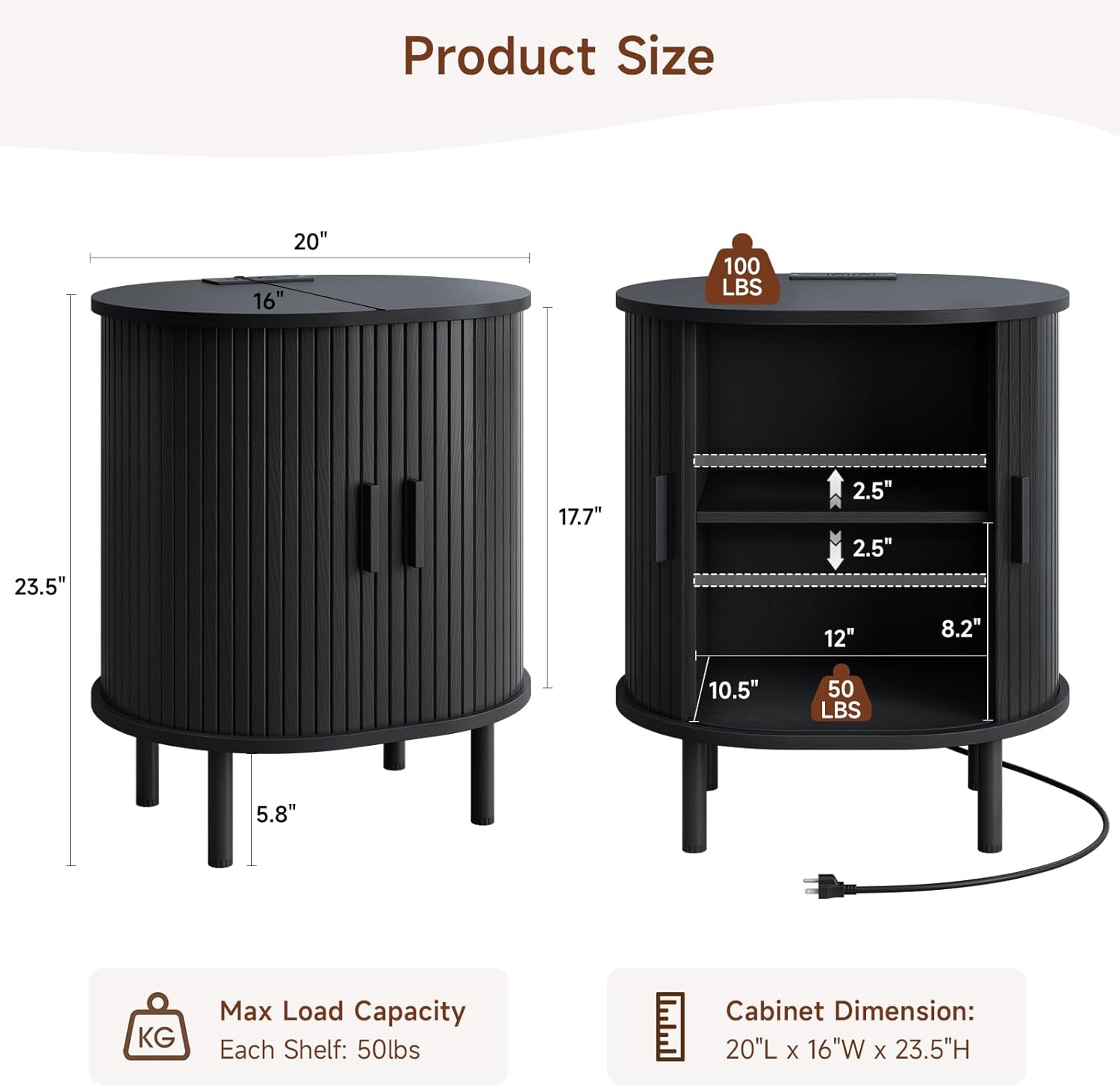
Figura 2.1: Dimensões do produto e capacidade de carga
3. Instruções de montagem
All parts and accessories are numbered for easy identification. Follow the steps below carefully. Tools recommended for assembly include a hammer and screwdriver.
Guia de montagem em vídeo:
Video 3.1: ONBRILL End Table Installation Guide
This video provides a comprehensive visual guide for assembling your ONBRILL Oval End Table. It demonstrates each step from unboxing to final setup, including the installation of the charging station and adjustable shelf.
Montagem passo a passo:
- Preparar os painéis laterais: Insert cam bolts (B) into the designated holes on the side panels (parts 3 and 4). Ensure they are screwed in firmly.
- Fixar barra transversal: Connect the crossbar (part 5) between the two side panels (3 and 4) using cam locks (A). Tighten the cam locks to secure the connection.
- Inserir painel inferior: Slide the bottom panel (part 6) into the grooves of the assembled side structure.
- Attach Top Panel (Base): Secure the oval base panel (part 2) to the top of the assembled structure using cam bolts (C) and screws (D).
- Inserir painel traseiro: Carefully slide the back panel (part 6, if applicable, or the second bottom panel) into the rear grooves of the structure.
- Prepare Top Surface: Insert cam bolts (B) into the underside of the main oval top surface (part 1).
- Attach Main Top Surface: Align the main oval top surface (part 1) with the assembled structure and secure it using cam locks (A) and screws (C).
- Instalar pernas: Attach the four legs (L) to the bottom of the table using the provided screws (F). Ensure they are tightly fastened.
- Instalar pinos de prateleira: Insert the shelf pins (K) into the desired height adjustment holes on the inner side panels.
- Attach Door Handles: Secure the handles (part 9) to the tambour doors (parts 7 and 8) using screws (E). Ensure the process hole at the end of the handle faces downwards.
- Insert Tambour Doors: Carefully slide the tambour doors (parts 7 and 8) into the top and bottom grooves of the table structure.
- Adjust Shelf: Place the adjustable shelf (part 10) onto the installed shelf pins (G) at your preferred height.
- Instalar estação de carregamento: Feed the power cord (H) through the designated hole on the top surface. Insert the charging station into its recess and secure it with screws (I).
4. Instruções de operação
Usando a estação de carregamento:
A estação de carregamento integrada oferece acesso conveniente à energia para seus dispositivos.
- Plug the table's power cord into a standard 125V/12A wall outlet.
- Use the 2 AC outlets for larger electronics.
- Connect your devices to the 5V/2A USB port or 5V/2A Type-C port for charging smartphones, tablets, and other compatible devices.

Figura 4.1: Estação de carregamento em uso
Sliding Tambour Door:
The tambour door slides smoothly along the curved track to reveal or conceal the storage compartment. Gently push or pull the handles to open and close the door.
Ajustando a prateleira interna:
The internal shelf can be adjusted to different heights to suit your storage needs.
- Retire todos os itens da prateleira.
- Carefully lift the shelf and remove the four shelf pins (G) from their current holes.
- Reinsert the shelf pins into the desired set of holes at the new height. Ensure all four pins are at the same level.
- Recoloque a prateleira nos pinos.

Figura 4.2: Mecanismo de prateleira ajustável
Adjusting Leg Pads:
The adjustable leg pads help stabilize the table on uneven floors. Rotate the bottom of each leg pad clockwise to raise or counter-clockwise to lower until the table is stable and level.
5. Manutenção
- Limpeza: Wipe the table surface with a soft, dry cloth. For stubborn marks, use a slightly damp cloth with mild soap, then dry immediately. Avoid abrasive cleaners or harsh chemicals, as they may damage the finish.
- Derramamentos: Limpe imediatamente qualquer derrame para evitar manchas ou danos à madeira.
- Inspeção: Verifique periodicamente todos os parafusos e conexões para garantir que permaneçam firmes. Reaperte-os, se necessário.
- Colocação: Avoid placing the table in direct sunlight or near heat sources, as this can cause fading or warping.
6. Solução De Problemas
| Problema | Possível causa | Solução |
|---|---|---|
| A mesa está bamba/instável. | Uneven floor or loose leg pads. | Adjust the leg pads by rotating them until the table is stable. Ensure all assembly screws are tightened. |
| A estação de carregamento não está funcionando. | Power cord not plugged in, outlet issue, or device incompatibility. | Ensure the table's power cord is securely plugged into a working wall outlet. Test the outlet with another device. Verify your device is compatible with the USB/Type-C ports. |
| Sliding door is stiff or stuck. | Debris in the track or misalignment. | Inspect the top and bottom tracks for any obstructions and remove them. Ensure the door is properly seated in the grooves. |
| Shelf does not fit or is uneven. | Shelf pins incorrectly installed. | Ensure all four shelf pins are inserted into corresponding holes at the same height. |
7. Especificações
- Marca: ONBRILL
- Número do modelo: ON COT-123
- Dimensões do produto: 16"P x 20"L x 23.5"A
- Peso do item: 20 libras
- Material da estrutura: Madeira
- Tipo de material: Metal, Madeira
- Cor: Black (for this variant)
- Forma: Oval
- Table Design: Mesa de canto
- Acabamento de móveis: Manchado
- Componentes incluídos: Adjustable Leg Pads, Adjustable Shelf, Charging Station, Sliding Door
- Montagem necessária: Sim
- Ferramentas recomendadas para a montagem: Martelo, chave de fenda
- Uso interno/externo: Interior
- Saída da estação de carregamento: 2x 125V/12A AC Outlets, 1x 5V/2A USB Port, 1x 5V/2A Type-C Port
- Comprimento do cabo de alimentação: 6.56 ft (metros 2)
8. Garantia e Suporte
For warranty information, product support, or to report missing/damaged parts, please contact ONBRILL customer service. Refer to your purchase documentation for specific contact details or visit the official ONBRILL website.
Atendimento ao Cliente: Please refer to the contact information provided with your purchase or on the ONBRILL official website.


