Introdução
The Volkano Galena Series Wireless Keyboard is a compact, versatile input device designed for efficiency and portability. It offers multi-device connectivity and seamless switching, making it suitable for various operating systems including Windows, Android, and MacOS. This manual provides essential information for setting up, operating, maintaining, and troubleshooting your keyboard.
Conteúdo da embalagem
- Volkano Galena Series Wireless Keyboard
- 2 pilhas AAA
- Manual de instruções
Configurar
1. Instalação da bateria
The Volkano Galena Series Wireless Keyboard operates on two AAA batteries. These are included in the package.
- Locate the battery compartment cover on the underside of the keyboard.
- Deslize a tampa aberta.
- Insira as duas pilhas AAA, certificando-se da polaridade correta (terminais + e -).
- Feche bem a tampa do compartimento da bateria.
2. Ligar / desligar
Locate the power switch on the keyboard. Slide it to the 'ON' position to power on the keyboard. Slide it to the 'OFF' position when not in use to conserve battery life. The keyboard features an auto-power saving mode to further extend battery life during periods of inactivity.
3. Emparelhamento Bluetooth
The keyboard supports Bluetooth 5.0 for a stable wireless connection. It can be paired with up to two devices simultaneously.

Image: The Volkano Galena Series keyboard, illustrating its compact design and key features such as Bluetooth 5.0 + BT 3.0 connectivity, multi-device switching, anti-slip rubber feet, and compatibility with Windows and Android operating systems.
- Certifique-se de que o teclado esteja ligado.
- On your device (Laptop, PC, Smart TV, Tablet), enable Bluetooth and search for available devices.
- Pressione e segure o Fn + 1 key combination for the first device, or Fn + 2 for the second device, until the corresponding indicator light (usually above the '1' or '2' key) starts blinking, indicating pairing mode.
- Select "Volkano Galena" or a similar name from the list of available Bluetooth devices on your screen.
- Follow any on-screen prompts to complete the pairing process. The indicator light will stop blinking once successfully paired.
Instruções de operação
1. Comutação de múltiplos dispositivos
The keyboard allows for quick switching between two paired devices.

Imagem: Uma imagem detalhada view of the Volkano Galena Series keyboard, showcasing its compact form factor and features like Bluetooth device switching, non-slip feet, a dedicated Copilot shortcut key, scissor-structure keycaps, and auto-power saving mode.
- To switch to the first paired device, press Fn + 1.
- To switch to the second paired device, press Fn + 2.
2. Function Keys (Fn)
The keyboard includes multimedia and special function keys accessible by pressing the Fn key in combination with the corresponding F-keys or other designated keys.
- Fn+F1-F12: Access various multimedia controls and system functions (e.g., volume, playback, screen brightness). Refer to the icons on the F-keys for specific functions.
- Fn + Q/W/E: Switch between operating system layouts (e.g., Android, Windows, iOS/MacOS).
- Copilot Shortcut Key: A dedicated key for quick access to AI assistant features on compatible operating systems.
3. Experiência em digitação
The keyboard features quiet keys with a scissor structure, providing a comfortable and responsive typing experience suitable for focused environments.
Manutenção
1. Limpeza
- Certifique-se de que o teclado esteja desligado antes de limpá-lo.
- Use um pano macio, seco e sem fiapos para limpar a superfície do teclado.
- Para sujeira teimosa, d levementeampUmedeça o pano com água ou um limpador suave e não abrasivo. Evite umidade excessiva.
- Não aplique soluções de limpeza diretamente no teclado.
- Use compressed air to remove debris from between the keys.
2. Armazenamento
- Guarde o teclado em local fresco e seco, longe da luz solar direta e de temperaturas extremas.
- If storing for an extended period, remove the AAA batteries to prevent leakage.
Solução de problemas
- Teclado não liga: Check if the batteries are correctly inserted and fully charged. Replace batteries if necessary. Ensure the power switch is in the 'ON' position.
- Teclado não conecta via Bluetooth:
- Certifique-se de que o Bluetooth esteja habilitado no seu dispositivo.
- Make sure the keyboard is in pairing mode (indicator light blinking).
- Delete previous pairings on your device and attempt to re-pair.
- Ensure the keyboard is within the 8-10 meter Bluetooth range of your device.
- Tente reiniciar tanto o teclado quanto o seu dispositivo.
- Teclas não respondem: Check battery level. Ensure the keyboard is properly connected to your device. Clean any debris from around the keys.
- Atraso ou entrada com atraso: Ensure there are no strong interferences (e.g., other wireless devices) nearby. Check battery level.
Especificações
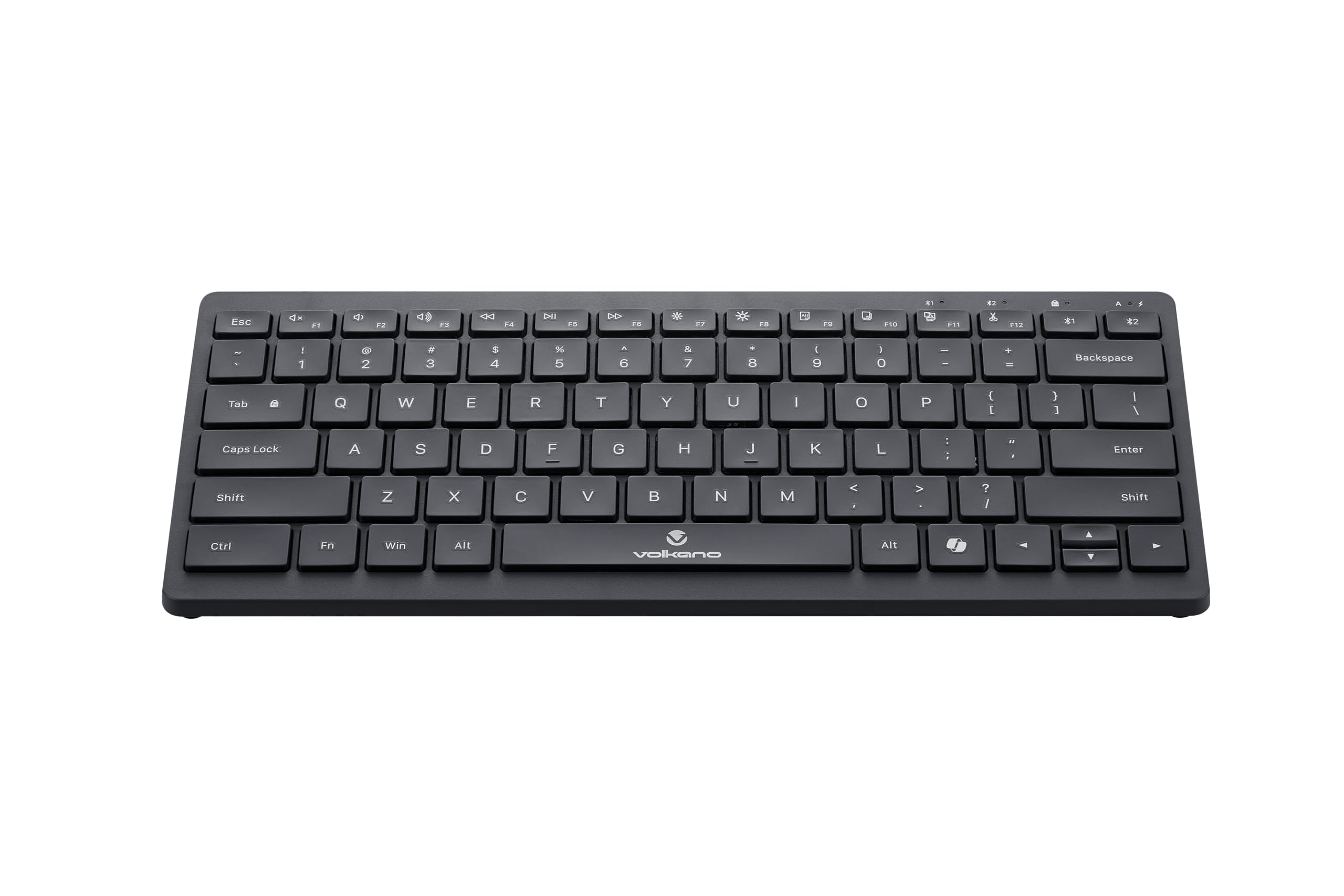
Image: A clear, angled view of the Volkano Galena Series Wireless Keyboard, highlighting its sleek black design and full key layout.
| Recurso | Detalhe |
|---|---|
| Número do modelo | VK-20247-BK |
| Conectividade | Tecnologia sem fio Bluetooth |
| Versão Bluetooth | Bluetooth 5.0 + Bluetooth 5.0 (Dual Channel) |
| Distância wireless | 8-10 metros |
| Fonte de energia | 2 pilhas alcalinas AAA (incluídas) |
| Tipo de chave | Scissor Structure Keycaps |
| Características especiais | Quiet keys, Multi-device pairing, Instant switching, Anti-slip rubber base, Auto-power saving mode, Lightweight, Portable, Copilot Shortcut Key |
| Dispositivos compatíveis | Laptop, PC, Smart TV, Tablet (Windows, Android, MacOS) |
| Dimensões (C x L x A) | 29.5C x 12.8L x 2.2A centímetros |
| Material | Plástico |
| Cor | Preto |
Garantia e Suporte
1. Garantia limitada
This Volkano product is covered by a 12-Month Limited Coverage from the date of purchase. You can extend this coverage by an additional 12 months, for a total of 24 months, by registering your product with Volkano.
2. Suporte ao cliente
For any questions, assistance, or support regarding your Volkano Galena Series Wireless Keyboard, please contact Volkano customer service through their official channels. Refer to the Volkano website or product packaging for contact details.


