1. Introdução
The UNI-T UT217A/UT217B is a versatile 2-in-1 device combining the functions of an AC/DC clamp meter and an oscilloscope. This instrument is designed for comprehensive electrical measurements, offering high precision and a user-friendly interface. It features a 2.8-inch high-definition LCD display and supports Bluetooth connectivity for mobile application integration, allowing for data transmission, analysis, and storage.
This manual provides essential information for the safe and effective operation of your UNI-T UT217A/UT217B device. Please read it thoroughly before use and retain it for future reference.
2. Informações de segurança
Para garantir o funcionamento seguro e evitar danos ao dispositivo ou ferimentos, observe as seguintes precauções de segurança:
- Sempre cumpra os códigos de segurança locais e nacionais.
- Não utilize o dispositivo se ele parecer danificado ou estiver funcionando de forma anormal.
- Ensure the battery is adequately charged before use to avoid unexpected power loss during critical measurements.
- Evite o contato com circuitos energizados ao conectar ou desconectar os cabos de teste.
- Não exceda os valores máximos de entrada especificados para cada função.
- Use only specified replacement parts and accessories.
- Mantenha o dispositivo seco e limpo. Não opere em ambientes úmidos ou explosivos.
- Esteja ciente do alto voltage warning indicator on the device.
3. Conteúdo da embalagem
Ao desembalar, verifique se todos os itens estão presentes e sem danos:
- Osciloscópio UNI-T UT217A/UT217B Clamp Metro
- Cabos de teste
- Cabo de carregamento tipo C
- Manual do usuário
- Carrying Pouch (may vary by model/region)
4. Produto acabadoview
Familiarize yourself with the components of your UNI-T UT217A/UT217B device:
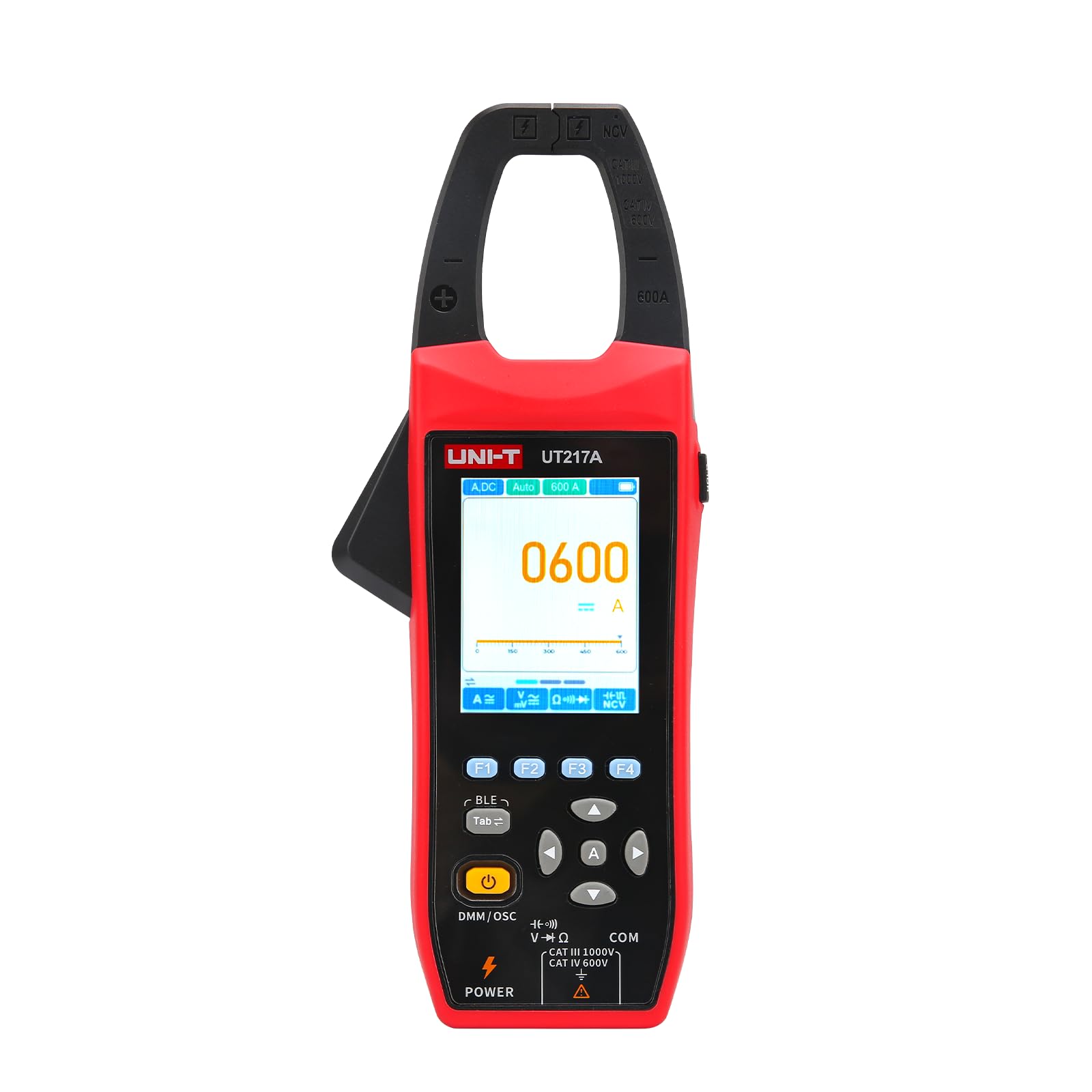
Figura 1: Frente view of the UNI-T UT217A/UT217B Oscilloscope Clamp Meter, showing the display, function dial, and clamp mandíbula.
- Clamp Mandíbula: Used for non-contact measurement of AC/DC current. The UT217A has a 31mm jaw opening, while the UT217B has a 38mm jaw opening.
- Tela LCD: 2.8-inch high-definition screen displaying measurement readings, waveforms, and function indicators.
- Seletor de funções: Rotary switch to select measurement modes (e.g., ACV, DCV, ACA, DCA, Resistance, Capacitance, Frequency, Oscilloscope).
- Botões de função: Buttons for range selection, hold, backlight, peak hold, and other specific functions.
- Terminais de entrada: Sockets for connecting test leads for voltage, resistência, capacitância e outras medições.
- Porta Type-C: For charging the built-in 2600mAh battery.
5. Configuração
Before first use, ensure the device is properly set up:
- Carregando a bateria:
- Conecte o cabo de carregamento Tipo C fornecido à porta Tipo C do dispositivo.
- Conecte a outra extremidade do cabo a um adaptador de energia USB padrão (não incluído) ou à porta USB de um computador.
- The charging indicator on the display will show the charging status. Allow the device to fully charge before initial use. The built-in battery capacity is 2600mAh.
- Ligar/desligar:
- Rotate the function dial from the 'OFF' position to any desired measurement function to power on the device.
- To power off, rotate the function dial back to the 'OFF' position.
6. Instruções de operação
This section details the primary functions of the UNI-T UT217A/UT217B.
6.1 Clamp Meter Function (AC/DC Current Measurement)
- Rotate the function dial to the 'ACA' (AC Current) or 'DCA' (DC Current) position.
- Pressione o gatilho de liberação da mandíbula para abrir a trava.amp mandíbula.
- Inclua um único condutor (não um cabo de alimentação com vários fios) dentro do clamp mandíbula. Certifique-se de que a mandíbula esteja completamente fechada.
- Read the current value displayed on the LCD. The device features 20000 count true RMS automatic ranging.
- For surge current measurement (AC current only), select the appropriate function if available on the dial or via a button.
6.2 Oscilloscope Function (Waveform Measurement)
The oscilloscope function allows for simultaneous measurement of current and voltage formas de onda.
- Rotate the function dial to the 'Oscilloscope' position.
- Connect the test leads to the appropriate input terminals for voltage medição, ou use o clamp Garra para medição da forma de onda da corrente.
- The display will show the real-time waveform. Use the function buttons to adjust parameters such as time base, voltage scale, and trigger settings as needed.
- Analyze the waveform characteristics (e.g., frequency, amplitude, shape).
6.3 Conectividade Bluetooth
The device supports Bluetooth connection to a mobile phone application for enhanced functionality.
- Baixe e instale o aplicativo oficial da UNI-T na loja de aplicativos do seu dispositivo.
- Certifique-se de que o Bluetooth esteja ativado no seu celular.
- Power on the UT217A/UT217B.
- Open the UNI-T application and follow the on-screen instructions to search for and connect to your device.
- Once connected, you can transmit measurement data, analyze trends, and store readings directly on your mobile device.
7. Manutenção
A manutenção adequada garante a longevidade e a precisão do seu dispositivo.
- Limpeza: Use um pano macio e macioamp cloth with mild detergent to clean the casing. Do not use abrasive cleaners or solvents. Ensure the device is powered off and disconnected from any power source before cleaning.
- Armazenar: Store the device in a cool, dry place, away from direct sunlight and extreme temperatures. If storing for extended periods, ensure the battery is partially charged (around 50%) to preserve battery health.
- Cuidados com a bateria: The device has a built-in 2600mAh rechargeable battery. Avoid fully discharging the battery frequently. Recharge it regularly, especially if not used for a long time.
- Calibração: For professional applications, periodic calibration by qualified personnel is recommended to maintain measurement accuracy.
8. Solução De Problemas
Consulte a tabela abaixo para problemas comuns e suas soluções:
| Problema | Possível causa | Solução |
|---|---|---|
| O dispositivo não liga | Low battery; Function dial not set correctly | Charge the battery; Rotate dial to a measurement function |
| Leituras imprecisas | Improper connection; Environmental interference; Device malfunction | Check test lead connections; Move away from strong electromagnetic fields; Contact support if issue persists |
| A conexão Bluetooth falha | Bluetooth off on phone; App not installed; Device not discoverable | Enable Bluetooth; Install UNI-T app; Restart device and app |
| A tela está em branco ou com brilho reduzido. | Low battery; Backlight off; Display damage | Charge battery; Press backlight button; Contact support |
9. Especificações
Key technical specifications for the UNI-T UT217A/UT217B Oscilloscope Clamp Medidor:
| Recurso | Descrição |
|---|---|
| Modelo | UT217A / UT217B |
| Funções | AC / DC Clamp Meter, Oscilloscope |
| Mostrar | LCD de alta definição de 2.8 polegadas |
| Contar | 20000 Count True RMS |
| Abertura da mandíbula | UT217A: 31mm; UT217B: 38mm |
| Função do osciloscópio | Measures current and voltage waveforms simultaneously |
| Conectividade | Bluetooth to mobile phone APP (transmit, analyze, store) |
| Características especiais | Surge current measurement (AC only), High voltage aviso |
| Fonte de energia | Type-C charging, Built-in 2600mAh battery |
| Fabricante | TECNOLOGIA UNI-TREND (CHINA) CO., LTD. |
| Número do modelo do produto | YQ-UT217A |
10. Garantia e Suporte
Os produtos UNI-T são fabricados segundo elevados padrões de qualidade e têm garantia contra defeitos de materiais e de fabrico. Para obter informações específicas sobre os termos e condições da garantia, consulte o certificado de garantia que acompanha o produto ou visite o site oficial da UNI-T. website.
For technical support, service, or inquiries, please contact your local distributor or the UNI-T customer service department. Ensure you have your product model number (UT217A/UT217B) and purchase information available when seeking support.