1. Introdução
Welcome to the user manual for your RebotAi A9 8.7-inch Android 15 Tablet. This guide provides essential information on setting up, operating, maintaining, and troubleshooting your device to ensure a smooth and enjoyable user experience. Please read this manual carefully before using your tablet.
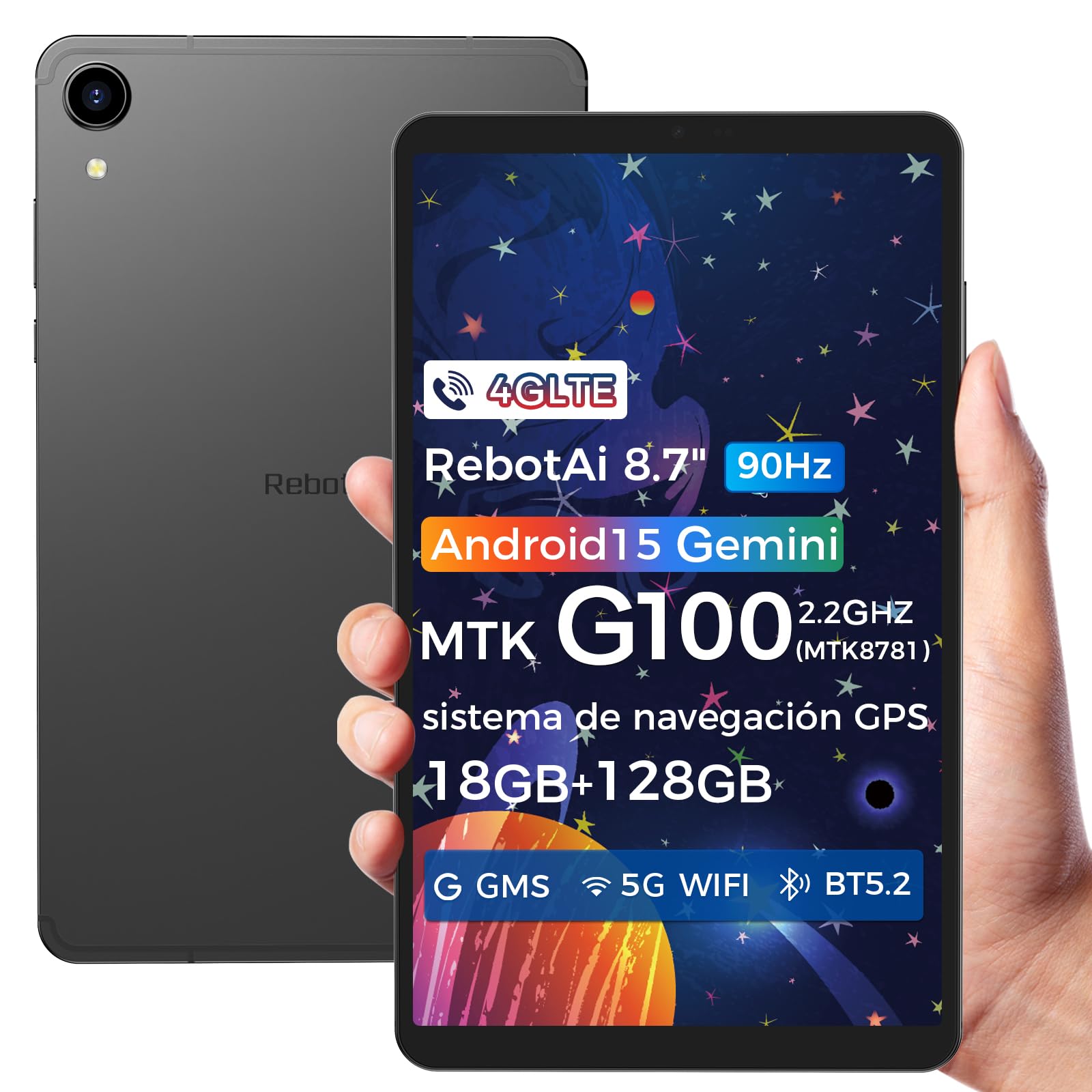
Image: General view of the RebotAi A9 tablet, showcasinseu design elegante.
2. Conteúdo da embalagem
Ao abrir a caixa, verifique se todos os itens estão presentes:
- Tablet RebotAi A9
- Cabo de carregamento USB-C
- Ferramenta Ejetora SIM
- Guia de início rápido
- Cartão de garantia
Observação: In accordance with global environmental guidelines, the RebotAi A9 tablet does not include a power adapter. Please use a compatible USB-C power adapter (not included) for charging.
3. Dispositivo acabadoview
Familiarize yourself with the physical components of your RebotAi A9 tablet.

Imagem: Um excessoview of the RebotAi A9 tablet's key features, including its 8.68-inch display, Android 15 OS, 1340x800 IPS resolution with 90Hz refresh rate, MediaTek Helio G100 processor, slim design, 6GB RAM, 5000mAh battery, 128GB ROM, dual-band Wi-Fi, GPS, Bluetooth 5.2, and Widevine L1 support.
Projeto Físico
- Mostrar: 8.7-inch IPS screen with 1340 x 800 resolution and 90Hz refresh rate for vibrant colors and smooth visuals.
- Casing: Metallic casing with nano-coating process, offering a smooth feel and elegant appearance, designed for water and impact resistance.
- Dimensões: Approximately 7.8 mm thin.
- Peso: Aproximadamente 360 gramas.

Image: This image highlights the tablet's durable construction, featuring nano-injection molding technology for advanced water and impact resistance. It shows details of the impermeability specifications and antenna slots designed with nanotechnology.
Áudio e sensores
- Palestrantes: Dual-BOX speakers for enhanced audio experience.
- Plug do fone de ouvido: Conector padrão para fones de ouvido de 3.5 mm.
- Sensores: High-precision gyroscope, light sensor, and gravity sensor for accurate orientation, automatic screen rotation, and improved navigation.

Image: This image details the tablet's advanced features, including dual-band Wi-Fi (2.4GHz/5GHz), Bluetooth 5.2, dual-box speakers, and a 3.5mm headphone jack. It also highlights fast connectivity and precise positioning with A-GPS and 4-mode GPS, along with a 450 nits bright display.
4. Configuração
4.1 Inicialização Inicial
- Press and hold the Power button located on the side of the tablet until the RebotAi logo appears.
- Siga as instruções na tela para selecionar seu idioma, conectar-se a uma rede Wi-Fi e configurar sua conta do Google.
4.2 Instalação do cartão SIM e do cartão microSD
The tablet supports two nano-SIM cards for 4G LTE connectivity and a microSD card for storage expansion.
- Localize a bandeja do cartão SIM/MicroSD na lateral do tablet.
- Insira a ferramenta de ejeção do SIM no pequeno orifício ao lado da bandeja para abri-la.
- Carefully place your nano-SIM card(s) and/or microSD card into the designated slots on the tray. Ensure the gold contacts are facing down.
- Empurre a bandeja de volta para o tablet com cuidado até ouvir um clique.

Image: This image illustrates the tablet's connectivity options, highlighting 4G LTE support, Bluetooth 5.2, dual-band Wi-Fi (2.4GHz and 5GHz), and multi-system GPS (GPS/Galileo/Glonass). A close-up of the dual SIM card slot is also visible, indicating support for mobile data and calls.
5. Operação
5.1 Exibição e elementos visuais
The 8.7-inch IPS display with 1340 x 800 resolution and 90Hz refresh rate provides a clear and fluid visual experience. With 450 nits brightness, content remains visible even in bright environments. Widevine L1 support ensures high-definition video streaming from compatible services.

Image: An image showing the tablet being used for gaming, emphasizing its smooth performance for games and videos. It highlights the 8.68-inch screen, G100 chip, and 90Hz refresh rate for an uninterrupted and comfortable visual experience.
5.2 Desempenho
Powered by the MediaTek Helio G100 octa-core processor (MT8781), the RebotAi A9 delivers enhanced performance for multitasking, gaming, and media consumption. It features two high-performance Cortex-A76 cores and six low-power Cortex-A55 cores, along with a Mali-G57 MC2 GPU.

Image: An image detailing the MediaTek Helio G100 processor, showing its octa-core CPU architecture (Cortex-A76 and Cortex-A55 cores), Mali-G57 MC2 GPU, and 2.2 GHz frequency. A benchmark comparison chart is included, demonstrating its performance relative to other chipsets.
5.3 Câmera
The tablet is equipped with a 13MP rear camera and a 5MP front camera, suitable for online meetings, video calls, and capturing daily moments with clear and natural images.

Image: This image focuses on the tablet's camera system, showing the 5MP front camera and 13MP rear camera. The accompanying text indicates these cameras provide clear and natural images suitable for online meetings and daily recordings.
5.4 Android 15 and AI Features
Running on Android 15 and GMS certified, the RebotAi A9 provides access to a wide range of Google services and applications. Its high-performance hardware and A9 chip are optimized for comfortable use of various AI tools, enhancing user interaction and productivity.

Image: An image depicting the tablet's interface with various app icons, emphasizing its Android 15 operating system and GMS certification. It highlights the high-performance hardware and A9 chip, enabling comfortable use of various AI tools.
6. Conectividade
The RebotAi A9 tablet offers comprehensive connectivity options:
- 4G LTE: Dual nano-SIM support for mobile data and calls, ensuring connectivity on the go.
- 5G WiFi: Dual-band Wi-Fi (2.4GHz and 5GHz) for fast and stable internet connections, ideal for streaming and downloads.
- Bluetooth 5.2: For connecting wireless accessories such as headphones, speakers, and keyboards with lower power consumption.
- GPS: Multi-system GPS (GPS/Galileo/Glonass) for precise positioning and navigation.
7. Armazenamento e desempenho
- BATER: 6GB of installed RAM, expandable virtually by an additional 12GB for a total of 18GB, ensuring smooth multitasking.
- Armazenamento interno: 128GB of internal storage for your apps, photos, and files.
- Armazenamento expansível: Supports microSD card expansion up to 1TB, providing ample space for large media files e documentos.
8. Bateria e carregamento
The RebotAi A9 is equipped with a 5000mAh high-capacity battery, offering extended usage times.
- Duração da bateria: Up to 12 hours of general use on a single charge.
- Carregamento rápido: Supports 20W PD fast charging, allowing the tablet to be fully charged quickly.
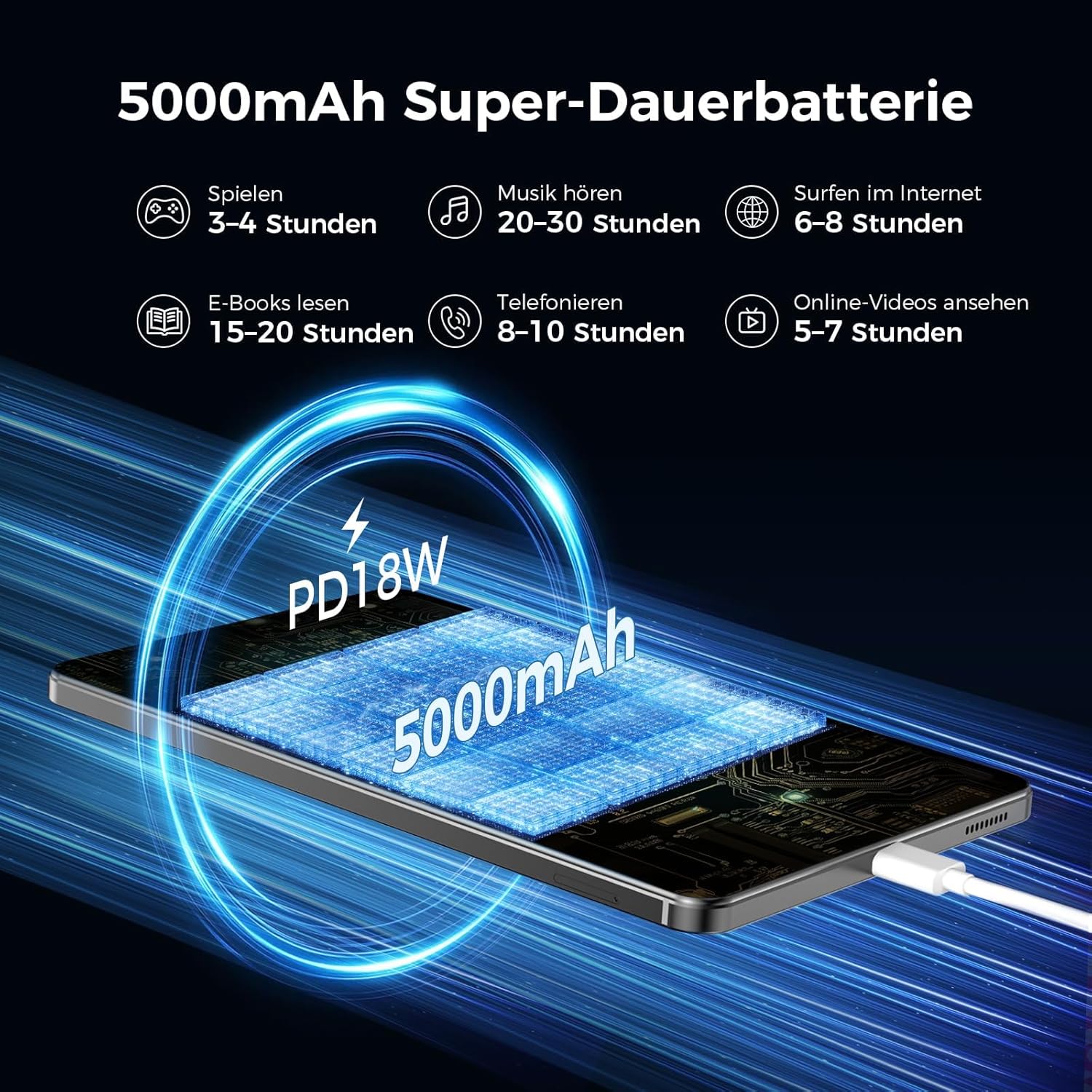
Image: An image illustrating the 5000mAh battery capacity and its estimated usage times for various activities: 3-4 hours gaming, 20-30 hours music, 6-8 hours internet browsing, 15-20 hours e-reading, 8-10 hours calls, and 5-7 hours online videos. It also shows the tablet being charged via PD18W fast charging.
9. Manutenção
To ensure the longevity and optimal performance of your RebotAi A9 tablet, follow these maintenance guidelines:
- Limpeza: Use um pano macio e sem fiapos para limpar a tela e a carcaça. Evite materiais abrasivos ou produtos químicos agressivos.
- Cuidados com a bateria: Avoid extreme temperatures. Do not let the battery fully discharge frequently. For long-term storage, charge the battery to about 50%.
- Atualizações de software: Verifique e instale regularmente as atualizações do sistema para garantir melhorias de segurança e desempenho.
- Gerenciamento de armazenamento: Limpe periodicamente o desnecessário files e aplicativos para liberar espaço de armazenamento e manter o desempenho.
10. Solução De Problemas
Se você encontrar problemas com seu tablet, tente as seguintes etapas comuns de solução de problemas:
- O tablet não liga: Verifique se a bateria está carregada. Conecte o tablet a uma fonte de energia e tente novamente.
- Tela não responde: Restart the tablet by holding the power button. If unresponsive, force restart by holding the power button for an extended period (usually 10-15 seconds).
- Wi-Fi/4G connectivity issues: Toggle Wi-Fi/Mobile Data off and on. Restart your router or contact your service provider.
- Aplicativos travando: Clear the cache of the problematic app or reinstall it. Ensure your tablet's software is up to date.
- Desempenho lento: Feche os aplicativos que não estiver usando, limpe o cache e verifique se há espaço de armazenamento suficiente. Considere a restauração de fábrica como último recurso (faça backup dos seus dados primeiro).
11. Especificações
| Recurso | Detalhe |
|---|---|
| Marca | RebotAi |
| Nome do modelo | A9 |
| Sistema operacional | Androide 15 |
| Processador | MediaTek Helio G100 (MT8781) Octa-Core |
| BATER | 6 GB (expansível até 18 GB) |
| Capacidade de armazenamento de memória | 128 GB |
| Armazenamento expansível | Até 1 TB via cartão microSD |
| Tamanho da tela | 8.7 polegadas (8.68 polegadas) |
| Resolução da tela | 1340 x 800 IPS, 90Hz Refresh Rate |
| Resolução Máxima Suportada | 2560 Pixels (for content playback) |
| Brilho | 450 lêndeas |
| Câmera Traseira | 13 MP |
| Câmera Frontal | 5 MP |
| Capacidade da bateria | 5000 mAh |
| Duração da bateria | Até 12 horas |
| Carregando | 20W PD Fast Charging (cable included, adapter not included) |
| Conectividade | 4G LTE (Dual Nano-SIM), 5G WiFi (2.4GHz/5GHz), Bluetooth 5.2, GPS (GPS/Galileo/Glonass) |
| Cor | Cinza |
12. Garantia e Suporte
RebotAi offers a Garantia de 2 ano for your A9 tablet. For any technical issues or support inquiries, please contact RebotAi customer service. We guarantee a quick response within 24 hours.
Consulte o cartão de garantia incluído na embalagem para obter os termos e condições detalhados.


