1. Introdução
Welcome to your new Baseus BC1 Open Ear Earbuds. This manual provides detailed instructions for setup, operation, and maintenance to ensure you get the best experience from your device. The Baseus BC1 earbuds feature a comfortable open-ear design, secure tri-curve clip, rich sound with powerful bass, clear calls with 4-mic AI noise reduction, IP55 water resistance, and precise button control.
2. Conteúdo da embalagem
Por favor, verifique o conteúdo da embalagem para garantir que todos os itens estejam presentes:
- Baseus BC1 Open Ear Earbuds (Left & Right)
- Estojo de carregamento
- Manual do usuário
- Cabo de carregamento tipo C

3. Produto acabadoview
The Baseus BC1 Open Ear Earbuds are designed for comfort and high-quality audio, allowing you to stay aware of your surroundings. The compact charging case provides extended battery life and convenient storage.

4. Configuração
4.1. Carregamento
Antes da primeira utilização, carregue totalmente os fones de ouvido e o estojo de carregamento.
- Conecte o cabo de carregamento Tipo C fornecido à porta de carregamento do estojo e a uma fonte de alimentação.
- Uma carga completa da caixa leva aproximadamente 1.5 horas.
- The earbuds offer up to 7.5 hours of listening on a single charge, and up to 38 hours total with the fully charged case.

4.2. Ligar/desligar
- Ligar: Abra o estojo de carregamento e os fones de ouvido serão ligados automaticamente.
- Desligar: Place the earbuds back into the charging case and close the lid; they will power off automatically.
4.3. Emparelhamento Bluetooth
- Abra o estojo de carregamento. Os fones de ouvido entrarão automaticamente no modo de emparelhamento, indicado por uma luz LED piscando.
- No seu dispositivo (smartphone, tablet, etc.), acesse as configurações de Bluetooth e ative o Bluetooth.
- Procurar "Baseus BC1" in the list of available devices and select it to connect.
- Once connected, you will hear a confirmation tone, and the LED indicator on the earbuds will turn off.
4.4. Usando os fones de ouvido
For optimal comfort and sound quality, follow these steps to wear your earbuds:
- Gently clip each earbud onto your ear, ensuring the main body rests comfortably behind your earlobe.
- Adjust the earbud to find the most comfortable and secure position. The tri-curve ergonomic clip is designed to adapt to various ear shapes.
- Ensure the sound outlet is aligned with your ear canal to experience the best sound quality.


5. Instruções de operação
5.1. Controles de botão
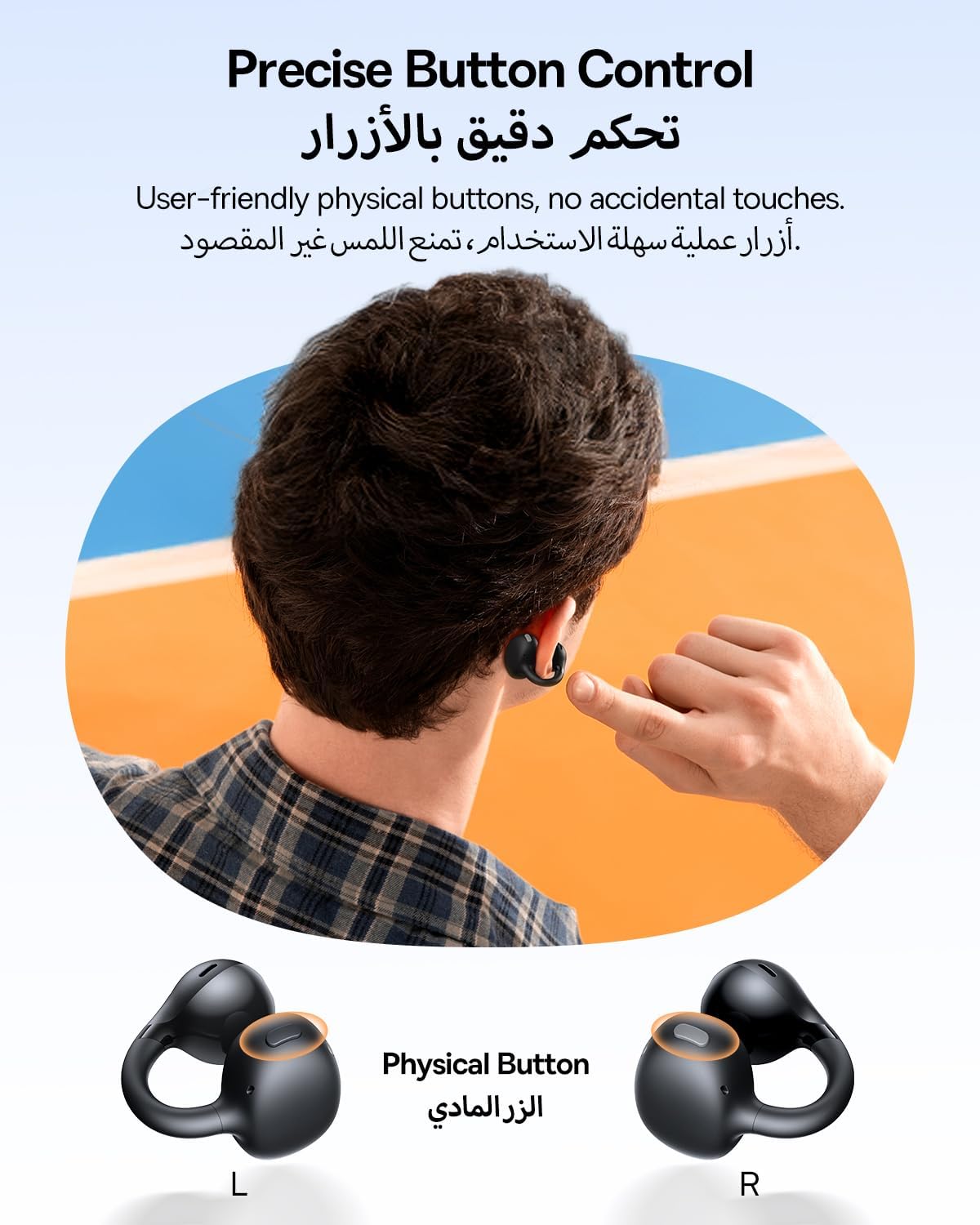
The Baseus BC1 earbuds feature physical buttons for precise control, minimizing accidental touches. The functions are as follows:
- Reproduzir/Pausar: Basta pressionar o botão em qualquer um dos fones de ouvido.
- Aumentar o volume: Single press the button on the right earbud.
- Volume baixo: Single press the button on the left earbud.
- Próxima faixa: Long press the button on the right earbud for 1.5 seconds.
- Faixa anterior: Long press the button on the left earbud for 1.5 seconds.
- Atender/encerrar chamada: Double press the button on either earbud.
- Rejeitar chamada: Long press the button on either earbud for 1.5 seconds during an incoming call.
- Assistente de voz: Triple press the button on the right earbud.
- Cycle Modes (Game/Movie/Normal): Triple press the button on the left earbud.
5.2. App Customization
Download the official Baseus app from your device's app store to unlock advanced features and personalize your listening experience:
- EQ personalizável: Adjust the equalizer settings to fine-tune the audio to your preference.
- Som Profissionalfiles: Escolha entre vários sons predefinidos profissionais.files for different music genres or listening scenarios.
- Touch Control Personalization: Reassign touch control functions to suit your needs.

5.3. Conexão multiponto
The Baseus BC1 earbuds support simultaneous connection to two devices, allowing seamless switching between them:
- Pair the earbuds with your first device (e.g., smartphone).
- Disconnect the earbuds from the first device's Bluetooth settings. The earbuds will re-enter pairing mode.
- Pair the earbuds with your second device (e.g., tablet or laptop).
- Manually reconnect the earbuds to the first device from its Bluetooth settings.
- The earbuds will now be connected to both devices simultaneously, allowing you to switch audio sources without re-pairing.

6. Manutenção
6.1. Limpeza
To ensure optimal performance and longevity of your earbuds:
- Regularly clean the earbuds and the charging contacts inside the case using a clean, dry cotton swab.
- Se necessário, d levementeampen the cotton swab with alcohol for disinfection.
- Avoid issues such as the earbuds being unable to charge or power on due to prolonged lack of cleaning.
6.2. Armazenamento
- Quando não estiverem em uso, guarde sempre os fones de ouvido no estojo de carregamento para protegê-los contra poeira e danos.
- If the earbuds will not be used for an extended period, charge the case at least once every three months to maintain battery health.
7. Solução De Problemas
If you encounter any issues with your Baseus BC1 earbuds, please refer to the following common problems and solutions:
- Os fones de ouvido não estão emparelhando: Ensure Bluetooth is enabled on your device and the earbuds are in pairing mode. Try forgetting previous pairings on your device and re-pairing.
- Apenas um fone de ouvido está funcionando: Place both earbuds back in the charging case, close the lid for 10 seconds, then open it again. If the issue persists, perform a factory reset.
- Má qualidade de som: Ensure the earbuds are worn correctly and the sound outlet is aligned with your ear canal. Check the EQ settings in the Baseus app.
- Fones de ouvido não carregam: Clean the charging contacts on both the earbuds and the case. Ensure the charging cable is properly connected to a working power source.
7.1. Redefinição de fábrica
If the earbuds are not functioning correctly, a factory reset may resolve the issue:
- Remove the pairing information of the earbuds from your device's Bluetooth settings (e.g., "Forget This Device").
- Place both earbuds into the charging case, ensuring they are securely in place.
- Close the charging case for 3 seconds, then reopen it.
- With the charging case open, long press the button on the charging case for 10 seconds until the indicator light flashes white twice. This indicates that the reset is complete.
- After the factory reset, use the initial Bluetooth pairing method (Section 4.3) to reconnect and resume normal use.
8. Especificações
| Recurso | Detalhe |
|---|---|
| Nome do modelo | BC1 |
| Número do modelo do item | PM153 |
| Marca | Baseus |
| Cor | Preto |
| Colocação da orelha | Ouvido aberto |
| Fator de forma dos fones de ouvido | Ouvido aberto |
| Tecnologia de Conectividade | Sem fio |
| Tecnologia de comunicação sem fio | Bluetooth |
| Impedância | 16 Ohm |
| Controle de Ruído | Nenhum |
| Entrada para fone de ouvido | Sem Jack |
| Método de controle | Botão de pressão |
| Nível de resistência à água | Resistente à água (IP55) |
| Tempo de carregamento | 1.5 horas |
| Peso do item | 111 gramas |
| Dimensões da embalagem | 13.4 x 8.5 x 4.2 cm |
| Componentes incluídos | Manual do usuário |
| Material | Plástico |
| Dispositivos compatíveis | Phones, tablets, desktop computers, laptops, mobile phones, smart speakers, TVs, digital video game players |
9. Informações de segurança
- Avoid prolonged listening at high volume levels to prevent potential hearing damage.
- Não utilize os fones de ouvido em situações em que a incapacidade de ouvir os sons ambientes possa ser perigosa (por exemplo, dirigir, andar de bicicleta, caminhar no trânsito).
- Mantenha os fones de ouvido e o estojo de carregamento longe de temperaturas extremas, luz solar direta e umidade.
- Do not attempt to disassemble, repair, or modify the product. This may void the warranty and cause damage.
- Mantenha fora do alcance de crianças e animais de estimação para evitar ingestão acidental ou uso indevido.
- Descarte o produto e sua bateria de forma responsável, de acordo com as normas locais.
10. Garantia e suporte
For warranty information, technical support, or any product-related inquiries, please refer to the official Baseus webou entre em contato com seu distribuidor local.
You can also visit the official Baseus Store for more information: Baseus Store