1. Instruções importantes de segurança
Please read and understand all safety instructions before operating the OUKITEL P1000 PLUS. Failure to follow these instructions may result in electric shock, fire, or serious injury.
- Não desmonte, repare ou modifique a unidade.
- Mantenha o aparelho longe do fogo, da água e de temperaturas extremas.
- Do not use the unit in wet conditions or expose it to rain.
- Garanta ventilação adequada durante o uso para evitar superaquecimento.
- Mantenha fora do alcance de crianças e animais de estimação.
- Utilize apenas acessórios e cabos de carregamento aprovados.
- If the unit emits smoke, strange odors, or unusual noise, discontinue use immediately and contact support.
2. Produto acabadoview
The OUKITEL P1000 PLUS is a portable power station designed to provide reliable power for various applications, from home backup to outdoor adventures. It features a robust LiFePO4 battery, multiple output ports, and fast charging capabilities.
Principais características:
- 1800W Continuous Output (3600W Peak): Alimenta uma ampla gama de aparelhos.
- Capacidade 1024Wh: Extended runtime for essential devices.
- Carregamento 1200W rápido: Recharges from 0-100% in approximately 41 minutes (AC + Solar).
- Bateria LiFePO4: Offers over 3,500 charge cycles for a lifespan exceeding 10 years.
- Controle de aplicativo: Monitor and manage the power station via a smartphone application.
- 0.01s UPS Function: Provides uninterrupted power during outage.
- 11 Output Ports: Versatile connectivity for various devices.

Image: The OUKITEL P1000 PLUS providing power to common household appliances, demonstrating its capacity and output.
3. Introdução
Conteúdo da embalagem:
Verifique se todos os itens estão presentes na embalagem:
- OUKITEL P1000 PLUS Power Station
- Cabo de carregamento CA
- Cabo de carregamento de carro
- Cabo de carregamento solar (MC4 para XT60)
- Manual do usuário
Carga inicial:
Before first use, fully charge the OUKITEL P1000 PLUS. Connect the AC charging cable to a wall outlet and to the AC input port on the power station. The display will indicate charging status. It is recommended to fully charge the unit every 3 months if not in regular use to maintain battery health.
4. Instruções de operação
Ligar/desligar:
- To turn on the unit, press and hold the main power button for 3 seconds. The display will illuminate.
- To turn off the unit, press and hold the main power button for 3 seconds. The display will turn off.
Utilizando as portas de saída:
The P1000 PLUS features 11 output ports:
- 4 tomadas CA: For standard household appliances (1800W continuous, 3600W peak). Press the AC power button to activate.
- 2 x USB-A Quick Charge 3.0 Ports: Para dispositivos USB compatíveis com carregamento rápido.
- 1 x USB-C PD 20W Port: For charging smaller USB-C devices.
- 1 x USB-C PD 100W Port: For fast charging laptops and other high-power USB-C devices.
- 2 x DC5521 Outlets: For 12V DC devices. Press the DC power button to activate.
- 1 x Porta para acendedor de cigarros: For 12V car accessories. Press the DC power button to activate.
Ensure that the total power consumption of connected devices does not exceed the unit's maximum output capacity to prevent overload.

Imagem: Detalhada view of the OUKITEL P1000 PLUS's optimized and versatile output ports.
5. Carregando a Estação de Energia
The OUKITEL P1000 PLUS supports multiple charging methods:
Carregamento CA de parede:
Connect the AC charging cable to the unit's AC input port and a standard wall outlet. The unit supports 1200W fast AC charging, reaching 0-70% in approximately 30 minutes.

Image: The power station undergoing fast AC charging from a wall outlet.
Carregamento solar:
Connect compatible solar panels (up to 500W) to the unit's solar input port using the provided MC4 to XT60 cable. The unit can be fully charged in approximately 2 hours with 500W solar input.

Image: The power station being charged by solar panels in an outdoor setting.
Carregamento combinado CA + solar:
For the fastest charging, combine AC and solar inputs. This method can charge the unit from 0-100% in approximately 41 minutes.
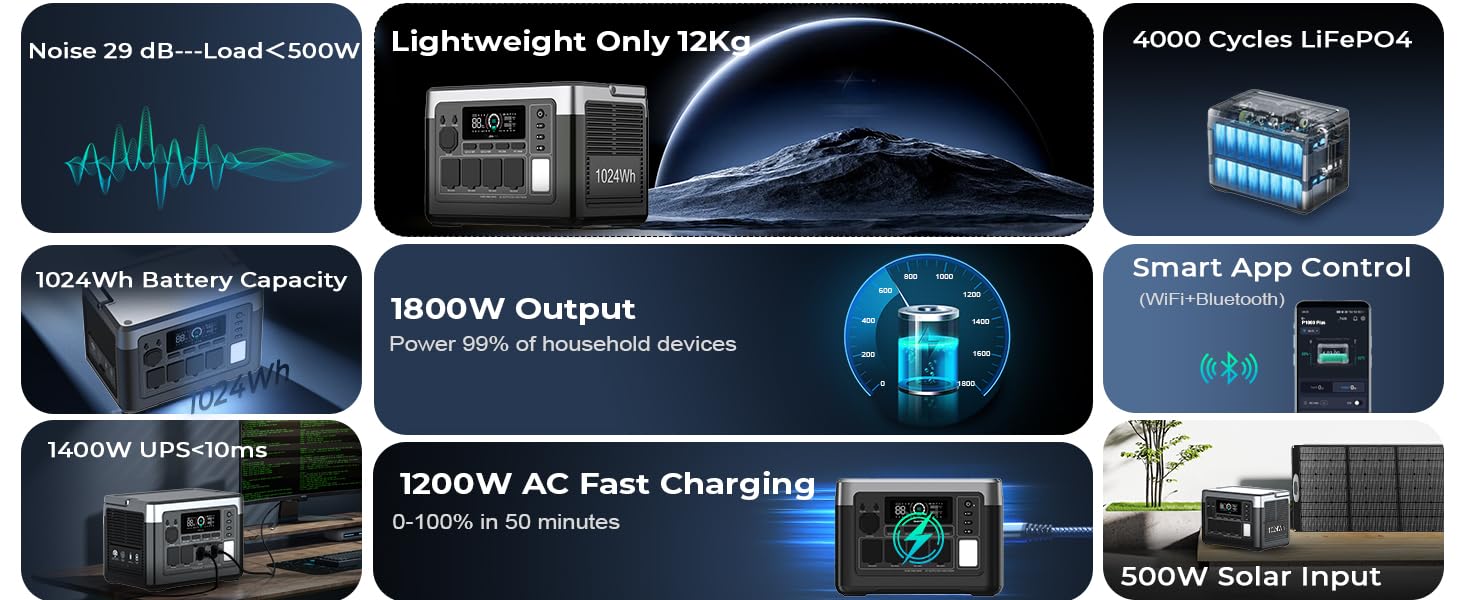
Image: The power station utilizing both AC and solar panel inputs for rapid charging.
Carregamento do carro:
Connect the car charging cable to your vehicle's 12V cigarette lighter socket and the unit's input port. This method is suitable for charging on the go.
6. Controle de aplicativos
The OUKITEL P1000 PLUS can be controlled and monitored using the OUKITEL smartphone application. This allows for remote management and real-time data access.
Conectando-se ao aplicativo:
- Download the OUKITEL app from your device's app store.
- Certifique-se de que o Bluetooth e o Wi-Fi estejam ativados em seu smartphone.
- Open the app and follow the on-screen instructions to pair with your P1000 PLUS.
Recursos do aplicativo:
- Monitor real-time battery level, input/output power, and charging status.
- Adjust AC charging power.
- Control individual output ports.
- View temperature and other operational data.

Image: A user interacting with the OUKITEL app on a smartphone to manage the power station.
7. Função UPS (Uninterruptible Power Supply - Fonte de Alimentação Ininterrupta)
The OUKITEL P1000 PLUS features a 0.01-second Uninterruptible Power Supply (UPS) function. When connected to an AC wall outlet and simultaneously powering devices, the unit can automatically switch to battery power in the event of a power outage, garantindo o funcionamento contínuo de dispositivos eletrônicos conectados.
How to Use UPS:
- Connect the P1000 PLUS to an AC wall outlet using the AC charging cable.
- Connect your critical devices (e.g., computers, medical equipment) to the AC output ports of the P1000 PLUS.
- In case of a power failure, the P1000 PLUS will automatically provide power from its internal battery to the connected devices with minimal interruption.
This feature is ideal for protecting sensitive electronics from data loss or disruption during unexpected power interruptions.

Image: The power station acting as a UPS, keeping essential home appliances running during a power interruption.
8. Manutenção e armazenamento
Manutenção geral:
- Limpe o aparelho com um pano seco e macio. Não utilize produtos de limpeza abrasivos ou solventes.
- Regularly check ports for dust or debris and clean if necessary.
- Evite deixar cair ou submeter a unidade a impactos fortes.
Armazenar:
- Store the unit in a cool, dry place, away from direct sunlight and heat sources.
- For long-term storage, charge the unit to approximately 50-80% every 3 months to prolong battery life.
- Avoid storing the unit in environments with extreme temperatures (below 0°C or above 40°C).

Image: An illustration of the advanced battery technology and BMS for safety and longevity.
9. Solução De Problemas
If you encounter issues with your OUKITEL P1000 PLUS, refer to the following common problems and solutions:
| Problema | Possível causa | Solução |
|---|---|---|
| A unidade não liga | Battery is depleted; Power button not pressed long enough. | Carregue o aparelho; pressione e segure o botão liga/desliga por 3 segundos. |
| Sem saída nas portas CA | Saída CA não ativada; proteção contra sobrecarga acionada. | Pressione o botão de alimentação CA; reduza a carga conectada e, em seguida, reinicie a saída CA. |
| Carregamento lento via energia solar. | Luz solar insuficiente; Painéis com ângulo inadequado; Painéis sujos. | Ensure direct sunlight; Adjust panel angle; Clean panels. |
| Problemas de conexão do aplicativo | Bluetooth/Wi-Fi off; App not updated; Unit too far from phone. | Enable Bluetooth/Wi-Fi; Update app; Move phone closer to unit. |
If the problem persists, please contact OUKITEL customer support.
10. Especificações
Detailed technical specifications for the OUKITEL P1000 PLUS:
| Recurso | Especificação |
|---|---|
| Modelo | P1000 MAIS |
| Tipo de Bateria | LiFePO4 |
| Capacidade | 1024 Wh |
| Saída CA | 1800W (Continuous), 3600W (Peak), 120V |
| Saída USB-A | 2 x Quick Charge 3.0 |
| Saída USB-C | 1 x PD 20W, 1 x PD 100W |
| Saída DC | 2 x DC5521, 1 x Cigarette Lighter Port |
| Entrada CA | 1200W Max |
| Entrada Solar | 500W Max |
| Tempo de comutação do UPS | 0.01s |
| Dimensões (C x L x A) | 11.42" x 6.7" x 7.87" |
| Peso | 13.2 libras (6 kg) |
| Temperatura de operação | 0°C a 40°C (32°F a 104°F) |
11. Garantia e Suporte
The OUKITEL P1000 PLUS comes with a 5-year warranty, ensuring reliable service and peace of mind. This warranty covers defects in materials and workmanship under normal use.
Suporte ao cliente:
For technical assistance, warranty claims, or any questions regarding your OUKITEL P1000 PLUS, please contact our dedicated customer support team. You can find contact information on our official website or through the OUKITEL app.
- Suporte online: Visita www.oukitel.com para perguntas frequentes e recursos de suporte.
- Suporte por e-mail: Consulte a embalagem do produto ou o manual oficial. website para o endereço de e-mail de suporte.


