Introdução
The Alesis Nitro Ultimate is a nine-piece electronic drum kit designed to provide a realistic and responsive drumming experience. It features dual-zone mesh pads for quiet practice, dual-zone cymbals with choke functionality, a stand-mounted hi-hat controller, and a mesh kick drum tower with a kick pedal. This manual provides essential information for setting up, operating, maintaining, and troubleshooting your Nitro Ultimate kit.

Image: A drummer actively playing the Alesis Nitro Ultimate kit, demonstrating its immersive experience.
Configurar
Carefully unpack all components of your Alesis Nitro Ultimate kit. The kit includes a sturdy, reinforced 4-post rack, mesh drum pads (snare, toms, kick), dual-zone cymbals (ride, crashes), and a stand-mounted hi-hat controller. Follow the assembly instructions provided in the Quickstart Guide included in your packaging to correctly set up the drum rack and mount all pads and cymbals.
- Mesh Pads: The ultra-quiet Alesis mesh heads provide a responsive playing surface. Ensure they are securely mounted to the rack.
- Pratos: The 10-inch dual-zone cymbals (ride and crashes) feature choke functionality. Position them for comfortable reach.
- Chimbau: The stand-mounted hi-hat controller allows for expressive playing. Note that a traditional hi-hat stand is sold separately and is required for full functionality.
- Bumbo: The mesh kick drum tower should be placed on a stable surface, and the included kick pedal attached.
- Cabeamento: Use the provided DB25-pin connector snake cable to connect the pads and cymbals to the Nitro Ultimate Drum Module. Ensure all connections are secure.

Image: Detailed diagram illustrating the various components of the Alesis Nitro Ultimate kit and their placement.

Image: The Alesis Nitro Ultimate kit assembled, highlighting the adjustable steel rack and included accessories.
Video: Alesis Nitro Ultimate Launch Promo
Vídeo: Um vídeo promocional oficial apresentadoasing the Alesis Nitro Ultimate Electric Drum Set in action, demonstrating its features and sound.
Operacional
The Nitro Ultimate Drum Module is the central control unit for your drum set. It comes pre-loaded with 52 kits and over 640 authentic BFD sounds, offering a wide range of sonic possibilities.
- Seleção de som: Use the module's interface to browse and select different drum kits and individual sounds.
- Conectividade Bluetooth: Connect your smartphone or tablet via Bluetooth to play along with your favorite songs or educational videos.
- MIDI USB: Utilize the USB MIDI connection for integration with virtual instruments and recording software on your computer.
- Entrada auxiliar: An 1/8-inch stereo aux input allows you to connect external audio devices.
- Saída de fone de ouvido: Practice privately using the 1/8-inch stereo headphone output.
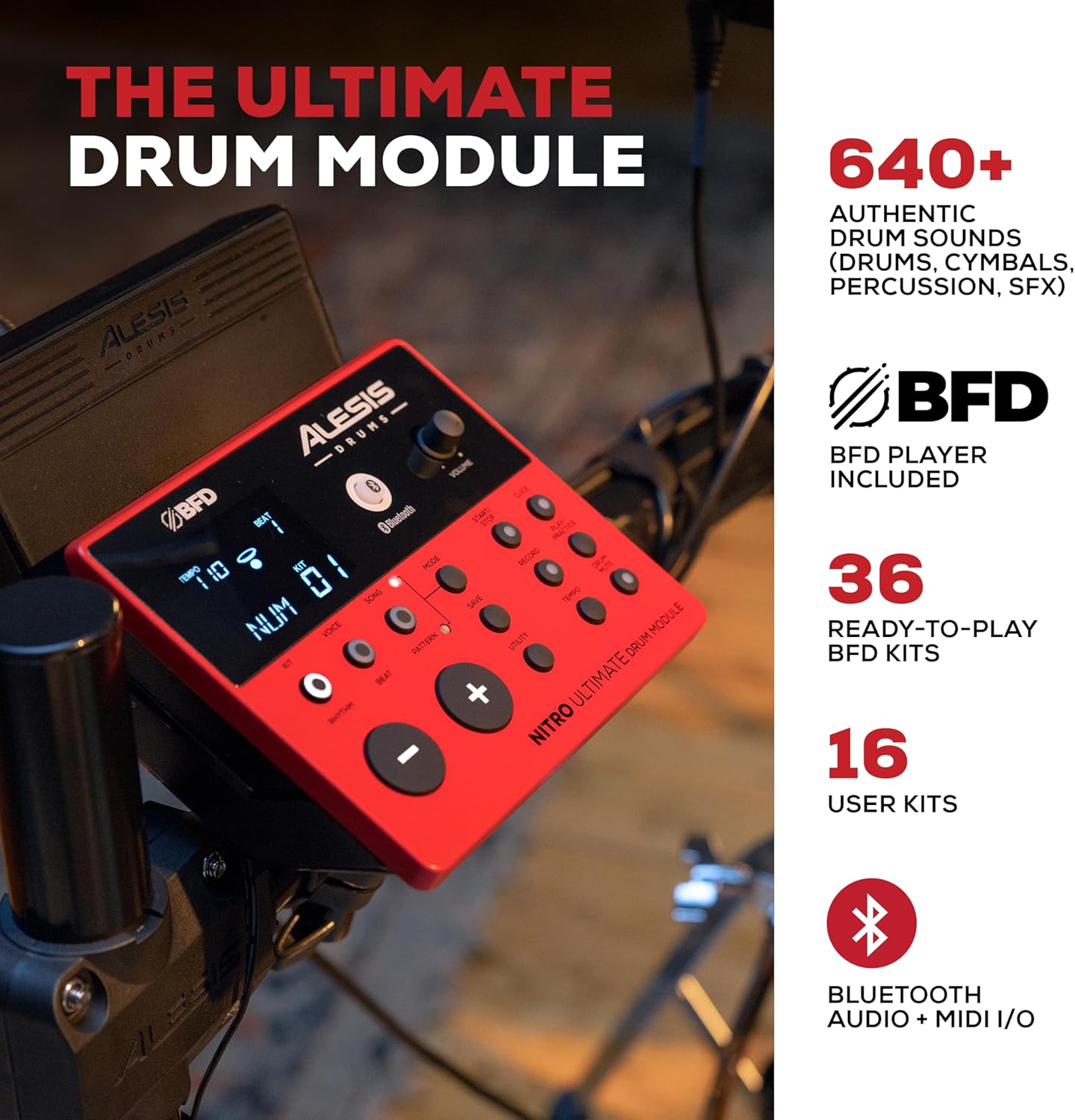
Image: The Alesis Nitro Ultimate Drum Module, detailing its controls and display for sound selection and kit management.

Imagem: Uma imagem clara view of the module's connectivity options, including trigger inputs, audio outputs, and USB MIDI.
Video: Practice Anytime | Alesis Drum Set
Video: A short demonstration highlighting the convenience and quietness of practicing with the Alesis Nitro Ultimate drum set at home.
Manutenção
Proper maintenance ensures the longevity and optimal performance of your Alesis Nitro Ultimate drum set.
- Limpeza: Use a soft, dry cloth to wipe down the drum module, pads, and cymbals. Avoid abrasive cleaners or solvents.
- Tensão da cabeça da malha: The mesh heads are tension-adjustable. Use the included drum key to adjust the tension to your preference. Do not overtighten.
- Gerenciamento de cabos: Keep all cables neatly organized and secured to the rack to prevent damage and ensure reliable connections.
- Armazenar: When not in use for extended periods, store the drum set in a dry, temperature-controlled environment away from direct sunlight.

Image: A close-up of an Alesis mesh drum head, illustrating its texture and design.
Solução de problemas
If you encounter issues with your Alesis Nitro Ultimate, refer to the following common troubleshooting tips:
- Sem som: Ensure the power adapter is securely connected and the module is turned on. Check all cable connections from the pads/cymbals to the module. Verify that headphones or speakers are properly connected and their volume is adjusted.
- Pad/Cymbal Not Responding: Check the cable connection for the specific pad or cymbal. If the issue persists, try unplugging and re-plugging the cable into the module. Ensure the pad/cymbal is not damaged.
- Hi-Hat Issues: If the hi-hat is not responding correctly or spinning on its stand, ensure all clamps are tightened sufficiently. If using a separate hi-hat stand, confirm it is compatible and properly assembled.
- Problemas de conexão Bluetooth: Ensure the drum module's Bluetooth is enabled and your device is in pairing mode. Try restarting both the module and your device.
- Movimento indesejado: If pads or cymbals move during play, ensure all clamps and wing nuts on the rack are securely tightened.
For more detailed troubleshooting or persistent issues, please consult the full manual available on the Alesis webou entre em contato com o suporte ao cliente da Alesis.
Especificações
| Número do modelo | NITROULTIMTKIT |
| Peso do item | 57.9 libras |
| Dimensões do produto | 17.76 x 53.15 x 55.08 polegadas |
| Tipo de material | Malha |
| Conectividade | Bluetooth, USB MIDI, 1/8" TRS Aux In, 1/8" Stereo Headphone Out, 2x TRS Main Outs |
| Kits de bateria | 52 Pre-set Kits, 16 User Kits |
| Sons | Over 640 Authentic BFD Sounds |
Informações de garantia
Warranty details for the Alesis Nitro Ultimate Electric Drum Set are typically included in the product packaging. Please refer to the 'Safety & Warranty Manual' provided with your kit for specific terms, conditions, and registration information. You can also find the most up-to-date warranty information on the official Alesis website.
Apoiar
For additional assistance, resources, and educational content, consider the following support options:
- Drumeo Lessons: Your purchase includes 90-day access to interactive Drumeo lessons, featuring content from over 200 drummers. Activate your access using the Drumeo Drum Lessons Card included in your kit.
- BFD Player Software: The kit comes with the BFD Player Software, including the BFD Player Core Library and Dark Mahogany Expansion Pack. Follow the instructions for software installation and authorization.
- Recursos on-line: Visit the official Alesis weblocal (www.alesis.com) for product registration, FAQs, software downloads, and additional support documentation.
- Suporte ao cliente: If you require direct technical support or have questions not covered in this manual, please contact Alesis customer service through their website.

Image: A drummer engaging with Drumeo lessons on a tablet, demonstrating the integrated learning experience.

Image: The BFD Player software running on a laptop, showcasing its interface and sound library integration.