1. Introdução
The DNT Optics HS650 Hydra is a versatile multi-function thermal device designed for various applications. It can operate as a standalone thermal scope, a clip-on thermal attachment for existing optics, or a handheld thermal monocular. This manual provides essential information for the proper setup, operation, and maintenance of your HS650 Hydra device.
2. Produto acabadoview
2.1 Principais Características
- Versatilidade 3 em 1: Functions as a standalone scope, clip-on attachment, and handheld monocular.
- Elite Thermal Imaging: Features a 12 µm, ≤18 mK uncooled infrared sensor with a 640×512 resolution and 50mm objective lens.
- AI-Powered Image Super Resolution (ISR): Enhances image clarity and detail, especially at higher digital zoom levels.
- Construção robusta: IP67-rated for waterproof and dustproof protection, shock-resistant housing handles recoil up to .50BMG.
- DNT App Connectivity: Connects to your smartphone for live feed viewing, management, editing, and sharing of content.
2.2 Conteúdo da embalagem
Verifique se todos os itens estão presentes em sua embalagem:
- HS650 Thermal Scope ×1
- PMS (Picatinny 0 MOA Short) Mount ×1
- Eye Cup ×1
- Flip Up Cover ×1
- 18650 Flat Top Battery ×2
- Battery Charger ×1
- Cabo USB × 2
- Manual do usuário ×1
- Lens Cleaning Cloth ×1
2.3 Visual Overview


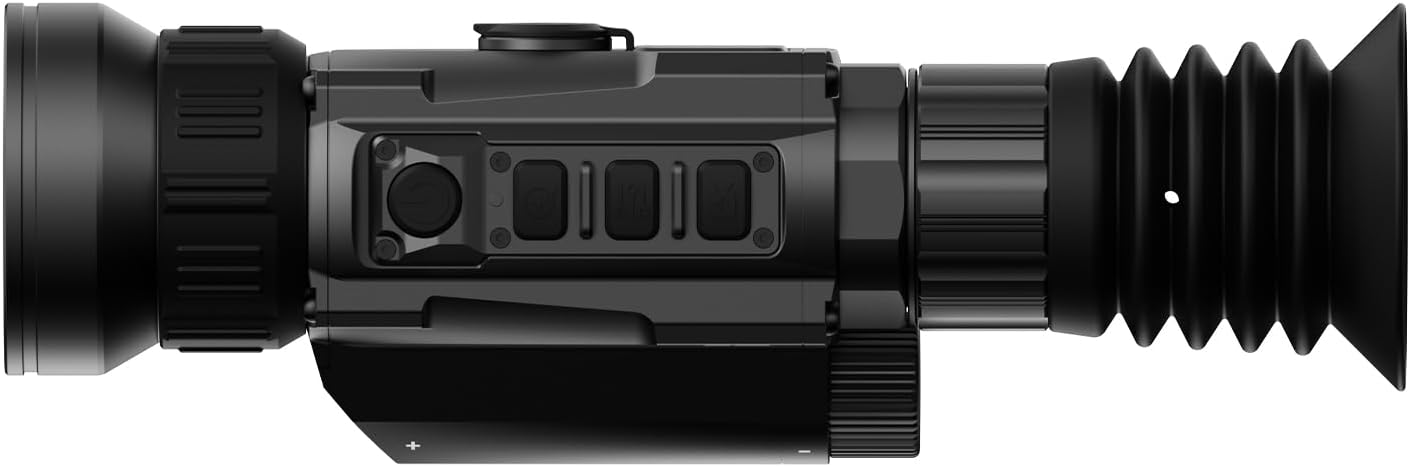


3. Configuração
3.1 Instalação da bateria
- Localize o compartimento da bateria no dispositivo.
- Insert two 18650 Flat Top Batteries, ensuring correct polarity.
- Feche bem o compartimento da bateria.
3.2 Opções de Montagem
The HS650 Hydra can be used in several configurations:
- Standalone Scope: Attach the provided PMS (Picatinny 0 MOA Short) mount to a compatible rail system. Ensure all screws are tightened to the recommended torque.
- Clip-on: Utilize an appropriate quick-detach mount (e.g., DNT QDM150 or QDS150, sold separately) to attach the device in front of your primary optic.
- Monóculo de mão: Use the device without any mounting for portable observation.
3.3 Inicialização e conexão do aplicativo
- Pressione e segure o botão liga/desliga para ligar o dispositivo.
- Download the DNT App on your smartphone.
- Follow the in-app instructions to connect your HS650 Hydra to your smartphone for live viewing and feature control.
4. Instruções de operação
4.1 Controles Básicos
Refer to the device's physical buttons for power, menu navigation, zoom, and recording functions. Detailed button assignments are available in the full user manual.
4.2 Modos de Imagem Térmica
The HS650 Hydra offers various thermal imaging modes to optimize viewing for different environments and preferences. These typically include:
- Natureza: Provides a balanced thermal view.
- Enhanced: Increases contrast for better detail recognition.
- Destaque: Emphasizes hot spots for quick target identification.
4.3 Image Super Resolution (ISR)
The AI-Powered Image Super Resolution (ISR) feature enhances image detail, especially when using digital zoom. This feature can be toggled on or off via the device menu or connected app.
4.4 Zoom Digital
The HS650 Hydra features a 2.5x base magnification with digital zoom capabilities up to 10x. Use the designated zoom buttons to adjust magnification levels.
4.5 Vídeo ativado por recuo
The device supports Recoil Activated Video recording, which automatically captures footage when recoil is detected. This ensures important moments are recorded without manual intervention.
5. Manutenção
5.1 Limpeza
- Use the provided lens cleaning cloth to gently wipe the objective and eyepiece lenses. Avoid abrasive materials.
- Para o corpo do dispositivo, use um material macio e damp pano para remover sujeira e resíduos.
5.2 Proteção Ambiental
The HS650 Hydra is IP67-rated, meaning it is protected against dust ingress and can withstand immersion in water up to 1 meter for 30 minutes. While robust, avoid unnecessary exposure to extreme conditions.
5.3 Armazenamento
Guarde o dispositivo em local fresco e seco, longe da luz solar direta e de temperaturas extremas. Remova as pilhas se for armazená-lo por longos períodos.
6. Solução De Problemas
If you encounter issues with your DNT Optics HS650 Hydra, consider the following:
- Dispositivo não liga: Check battery charge and ensure batteries are inserted with correct polarity.
- Má qualidade de imagem: Ensure lenses are clean. Adjust focus and brightness settings. Verify ISR is enabled if desired.
- Problemas de conectividade do aplicativo: Ensure Bluetooth/Wi-Fi is enabled on your smartphone and the device. Restart both the device and the app.
- Mounting stability: Verifique novamente se todos os parafusos de fixação estão devidamente apertados.
For further assistance, please contact DNT Optics customer support.
7. Especificações
| Marca | Óptica DNT |
| Nome do modelo | HS650 |
| Estilo | 640-50 |
| Cor | Preto |
| Dimensões do produto | 8.4"C x 2.7"L x 2.2"A |
| Peso do item | 1.02 libras (16.3 onças) |
| Material | Metal or High-Quality Plastic |
| Diâmetro da lente objetiva | 68.58 milímetros |
| Ampliação Mínima | 2.5 x |
| Dispositivos compatíveis | Rifle, espingarda, pistola |
| Tipo de montagem | PMS - Picatinny 0 MOA Short |
| Visão noturna | No (Thermal Imaging) |
| Tipo de retículo | Digital |
8. Garantia e Suporte
For information regarding product warranty, returns, or technical support, please refer to the official DNT Optics website ou entre em contato diretamente com o serviço de atendimento ao cliente. Os detalhes de contato geralmente podem ser encontrados na embalagem do fabricante ou website.
You can visit the DNT Optics Store for more information: Loja de Ótica DNT