1. Produto acabadoview
The KLIM Cassette Player Boombox is a versatile audio device combining classic cassette playback with modern features like AM/FM radio, Bluetooth connectivity, and USB playback/recording. Its portable design allows for use at home or on the go.
Principais características:
- Leitor e gravador de cassetes
- Sintonizador de rádio AM/FM
- Bluetooth Connectivity for wireless streaming
- USB Port for MP3 playback and recording
- Integrated Microphone for direct recording
- Headphone Jack for private listening
- Dual Power: AC power cord or 4 x C-type batteries (not included)
- Portable design with a carrying handle
O que está na caixa:
- KLIM Cassette Player Boombox
- Cabo de alimentação CA
- Manual do usuário

Figura 1: Frente view of the KLIM Cassette Player Boombox, showcasing its controls and cassette compartment.
2. Configuração
Ligando o dispositivo:
The KLIM Cassette Player Boombox can be powered in two ways:
- Alimentação CA: Connect the included AC power cord to the device's power input and then to a standard wall outlet.
- Potência da bateria: For portable use, insert 4 x C-type batteries (not included) into the battery compartment located on the underside of the device. Ensure correct polarity.

Figura 2: Parte inferior view showing the battery compartment for portable power.
3. Instruções de operação
3.1. Cassette Player/Recorder
- Slide the function selector to 'TAPE'.
- Press the 'OPEN' button to open the cassette compartment.
- Insert a cassette tape with the open side facing up.
- Feche o compartimento da cassete.
- Use the 'PLAY', 'STOP/EJECT', 'FFWD' (Fast Forward), and 'REW' (Rewind) buttons to control playback.
- To record, ensure a blank tape is inserted. Press the 'REC' button to start recording from the built-in microphone, radio, or USB.

Figura 3: parte superior view of the boombox with a cassette tape inserted into the compartment.
3.2. Rádio AM/FM
- Slide the function selector to 'RADIO'.
- Estenda a antena telescópica para obter a melhor recepção.
- Use the 'BAND' switch to select between AM and FM frequencies.
- Rotate the 'TUNING' knob to find your desired radio station.
3.3. Conectividade Bluetooth
- Slide the function selector to 'BT' (Bluetooth).
- The device will enter pairing mode, indicated by a flashing light or audible prompt.
- No seu smartphone ou tablet, ative o Bluetooth e procure os dispositivos disponíveis.
- Select 'KLIM Cassette Player' (or similar name) from the list to pair.
- Após o emparelhamento, você poderá transmitir áudio sem fio do seu dispositivo.
3.4. Reprodução e gravação via USB
- Slide the function selector to 'USB'.
- Insira um pen drive USB contendo arquivos de áudio MP3. files na porta USB.
- The device will automatically begin playing the audio files. Use the playback controls (play/pause, skip) to navigate.
- To record to USB, ensure a USB drive is inserted. Press the 'REC' button while in radio or cassette mode to record the audio source directly to the USB drive.
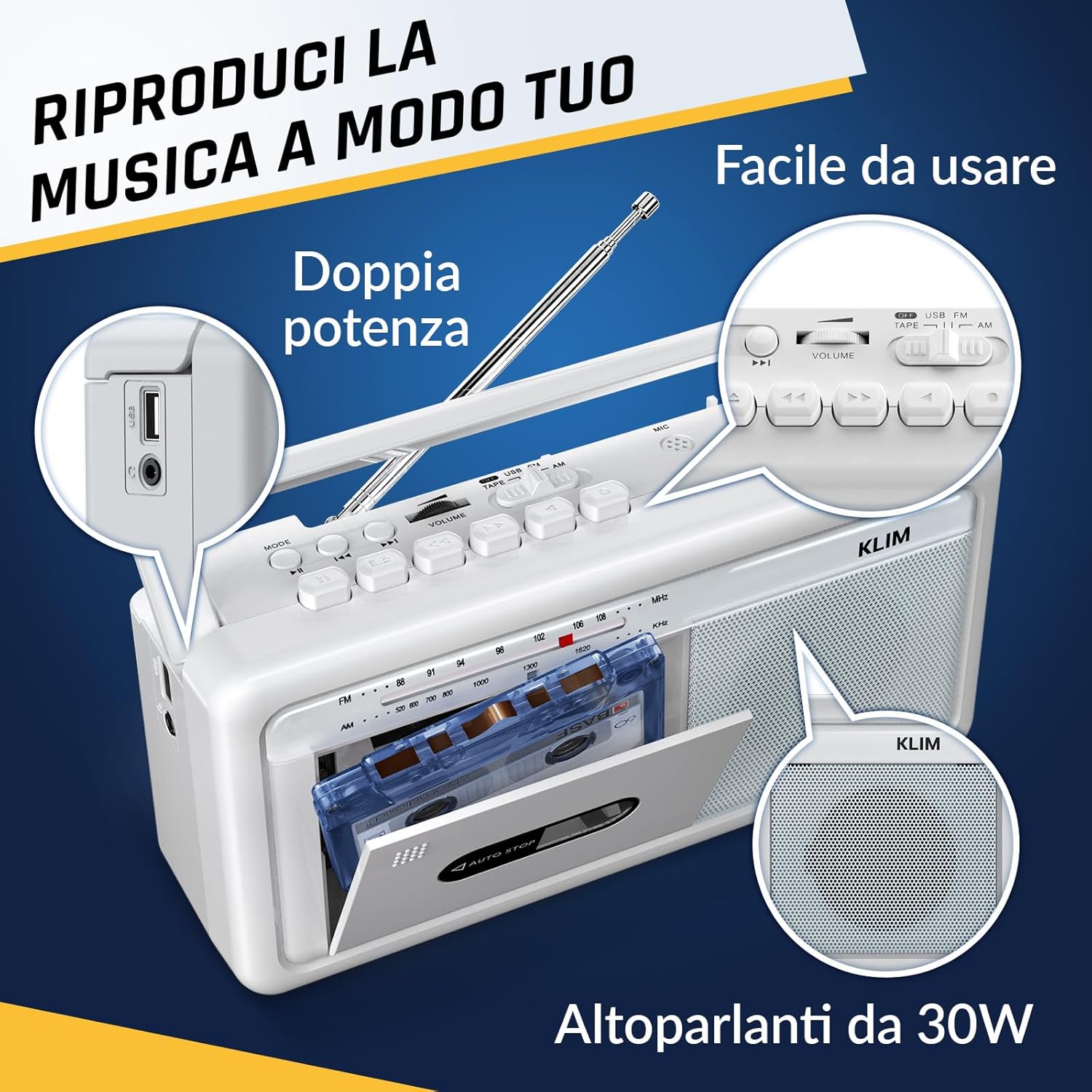
Figura 4: Lateral view highlighting the USB port for media playback and recording.
3.5. Uso de fones de ouvido
Connect standard 3.5mm headphones to the headphone jack for private listening. The internal speakers will automatically mute when headphones are connected.
Video 1: Instructions on how to record a tape to USB using the WTB-795 model. This video demonstrates the USB recording functionality.
Vídeo 2: Acabouview of a retro cassette player with USB, Bluetooth, and AM/FM radio features, similar to the KLIM Cassette Player Boombox.
4. Manutenção
- Mantenha o dispositivo limpo, passando um pano macio e seco. Evite usar produtos de limpeza líquidos ou solventes.
- Regularly clean the cassette head and pinch rollers with a cotton swab lightly dampFinalizado com álcool isopropílico para garantir a melhor qualidade de som e evitar danos à fita.
- Keep the device away from direct sunlight, heat sources, and excessive dust or moisture.
- Quando não estiver em uso por longos períodos, remova as pilhas para evitar vazamentos.
5. Solução De Problemas
| Problema | Solução possível |
|---|---|
| Sem energia | Check if the AC power cord is securely connected. If using batteries, ensure they are inserted correctly and are not depleted. |
| Não há som nos alto-falantes | Increase the volume. Ensure headphones are not connected. Check the function selector is in the correct mode (TAPE, RADIO, BT, USB). |
| Má recepção de rádio | Extend the telescopic antenna fully. Adjust the antenna direction. Try moving the unit to a different location. |
| Fita cassete não está reproduzindo/gravando | Ensure the tape is inserted correctly. Check if the tape is damaged. Clean the cassette head and pinch rollers. |
| Bluetooth não conecta | Ensure the unit is in Bluetooth mode. Make sure your device's Bluetooth is enabled and within range. Try unpairing and re-pairing the device. |
| problemas de reprodução via USB | Certifique-se de que a unidade USB esteja formatada corretamente (FAT32) e contenha áudio compatível. files (MP3, WAV, WMA, AAC, FLAC). Try a different USB drive. |
6. Especificações
- Marca: KLIM
- Modelo: Tocador de cassetes
- Dimensões do produto: 25 x 13.1 x 7.6 cm
- Peso do item: 1 kg
- Dispositivos compatíveis: Reprodutor de MP3, Smartphone, Tablet
- Modo de saída de áudio: Estéreo
- Formatos de áudio suportados: Cassette, Analog Radio, MP3, WAV, WMA, AAC, FLAC, Bluetooth
- Fonte de energia: Corded Electric (AC) / 4 x C-type Batteries (not included)
- Tecnologia de conectividade: USB, Bluetooth
- Cor: Branco Gelo
- Número do item: KLSIN4825
7. Garantia e suporte
The KLIM Cassette Player Boombox comes with a Garantia de 5 ano. For any questions, technical assistance, or warranty claims, please contact KLIM customer support. Our team is available 24/7 to assist you.
Please refer to the contact information provided in your product packaging or visit the official KLIM website para mais detalhes.


