1. Introdução
This manual provides essential information for the safe and efficient operation of your Thomson 43FT2S15 FHD LED Smart TV. Please read this manual thoroughly before using the television and retain it for future reference.
2. Informações de segurança
Siga sempre as precauções básicas de segurança ao usar este produto para reduzir o risco de incêndio, choque elétrico e ferimentos.
- Não exponha a TV à chuva ou umidade.
- Não bloqueie as aberturas de ventilação.
- Assegure-se de que o cabo de alimentação esteja devidamente aterrado.
- Não coloque a TV sobre um carrinho, suporte, tripé, braçadeira ou mesa instáveis.
- Desligue a TV da tomada durante tempestades com raios ou quando não for utilizá-la por longos períodos.
- Deixe toda a manutenção a cargo de pessoal qualificado.
3. Conteúdo da embalagem
Verifique se todos os itens listados abaixo estão incluídos em seu pacote:
- Thomson 43FT2S15 FHD LED Smart TV
- Adaptador de energia
- Controle remoto
- Manual do usuário (este documento)
- Cartão de garantia

Imagem: Frente view of the Thomson 43FT2S15 Smart TV.
4. Configuração
4.1 Instalação Física
The Thomson 43FT2S15 TV is designed for table mounting. Ensure the TV is placed on a stable, flat surface.

Image: Diagram showing the dimensions of the Thomson 43FT2S15 Smart TV. The screen size is 109 cm (43 inches) diagonally, with a width of 95 cm and height of 60 cm (including stand). The depth is 6 cm.
Dimensões (L x A x P): 95 cm x 60 cm x 6 cm (without stand, depth is 6 cm). The screen diagonal is 109 cm (43 inches).
4.2 Conectando Dispositivos
Connect your external devices to the appropriate ports on the TV. Refer to the diagram below for port locations.
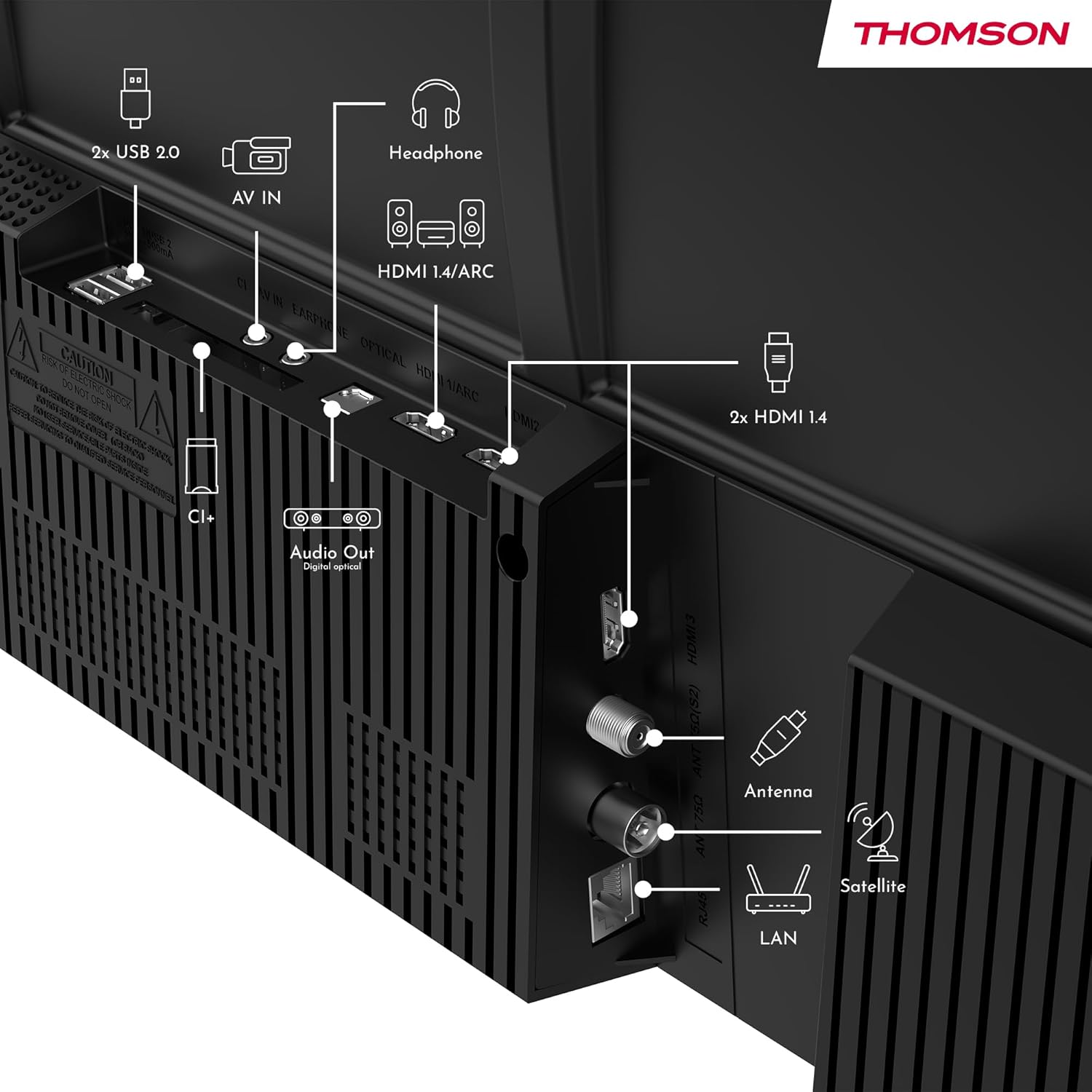
Imagem: Traseira view of the Thomson 43FT2S15 Smart TV showing various connection ports. These include 2x USB 2.0, AV IN, Headphone out, HDMI 1.4/ARC, Optical Audio Out, CI+, Antenna (DVB-T2/C), Satellite (DVB-S2), and LAN (Ethernet).
- HDMI: Connect external devices like Blu-ray players, game consoles, or set-top boxes. The TV has 2 HDMI 1.4 ports, one with ARC support.
- USB: For connecting USB storage devices. The TV has 2 USB 2.0 ports.
- Antena/Satélite: Connect your terrestrial or satellite antenna for live TV.
- LAN (Ethernet): Para uma conexão de internet com fio.
- Wi-fi: Para conexão de internet sem fio.
- Bluetooth: Para conectar acessórios sem fio compatíveis.
- Saída de áudio (óptica): For connecting to an external sound system.
- Fone de ouvido: Para conectar fones de ouvido.
- Slot CI+: For inserting a Conditional Access Module (CAM) for encrypted channels.
5. Instruções de operação
5.1 Ligar/Desligar
Connect the power adapter to the TV and a power outlet. Press the power button on the remote control to turn the TV on or off.
5.2 Sistema Operacional TiVo e Recursos Inteligentes
Your Thomson Smart TV is powered by TiVo OS, which integrates live TV, streaming applications, and on-demand services into a single, intuitive interface. Personalized recommendations help you discover new content.

Image: The Thomson Smart TV displaying the TiVo OS interface with various streaming apps like Netflix, Canal+, Prime Video, YouTube, and Disney+.
5.3 Controle de voz
Use the TiVo Voice Control feature to navigate channels, open applications, or search for content across different platforms using voice commands. The remote control includes a microphone for this function.

Image: The Thomson Smart TV remote control highlighting the voice control microphone, backlit buttons, and direct access buttons for streaming services.
5.4 Wireless Display
Mirror content from your smartphone, tablet, or laptop to the TV screen using the Wireless Display function. This allows for easy sharing of videos, photos, and applications.
5.5 Melhorias de áudio e vídeo
- Áudio Dolby: Experience enhanced sound quality with Dolby Audio, providing clear dialogue and immersive, multi-dimensional effects.

Image: A Thomson Smart TV displaying content with visual representations of sound waves, indicating the Dolby Audio feature.
- HDR10: Enjoy sharper contrast and lifelike colors with HDR10 technology, revealing details in both bright highlights and deep shadows.

Image: A split-screen comparison showing the difference between SDR (Standard Dynamic Range) and HDR10 (High Dynamic Range) image quality on a Thomson Smart TV, demonstrating improved contrast and color.
5.6 Controle Remoto
The ergonomic remote control features backlit buttons for easy navigation in low light conditions. It also includes direct access buttons for popular streaming services such as Netflix, YouTube, Prime Video, Disney+, and Canal+.
6. Manutenção
Para garantir a longevidade e o desempenho ideal da sua TV, siga estas orientações de manutenção:
- Limpando a tela: Limpe a tela delicadamente com um pano macio e sem fiapos. Para manchas persistentes, use um produto de limpeza específico para telas de TV, aplicando-o no pano e não diretamente na tela.
- Limpando o Gabinete: Use um pano macio e seco para limpar o móvel da TV. Não use produtos de limpeza abrasivos ou solventes.
- Ventilação: Certifique-se de que as aberturas de ventilação na parte traseira da TV não estejam bloqueadas para evitar superaquecimento.
- Cabo de alimentação: Verifique regularmente se o cabo de alimentação apresenta danos. Caso esteja danificado, entre em contato com pessoal de serviço qualificado para a substituição.
7. Solução De Problemas
Se você tiver problemas com sua TV, consulte as etapas de solução de problemas comuns a seguir:
- Sem energia:
- Verifique se o cabo de alimentação está firmemente conectado à TV e à tomada.
- Ensure the power outlet is functioning by plugging in another device.
- Tente pressionar o botão liga/desliga na própria TV, e não apenas no controle remoto.
- Sem imagem/som:
- Verify that the correct input source is selected (e.g., HDMI 1, Antenna).
- Verifique todas as conexões de cabos entre a TV e os dispositivos externos.
- Adjust the volume and ensure the TV is not muted.
- Controle remoto não funciona:
- Substitua as pilhas do controle remoto.
- Certifique-se de que não haja obstruções entre o controle remoto e o sensor infravermelho da TV.
- Smart TV Features Not Working (Wi-Fi/Apps):
- Check your internet connection. Restart your router if necessary.
- Go to the TV's network settings to ensure it's connected to Wi-Fi or Ethernet.
- Tente reiniciar a TV.
For more complex issues, please contact customer support or refer to the manufacturer's website.
8. Especificações
Key technical specifications for the Thomson 43FT2S15 FHD LED Smart TV:
| Recurso | Especificação |
|---|---|
| Marca | Thomson |
| Modelo | 43FT2S15 |
| Tamanho da tela | 43 polegadas (109 cm) |
| Tecnologia de exibição | LIDERADO |
| Resolução | 1920 x 1080 (Full HD) |
| Taxa de atualização | 60 Hz |
| Proporção da tela | 16:9 |
| Sistema operacional | TiVo OS |
| Tecnologia de Áudio | Dolby Audio (Dolby Atmos encoding) |
| Suporte HDR | HDR10 |
| Conectividade | Wi-Fi, Ethernet, Bluetooth, 2x HDMI 1.4 (1x ARC), 2x USB 2.0, Optical Audio Out, AV In, Headphone, CI+ |
| Afinadores | DVB-T2/C/S2 (Sintonizador Triplo) |
| Serviços de Internet suportados | Netflix, YouTube, Prime Video, Disney+, Canal+, Browser |
| Dimensões (produto) | 6 x 95 x 60 cm; 6.5 kg |
| Classe de Eficiência Energética | E |

Image: Energy efficiency label for the Thomson 43FT2S15 Smart TV, showing an energy class of E and energy consumption of 42 kWh/1000h (SDR) and 46 kWh/1000h (HDR).
Para informações detalhadas sobre o produto, consulte o banco de dados EPREL: https://eprel.ec.europa.eu/qr/1969521
9. Garantia e Suporte
Your Thomson 43FT2S15 TV comes with a warranty. Please refer to the included Warranty Card for specific terms and conditions.
For technical support or service inquiries, please contact the manufacturer:
- Fabricante: Fluxoview GmbH
- Website: www.streamview.com
- E-mail: contato@streamview.com
- Telefone: +4318900066
Please have your model number (43FT2S15) and purchase information ready when contacting support.