Informações importantes de segurança
Please read all safety instructions carefully before using your new television. Keep this manual for future reference. Always follow basic safety precautions to reduce the risk of fire, electric shock, and injury.
- Não exponha a TV à chuva ou umidade.
- Não abra a TV casing; encaminhe todos os serviços de manutenção para pessoal qualificado.
- Garanta ventilação adequada ao redor da TV.
- Proteja o cabo de alimentação para que não seja pisado ou comprimido.
- Desligue a TV da tomada durante tempestades com raios ou quando não for utilizá-la por longos períodos.
1. Configuração
1.1 Desembalagem e Inspeção Inicial
Carefully remove the television and all accessories from the packaging. Check for any damage. The package should include:
- THOMSON 24HT2S15 Smart TV
- Controle remoto
- Adaptador de energia
- Manual do usuário (este documento)
- Cartão de garantia
- Suportes para TV (2 peças) e parafusos
1.2 Instalação dos suportes de TV
Place the TV face down on a soft, flat surface to prevent screen damage. Attach the two stand feet to the designated slots on the bottom of the TV using the provided screws. Ensure they are securely fastened. The adjustable feet allow for two positions (60 cm or 30 cm apart) to fit your furniture.


1.3 Conectando dispositivos externos
Refer to the diagram below for available ports and connect your devices accordingly.
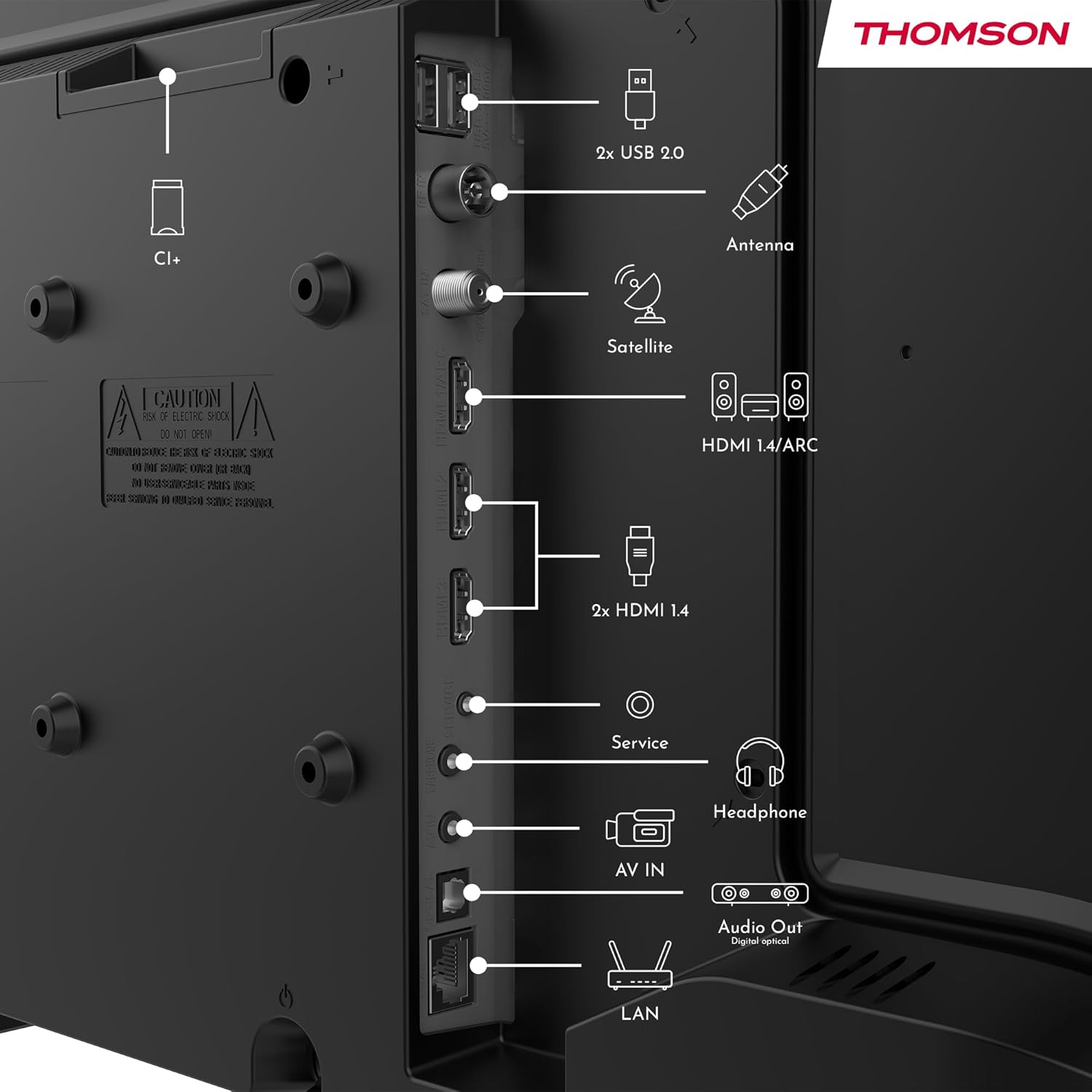
- Poder: Connect the power adapter to the TV and then to a power outlet.
- Antena/Satélite: Connect your terrestrial antenna or satellite dish cable to the respective inputs.
- HDMI: Use cabos HDMI para conectar dispositivos como reprodutores de Blu-ray, consoles de jogos ou decodificadores. O HDMI 1.4/ARC suporta o Canal de Retorno de Áudio (ARC).
- USB: Insira unidades USB para reprodução de mídia ou atualizações de software.
- LAN (Ethernet): Conecte um cabo Ethernet para obter uma conexão de internet com fio.
- Fone de ouvido: Conecte fones de ouvido para ouvir com privacidade.
- Saída de áudio óptica digital: Connect to an external sound system for high-quality audio.
- ENTRADA AV: Para dispositivos mais antigos que utilizam cabos de vídeo composto e áudio estéreo.
- Slot CI+: Insert a Conditional Access Module (CAM) for encrypted digital channels.
2. Instruções de operação
2.1 First-Time Setup and TiVo System
Upon first power-on, the TV will guide you through the initial setup process. This includes language selection, network connection (Wi-Fi or Ethernet), and channel scanning. The integrated TiVo system provides a user-friendly interface that combines live TV and streaming applications, offering personalized recommendations.

2.2 Funções de controle remoto
The included remote control is backlit for easy use in low light and features direct access buttons for popular streaming services.

- Botão de energia: Liga ou desliga a TV.
- Botão de controle de voz: Activates the voice assistant for commands like searching for content or adjusting settings.
- Teclado de navegação (Cima/Baixo/Esquerda/Direita/OK): Navega pelos menus e seleciona as opções.
- Aumentar/diminuir volume: Ajusta o nível de som.
- Canal para cima/para baixo: Muda de canal na TV.
- Botões de acesso direto: One-touch access to Netflix, YouTube, Prime Video, Disney+, and Canal+.
- Voltar/Sair: Retorna à tela anterior ou sai do menu atual.

2.3 Wireless Display (Screen Mirroring)
The Wireless Display function allows you to project the screen of your smartphone, tablet, or computer onto the TV. This feature is convenient for sharing photos, videos, or presentations.

2.4 Configurações de áudio e imagem
Your TV supports Dolby Audio for rich and precise sound, enhancing dialogues and immersion. HDR10 technology provides more natural images with balanced contrast and faithful colors for a realistic viewexperiência.


Access the TV's settings menu to adjust picture modes (e.g., Standard, Dynamic, Movie), sound modes (e.g., Standard, Music, Movie), and other advanced options to customize your viewexperiência.
3. Manutenção
3.1 Limpeza da tela da TV
Limpe suavemente a tela com um pano macio e sem fiapos. Para manchas persistentes, esfregue levemente.ampLimpe o pano com água ou um produto de limpeza específico para telas. Nunca borrife líquido diretamente na tela.
3.2 Cleaning the TV Casing
Use um pano macio e seco para limpar a TV.asing. Avoid using abrasive cleaners, waxes, or solvents as they can damage the finish.
3.3 Cuidados com o Controle Remoto
Keep the remote control dry and clean. Replace batteries when necessary, ensuring correct polarity. If the remote will not be used for an extended period, remove the batteries to prevent leakage.
4. Solução De Problemas
Se você tiver problemas com sua TV, consulte os problemas e soluções comuns a seguir antes de entrar em contato com o suporte.
4.1 Sem energia
- Certifique-se de que o cabo de alimentação esteja firmemente conectado tanto à TV quanto à tomada.
- Verifique se a tomada elétrica está funcionando conectando outro dispositivo.
- Pressione o botão liga/desliga na própria TV, não apenas no controle remoto.
4.2 No Picture, But Sound is Present
- Check the input source. Press the "Source" button on your remote and select the correct input (e.g., HDMI 1, Antenna).
- Certifique-se de que todos os cabos (HDMI, antena) estejam firmemente conectados.
- Tente reiniciar a TV e todos os dispositivos conectados.
4.3 No Sound, But Picture is Present
- Verifique o nível de volume e certifique-se de que a TV não esteja no mudo.
- Verifique as configurações de áudio no menu da TV.
- Se estiver usando alto-falantes externos, certifique-se de que estejam devidamente conectados e ligados.
4.4 Controle remoto não funciona
- Substitua as pilhas por novas, certificando-se de que a polaridade esteja correta.
- Certifique-se de que não haja obstruções entre o controle remoto e o sensor infravermelho da TV.
- Aponte o controle remoto diretamente para a TV.
4.5 Problemas de conexão Wi-Fi
- Certifique-se de que seu roteador Wi-Fi esteja ligado e funcionando corretamente.
- Reinicie o roteador e a TV.
- Check the Wi-Fi password in the TV's network settings.
- Move the TV closer to the router or use a wired Ethernet connection if possible.
5. Especificações
| Número do modelo | 24HT2S15 |
| Tamanho da tela | 24 polegadas (60 cm) |
| Tecnologia de exibição | LIDERADO |
| Resolução | 768p (HD) |
| Taxa de atualização | 60 Hz |
| Proporção da tela | 16:9 |
| Características especiais | TiVo System with Voice Control, Dolby Audio, HDR10, Wireless Display, Backlit Remote with Direct Access Buttons |
| Conectividade | Wi-Fi, Ethernet, HDMI (x3, one with ARC), USB (x2), Antenna, Satellite, AV In, Digital Optical Audio Out, Headphone Out, CI+ |
| Dimensões (L x A x P) | 53 x 37 x 8 cm (sem suporte) |
| Peso | 3.33 kg |
| Componentes incluídos | Power Adapter, Remote Control, User Manual, Warranty Card |
| Fabricante | Fluxoview GmbH |
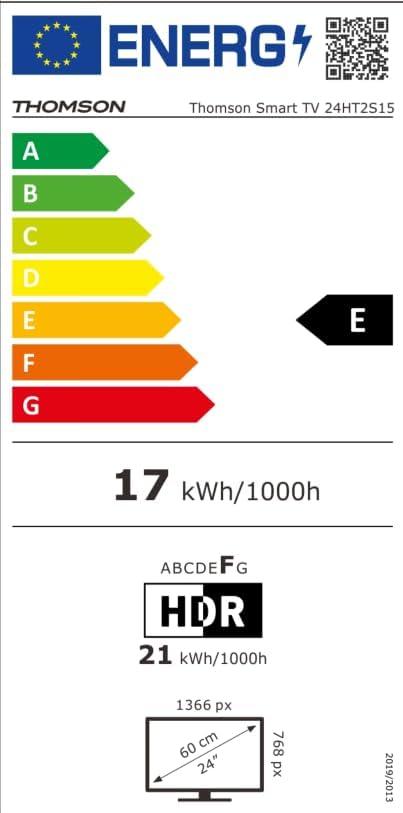
| Classe de Eficiência Energética | E |

6. Garantia e Suporte
Your THOMSON 24HT2S15 Smart TV comes with a warranty card included in the box. Please refer to this card for specific warranty terms and conditions applicable in your region.
For technical support, service, or warranty claims, please contact the manufacturer, Streamview GmbH, or your local authorized service center. Contact information can typically be found on the warranty card or the manufacturer's official website.
Fabricante: Streamview GmbH
Website: www.streamview.com


