1. Introdução
Thank you for choosing the Nillkin Pocket Foldable Wireless Keyboard. This manual provides essential information for setting up, operating, and maintaining your new keyboard. Please read it thoroughly before use to ensure proper functionality and to maximize your user experience.
2. Conteúdo da embalagem
Verifique se todos os itens estão presentes no seu pacote:
- Nillkin Pocket Foldable Wireless Keyboard
- Cabo de carregamento USB-C
- Manual do usuário (este documento)
- Bolsa de transporte
3. Produto acabadoview
The Nillkin Pocket Foldable Wireless Keyboard is designed for portability and versatility, featuring a full-size (small) layout, integrated touchpad, and numerical pad. It connects wirelessly via Bluetooth to multiple devices.

Image: The Nillkin Pocket Foldable Wireless Keyboard in its fully unfolded state, displaying the complete QWERTY layout alongside the integrated numerical pad and touchpad.
The keyboard features a durable organic silicone cover and magnetic folding mechanism, making it compact for travel. Its design includes dedicated function keys for media control and shortcuts, enhancing productivity across various operating systems.

Image: The keyboard in its compact, folded state, demonstrating its portability as it is easily stored in a bag.
4. Configuração
4.1 Carregando o teclado
Before first use, fully charge the keyboard using the provided USB-C cable. Connect the cable to the keyboard's USB-C port and a compatible power source (e.g., computer USB port, USB wall adapter). The charging indicator light will show charging status (refer to Section 5.5 for details).
4.2 Emparelhamento Bluetooth
The keyboard supports connection to up to three devices simultaneously.
- Certifique-se de que o Bluetooth do seu dispositivo esteja ativado.
- No teclado, pressione Fn + Q (para BT1), Fn + W (para BT2), ou Fn + E (for BT3) to select a Bluetooth channel.
- Imprensa Fn+C to enter pairing mode. The Bluetooth indicator light will flash.
- On your device, search for "Cube Pocket Keyboard" in the Bluetooth settings and select it to connect.
- Once connected, the Bluetooth indicator light will turn off.
- To connect additional devices, repeat steps 2-5 for BT2 and BT3.
Video: A tutorial demonstrating Bluetooth connection and switching between multiple devices on the Nillkin Pocket Foldable Wireless Keyboard.
5. Instruções de operação
5.1 Alternando entre dispositivos conectados
After pairing with multiple devices, you can switch between them by pressing Fn + Q (para o Dispositivo 1), Fn + W (para o Dispositivo 2), ou Fn + E (para o dispositivo 3).

Image: Visual guide on seamlessly switching between up to three paired devices using the designated function key combinations.
5.2 Touchpad and Numerical Pad Functionality
The numerical pad area also functions as a touchpad. To switch between touchpad mode and numerical keypad mode, press Fn + Comando.
- In numerical keypad mode, press a multi-function key alone to input numbers.
- Imprensa Shift + multi-function key for punctuation.
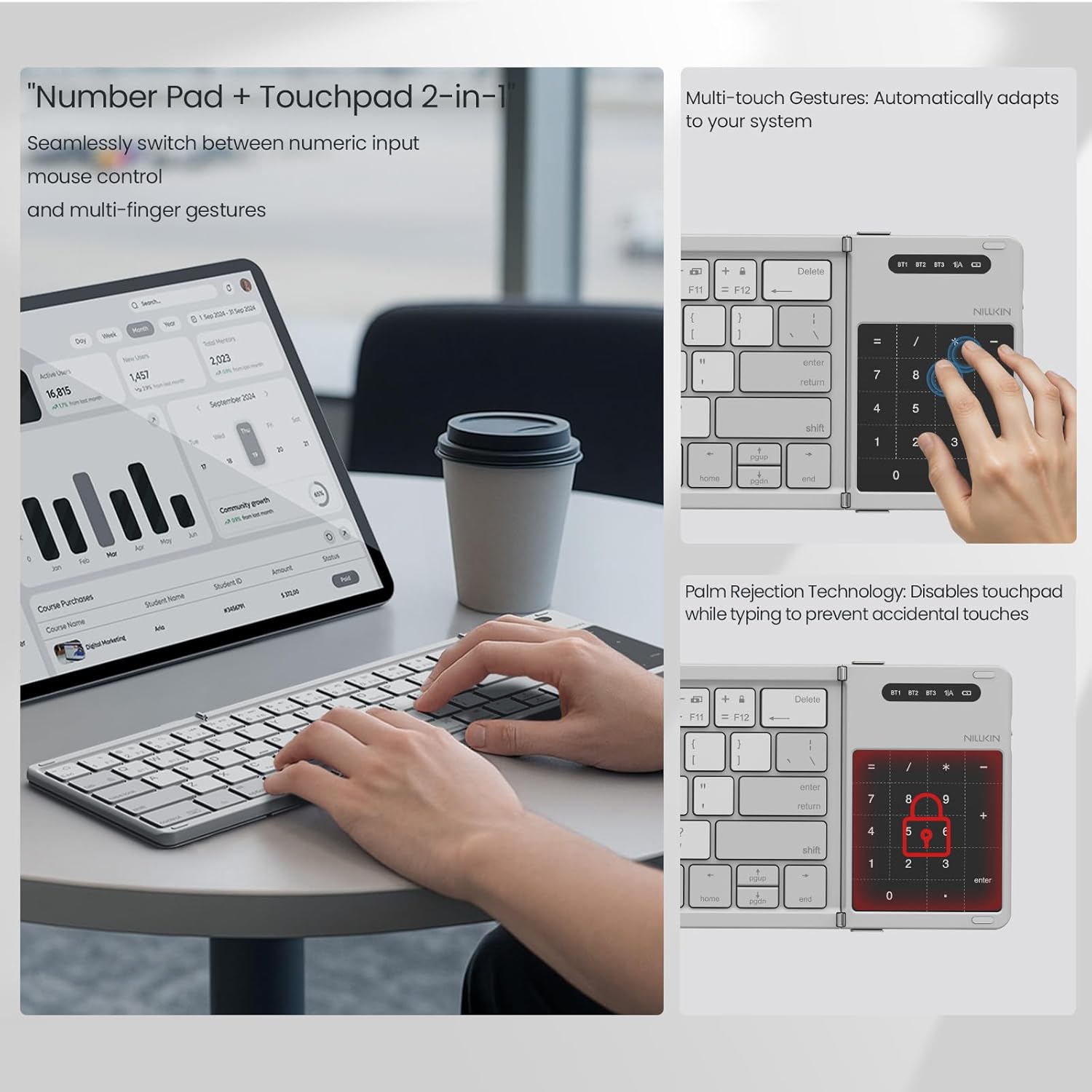
Image: The numerical pad area, highlighting its dual functionality as a touchpad with support for multi-touch gestures.

Image: A visual representation of how the touchpad and numerical keypad functions are combined into one area.
5.3 Fn Keyboard Shortcuts (Multimedia and F-keys)
The keyboard's function keys have dual purposes:
- Primeira imprensa Fn + Tab: Keys output multimedia controls (e.g., volume, play/pause).
- Segunda imprensa Fn + Tab: Keys output standard ESC/F1-F12 functions.
- Terceira imprensa Fn + Tab: Keys return to number mode.
5.4 Troca de idioma
To switch input languages:
- For iOS/Mac devices: Press Ctrl + Espaço.
- Para dispositivos Android: Pressione Ctrl + Espaço or Shift + Espaço.
- Para dispositivos Windows: Pressione Alt + Shift.
5.5 Verificando o nível da bateria
Para verificar o nível atual da bateria, pressione Fn + Comando. The indicator light will flash:
- Green light flashes 3 times: 70-100% battery.
- Blue light flashes 3 times: 30-70% battery.
- Red light flashes 3 times: 0-30% battery.
During charging, the red light stays on. When fully charged, the light turns off.
6. Manutenção
To ensure the longevity of your Nillkin keyboard:
- Limpeza: Use um pano macio e seco para limpar a superfície do teclado. Para sujeira mais persistente, umedeça levemente o teclado.ampLimpe o pano com água ou uma solução de limpeza suave. Evite o excesso de umidade.
- Armazenar: When not in use, fold the keyboard and store it in the provided carrying bag to protect it from dust and scratches.
- Evite extremos: Não exponha o teclado a temperaturas extremas, luz solar direta ou alta umidade.
- Derramamentos de líquidos: The keyboard is made from organic silicone that resists spills, but it is not waterproof. In case of a spill, immediately power off the keyboard and allow it to dry completely before reuse.
7. Solução De Problemas
| Problema | Possível causa | Solução |
|---|---|---|
| O teclado não liga. | Bateria fraca. | Charge the keyboard using the USB-C cable. |
| Não foi possível emparelhar via Bluetooth. | Bluetooth not enabled on device; keyboard not in pairing mode; device too far. | Ensure device Bluetooth is on. Press Fn+C to enter pairing mode. Move keyboard closer to the device. |
| As teclas não estão respondendo ou estão digitando incorretamente. | Incorrect operating system mode; low battery; connection issue. | Ensure the correct operating system mode is selected (if applicable). Recharge the keyboard. Re-pair the keyboard. |
| Touchpad/Numerical pad not working as expected. | Modo incorreto selecionado. | Imprensa Fn + Comando to toggle between touchpad and numerical pad modes. |
8. Especificações
- Marca: Nillkin
- Modelo: Pocket Foldable Wireless Keyboard
- Tecnologia de conectividade: Wireless (Bluetooth)
- Dispositivos compatíveis: iPad, most tablets (e.g., Samsung, Pixel), Laptops, PCs, Fold Mobile Phones
- Descrição do teclado: Multi-functional, Foldable, Portable, Numeric Keypad, Trackpad, Hotkeys and Media Keys, Lightweight, Rechargeable, Silent and Quiet
- Material: PC Basic + Organic Silicone Cover + Magnets
- Tamanho dobrável: Aproximadamente 18 x 10.8 x 1.6 cm (7.09 x 4.25 x 0.63 polegadas)
- Tamanho estendido: Aproximadamente 34 x 10.8 x 0.95 cm (13.39 x 4.25 x 0.37 polegadas)
- Peso do item: Aproximadamente 0.52 lbs (0.24 kg)
- Bateria: 1 bateria não padrão (incluída)

Image: Detailed dimensions of the keyboard in both folded and unfolded states, presented with other devices for size comparison.
9. Garantia e Suporte
Nillkin products are manufactured to high-quality standards. For warranty information, technical support, or service inquiries, please refer to the warranty card included in your package or visit the official Nillkin webGuarde o comprovante de compra como prova de aquisição.


