Introdução
This manual provides detailed instructions for the setup, operation, and maintenance of your Eyoyo EY-009L 1D Mini Bluetooth Barcode Scanner. This compact and versatile device offers three connection modes: USB Wired, 2.4G Wireless, and Bluetooth, ensuring flexible integration with various systems and devices. Please read this manual thoroughly before using the scanner to ensure optimal performance and longevity.
Produto acimaview
Principais características
- Compacto e portátil: Weighing only 35g (1.2 oz), designed for easy carry and enhanced mobility.
- Conectividade de Modo Triplo: Supports 2.4G wireless, Bluetooth, and USB wired connections for versatile use.
- Superior 1D Decoding: Accurately reads standard 1D barcodes, including damaged, distorted, or reflective codes.
- Compatibilidade ampla: Connects seamlessly with PCs, POS systems, smartphones, and tablets running Windows, Mac OS, and Linux.
- Bateria de longa duração: 650mAh rechargeable battery provides up to 8 hours of continuous scanning, with a 2-hour charge time and up to 30 days standby.
- Data Customization: Options to add/hide prefixes/suffixes, delete characters, and append keyboard keys.
- Feedback ajustável: Features adjustable volume control and a silent vibration mode for discreet operation.
- Modo de armazenamento: 16MB internal storage for over 100,000 barcodes when offline.
Conteúdo da embalagem
- 1x Eyoyo 1D Barcode Scanner (Model: EY-009L)
- Cabo de carregamento USB 1x
- 1x Dongle USB 2.4G
- 1x Cordão
- 1x Manual do Usuário
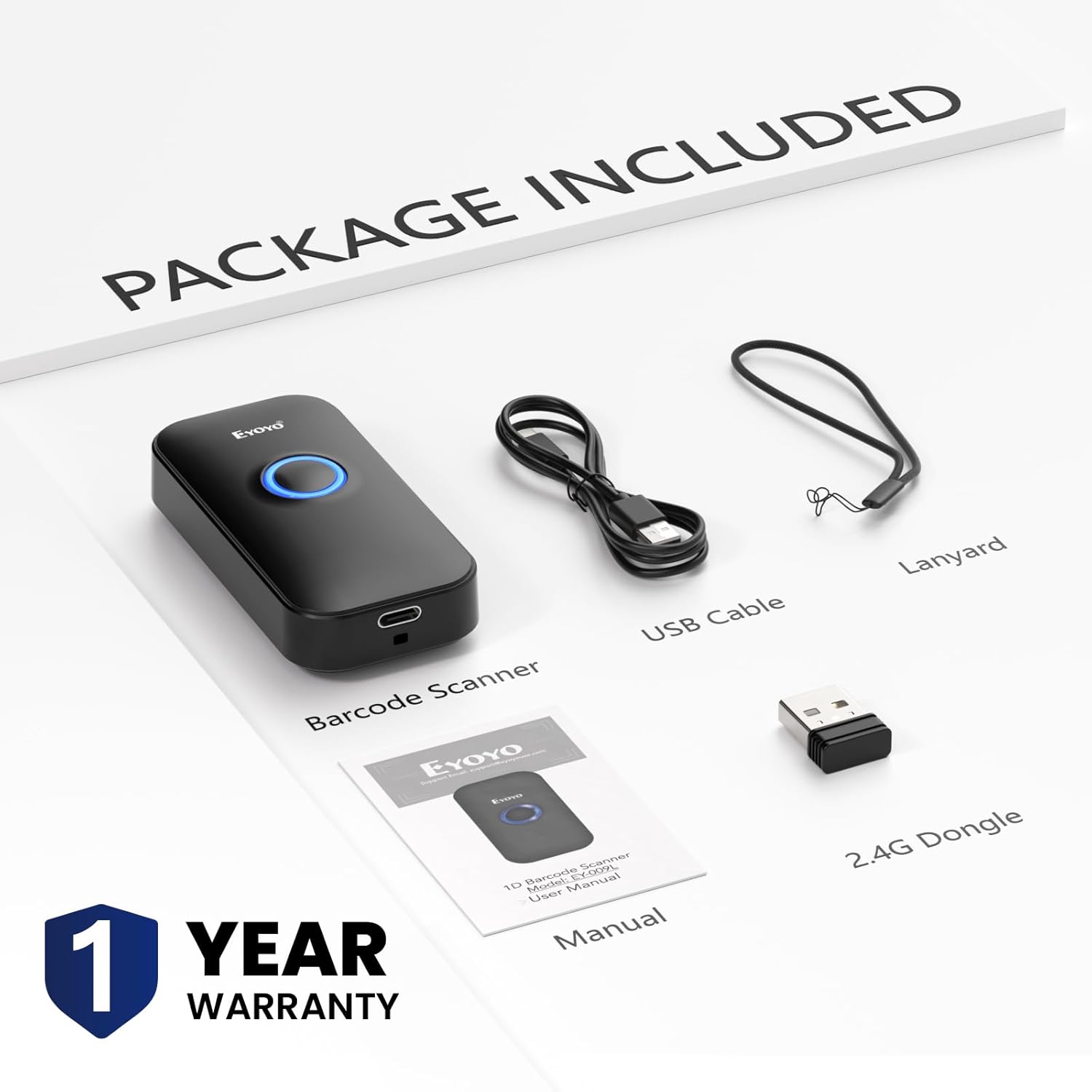
Image: Contents of the Eyoyo EY-009L barcode scanner package, including the scanner, USB cable, 2.4G dongle, lanyard, and user manual.

Image: The Eyoyo EY-009L barcode scanner being held in a pocket and scanning a package, illustrating its compact size and portability (35g/1.23oz).
Configurar
The Eyoyo EY-009L scanner supports three connection methods: USB Wired, 2.4G Wireless, and Bluetooth. Choose the method that best suits your needs.
1. Conexão USB com fio
- Conecte o cabo USB fornecido à porta de carregamento do scanner.
- Conecte a outra extremidade do cabo USB a uma porta USB disponível em seu computador ou sistema POS.
- The scanner will automatically enter USB wired mode and function as a keyboard input device.

Image: Diagram showing the Eyoyo EY-009L scanner connected to a laptop via a USB cable, indicating USB Wired Connection mode.
2. Conexão sem fio 2.4G
- Insira o dongle USB de 2.4 GHz em uma porta USB disponível no seu computador.
- Turn on the barcode scanner. It will automatically attempt to pair with the dongle.
- Uma conexão bem-sucedida é indicada por um padrão específico de som ou luz (consulte o guia do indicador LED do scanner no manual completo).
- The wireless transmission distance is up to 30m (98 ft) in barrier-free environments and 15m (49 ft) with obstacles.

Image: Diagram showing the Eyoyo EY-009L scanner wirelessly connected to a laptop via a 2.4G USB dongle, indicating 2.4G Wireless Connection mode.
3. Conexão Bluetooth
- Ligue o leitor de código de barras.
- Ative o Bluetooth no seu dispositivo host (smartphone, tablet, computador).
- Procurar available Bluetooth devices and select the scanner (usually named 'Barcode Scanner HID' or similar).
- Pair the devices. A successful connection is indicated by a specific sound or light pattern.
- The Bluetooth transmission distance is up to 50m (164 ft) in barrier-free environments and 20m (66 ft) with obstacles.

Image: Diagram showing the Eyoyo EY-009L scanner connected to a tablet and smartphone via Bluetooth, indicating Bluetooth Wireless Connection mode.
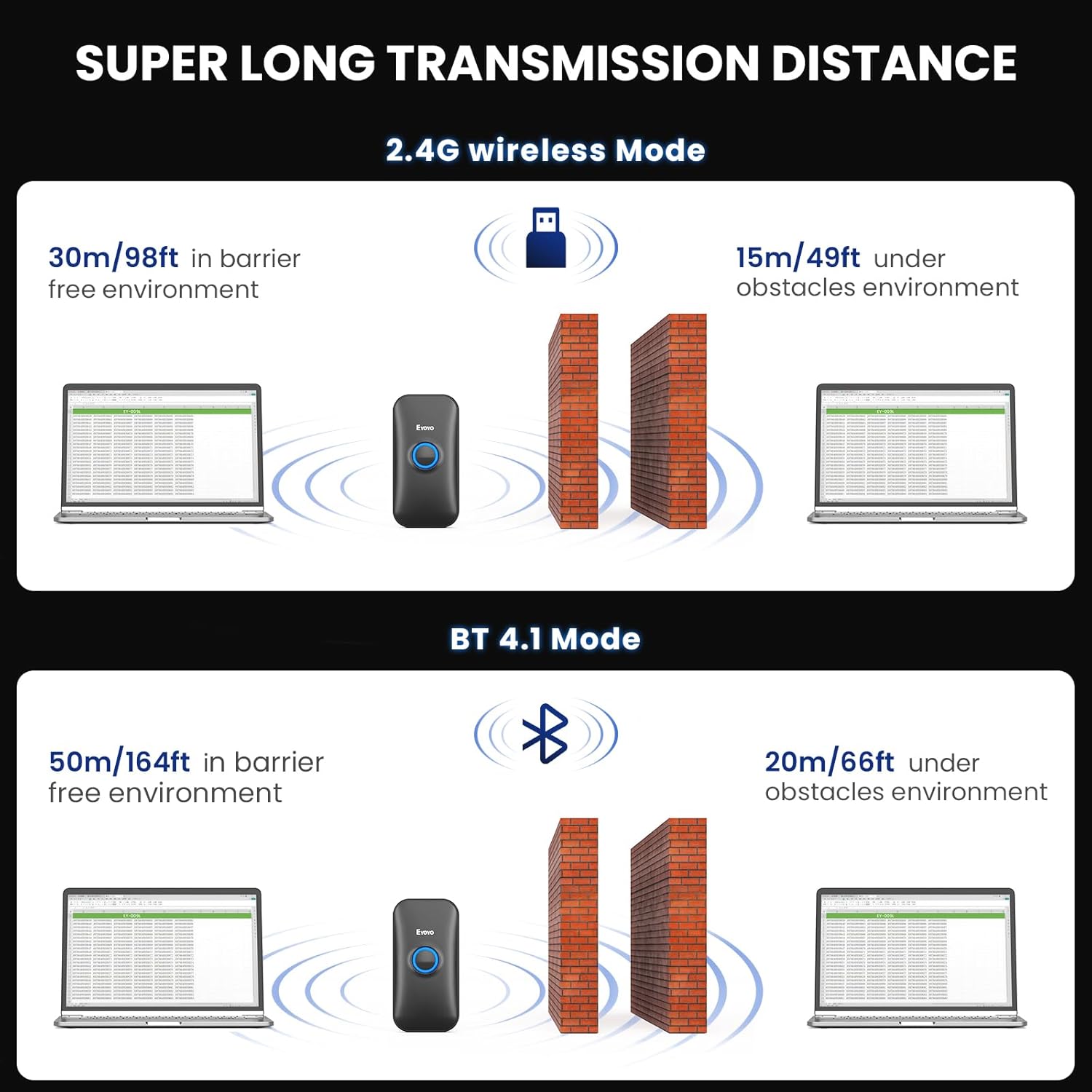
Image: Illustration of the transmission distances for 2.4G wireless mode (30m barrier-free, 15m with obstacles) and Bluetooth mode (50m barrier-free, 20m with obstacles).
Instruções de operação
Digitalizar códigos de barras
Point the scanner's light beam at the 1D barcode you wish to scan. Ensure the beam covers the entire barcode. A successful scan is typically indicated by a beep (if enabled) and/or vibration (if enabled).

Image: The Eyoyo EY-009L scanner actively scanning various 1D barcodes on paper, demonstrating its superior decoding capability for different barcode types.
Modos de digitalização
O scanner suporta dois modos principais de carregamento de dados:
- Modo de upload instantâneo: Barcode data is transmitted directly to the connected device immediately after scanning. This is the default mode.
- Modo de armazenamento: Barcode data is stored in the scanner's internal 16MB memory. This mode is useful when out of range or not connected to a host device. Data can be uploaded later by scanning a specific command barcode (refer to the full manual for command barcodes). The scanner can store over 100,000 barcodes in this mode.

Image: Illustration showing two upload modes: Storage Mode (with 16MB capacity) and Instant Upload Mode, indicating how data is handled by the scanner.
Configurações de som e vibração
The scanner provides audible and tactile feedback for successful scans. These settings can be adjusted:
- Ativar/Desativar Som: Scan the appropriate command barcode from the full user manual to enable or disable the beep sound.
- Turn On/Off Vibration: Scan the appropriate command barcode from the full user manual to enable or disable vibration feedback. This is ideal for quiet environments.

Image: Visual representation of options to turn on/off sound and turn on/off vibration for the Eyoyo EY-009L scanner, showing a hand scanning a book.
Data Customization
You can configure the scanner to modify the output data:
- Add/Hide Prefixes/Suffixes: Append custom characters before or after the scanned barcode data.
- Delete Characters: Remove specific characters from the scanned data.
- Append Keyboard Keys: Add special keys like TAB or Enter after each scan for automated data entry.
Refer to the comprehensive programming guide in the full user manual for specific command barcodes to implement these customizations.
Manutenção
Carregamento da bateria
The scanner is equipped with a 650mAh rechargeable battery. To charge:
- Connect the scanner to a power source (computer USB port or USB wall adapter) using the provided USB charging cable.
- Uma carga completa leva aproximadamente 2 horas.
- The scanner provides up to 8 hours of continuous scanning time and up to 30 days of standby time.

Image: Diagram illustrating the battery performance of the Eyoyo EY-009L scanner: 8 hours working time, 2 hours charging time, and 720 hours (30 days) standby time.
Limpeza
Para manter o desempenho ideal da digitalização, mantenha a janela óptica do scanner limpa. Use um pano macio e sem fiapos, levemente umedecido.ampLimpe com água ou uma solução de limpeza suave. Evite materiais abrasivos ou produtos químicos agressivos.
Solução de problemas
O scanner não está conectando.
- Verifique a potência: Ensure the scanner is charged and turned on.
- Modo de verificação: Confirm the scanner is in the correct connection mode (USB, 2.4G, or Bluetooth) for your setup.
- Re-pair Bluetooth/2.4G: If using wireless, try re-pairing the scanner with your device or re-inserting the 2.4G dongle.
- Cabo USB: For wired connection, ensure the USB cable is securely connected to both the scanner and the host device.
- Instalação do driver: For some systems, a driver might be required for the 2.4G dongle or USB connection. Check your operating system's device manager.
O leitor não está lendo os códigos de barras.
- Tipo de código de barras: This device is exclusively designed to read printed Códigos de barras 1D. It cannot scan electronic codes from screens (e.g., 1D or 2D QR codes on phones/computers) or any printed 2D codes.
- Barcode Condition: Ensure the barcode is not severely damaged, smudged, or poorly printed. While the scanner has superior decoding, extreme damage can prevent reading.
- Distância e ângulo: Ajuste a distância e o ângulo entre o leitor e o código de barras.
- Iluminação: Garanta uma iluminação adequada, mas evite o brilho direto no código de barras.
- Janela do scanner: Clean the scanner's optical window if it is dirty.

Image: Illustration showing a 1D barcode being scanned successfully, with crossed-out 2D QR codes and screen-based barcodes, emphasizing that the scanner only reads printed 1D barcodes.
Notas de Compatibilidade
- Not compatible with Square POS or Square Register systems.
- Compatible with Windows XP, Win7, Win8, Win10, Mac OS, Linux, Android, and iOS devices.

Image: Visual representation of the Eyoyo EY-009L scanner's compatibility with various operating systems and devices, including Windows, Mac OS, Linux, tablets, and smartphones.
Especificações
| Número do modelo | EY-009L |
| Dimensões do produto | 4.8 x 2.44 x 1.99 polegadas |
| Peso do item | 3.84 ounces (35g / 1.23oz for scanner only) |
| Tecnologia de Conectividade | 2.4G sem fio, Bluetooth, cabo USB |
| Bateria | 1 Nonstandard Battery (650mAh, included) |
| Tempo de trabalho | Up to 8 hours continuous scanning |
| Tempo de carregamento | Aproximadamente 2 horas |
| Tempo de espera | Até 30 dias |
| Capacidade de armazenamento | 16 MB (armazena mais de 100,000 códigos de barras) |
| 2.4G Transmission Range | 30m (98 ft) barrier-free, 15m (49 ft) with obstacles |
| Alcance de transmissão Bluetooth | 50m (164 ft) barrier-free, 20m (66 ft) with obstacles |
| Dispositivos compatíveis | Computador de mesa, laptop, PDV (Ponto de Venda), smartphone, tablet |
| SO compatível | Windows XP/7/8/10, Mac OS, Linux, Android, iOS |
Garantia e Suporte
Informações de garantia
The Eyoyo EY-009L Barcode Scanner comes with a Garantia de 1 ano a partir da data da compra. Esta garantia cobre defeitos de fabricação e mau funcionamento sob condições normais de uso. Guarde o comprovante de compra para solicitações de garantia.
Suporte ao cliente
For technical assistance, troubleshooting, or warranty inquiries, please contact Eyoyo customer support. Refer to the contact information provided in the packaging or on the official Eyoyo website.


