Introdução
This manual provides detailed instructions for setting up, operating, maintaining, and troubleshooting your GEEKOM GeekBook X14 Pro laptop. Please read this manual thoroughly before using your device to ensure proper functionality and longevity. Keep this manual for future reference.
O que está na caixa
Upon unboxing your GEEKOM GeekBook X14 Pro, verify that all the following items are included:
- GEEKOM GeekBook X14 Pro Laptop
- GEEKOM GeekBook X14 Pro Premium Packaging
- 65W PD GaN Fast Charger
- Cabo USB-C para USB-C
- Estação de ancoragem
- Manual do usuário

Produto acimaview
The GEEKOM GeekBook X14 Pro is an ultra-light and thin laptop designed for professionals. It features a magnesium alloy unibody chassis, weighing only 999g and tapering to 6mm at its thinnest point.

Principais características:
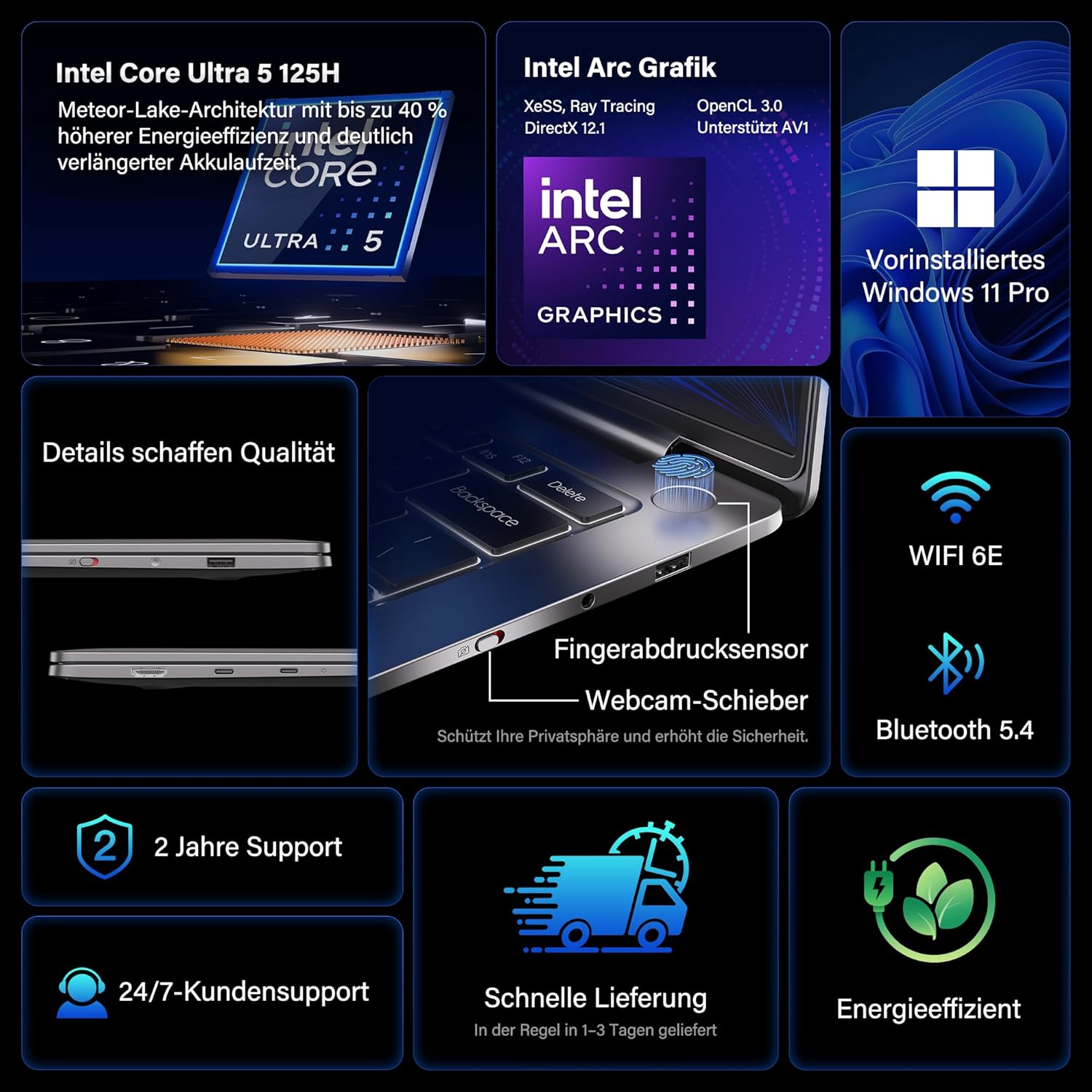
- Processador: Intel Core Ultra 5 125H (14 cores, 18 threads, up to 4.5 GHz)
- Gráficos: Intel Arc Graphics with Xe-LPG architecture
- Mostrar: 14-inch 2.8K OLED (2880 x 1800) with 120Hz refresh rate, 100% DCI-P3, up to 450 nits brightness
- Memória: 32GB LPDDR5x RAM (7500 MT/s)
- Armazenar: SSD NVMe PCIe 4.0 de 1 TB
- Sistema operacional: Windows 11 Pro pré-instalado
- Conectividade: 2x USB4 (40 Gbps), 1x USB 3.2 Gen 1 Type-A (5 Gbps), HDMI 2.0, Wi-Fi 6E, Bluetooth 5.4
- Segurança: Fingerprint sensor in power button, physical webcam slider
- Áudio: DTS:X Ultra Audio
- Bateria: 72 Wh, up to 16 hours battery life, 65W USB-C fast charging
- Resfriamento: GEEKOM IceBlade 2.0 cooling system with adjustable fan profiles

Portas e Conectores:
- 2x USB4 (40 Gbps)
- 1x USB 3.2 Gen 1 Type-A (5 Gbps)
- 1x HDMI 2.0
- 1x conector de áudio de 3.5 mm
- Power Input (via USB-C)

Configurar
1. Inicialização da alimentação e carregamento
- Connect the 65W PD GaN Fast Charger to a power outlet and then to one of the USB-C ports on your laptop.
- Deixe o laptop carregando por pelo menos 30 minutos antes do primeiro uso, ou até que o indicador de bateria mostre carga suficiente.
- Pressione o botão liga/desliga (integrado ao sensor de impressões digitais) para ligar o laptop.
2. Configuração do Windows 11 Pro
Follow the on-screen prompts to complete the initial Windows 11 Pro setup. This includes:
- Selecione sua região e layout de teclado.
- Conectando-se a uma rede Wi-Fi.
- Signing in with a Microsoft account or creating a local account.
- Configurando as opções de privacidade.
3. Configuração do sensor de impressões digitais
For enhanced security and quick login, set up the fingerprint sensor:
- Vá para Configurações > Contas > Opções de login.
- Under "Ways to sign in," select Reconhecimento de impressão digital (Windows Hello) e siga as instruções para registrar suas impressões digitais.
Instruções de operação
Recursos de exibição
The 14-inch 2.8K OLED display offers vibrant colors and sharp details. With a 120Hz refresh rate, scrolling and animations are smooth. The display covers 100% DCI-P3 color gamut and reaches up to 450 nits brightness, ensuring clear visibility in various lighting conditions.

Desempenho
Equipped with an Intel Core Ultra 5 125H processor, 32GB LPDDR5x RAM, and a 1TB PCIe 4.0 NVMe SSD, the GeekBook X14 Pro delivers efficient performance for demanding tasks, quick application launches, and seamless multitasking.

Conectividade
The laptop supports Wi-Fi 6E for fast and stable wireless internet connections and Bluetooth 5.4 for connecting peripherals. The two USB4 ports offer high-speed data transfer (40 Gbps) and support up to three 4K external displays simultaneously via the included mini docking station or direct connection.
Áudio
Experience clear and spatial audio with DTS:X Ultra technology, enhancing your video calls, movies, and music playback.
Cooling System (GEEKOM IceBlade 2.0)
The GEEKOM IceBlade 2.0 cooling system ensures optimal performance even under sustained load. It features a quiet fan and a dual-heatpipe design to efficiently dissipate heat. You can switch between three intelligent fan profiles (Silent, Standard, Performance) by pressing Fn + P to balance noise and cooling efficiency.

Bateria e Carregamento
The 72 Wh battery provides up to 16 hours of usage. The included 65W USB-C PD GaN fast charger can charge the battery up to 80% in approximately one hour, allowing for quick power-ups on the go.

Webcam Privacy Slider
For enhanced privacy, the laptop includes a physical slider to cover the webcâmera quando não estiver em uso.
Manutenção
Limpeza
- Use um pano macio e sem fiapos para limpar a tela e o chassi.
- Para manchas persistentes, aplique levementeampLimpe o pano com água ou uma solução de limpeza segura para telas.
- Evite usar produtos químicos agressivos, materiais abrasivos ou umidade excessiva.
- Certifique-se de que o laptop esteja desligado e desconectado da tomada antes de limpá-lo.
Atualizações de software
Regularly check for and install Windows updates and driver updates to ensure optimal performance, security, and compatibility. You can check for Windows updates via Configurações > Atualização do Windows.
Solução de problemas
O laptop não liga.
- Certifique-se de que o carregador esteja conectado firmemente tanto ao laptop quanto a uma tomada elétrica em funcionamento.
- Allow the laptop to charge for at least 30 minutes.
- Try a different power outlet or USB-C port if available.
Problemas de exibição
- If the screen is black, ensure the laptop is powered on and not in sleep mode. Press any key or the power button briefly.
- Check display settings in Windows if external monitors are not detected or showing incorrect resolution.
Desempenho lento
- Feche os aplicativos desnecessários que estão sendo executados em segundo plano.
- Certifique-se de que o Windows e os drivers estejam atualizados.
- Verifique se há espaço de armazenamento livre suficiente no SSD.
- Monitor CPU/RAM usage in Task Manager to identify resource-intensive processes.
Problemas de conectividade
- Wi-fi: Restart your router and the laptop. Ensure Wi-Fi is enabled in Windows settings.
- Bluetooth: Ensure Bluetooth is enabled and devices are in pairing mode. Remove and re-pair devices if issues persist.
- USB/HDMI: Ensure cables are securely connected. Test with different cables or ports if possible.
Para obter mais assistência, consulte a seção Garantia e Suporte.
Especificações
| Recurso | Detalhe |
|---|---|
| Marca | GEEKOM |
| Nome do modelo | GeekBook X14 Pro |
| Número do modelo | NX14CM |
| Cor | Cinza Titânio |
| Fator de forma | Ultra-portable and Ultra-light Notebook |
| Tamanho da tela | 14 polegadas |
| Resolução da tela | 2.8K (2880 x 1800 pixels, 16:10) |
| Tipo de processador | Intel Core Ultra 5 125H |
| Velocidade do processador | Até 4.5 GHz |
| Tamanho da RAM | 32 GB |
| Tecnologia RAM | LPDDR5x |
| Velocidade do relógio de memória | 7500 MHz |
| Tamanho do disco rígido | 1 TB |
| Tipo de disco rígido | SSD (PCIe x4) |
| Coprocessador gráfico | Gráficos Intel Arc |
| Tipo sem fio | 802.11ax (Wi-Fi 6E), Bluetooth 5.4 |
| Portas USB | 2x USB4, 1x USB 3.2 Gen 1 Type-A |
| Portas HDMI | 1 (HDMI2.0) |
| Sistema operacional | Windows 11 Pro |
| Duração média da bateria | Up to 16 Hours (72 Wh) |
| Peso do item | 999g (Laptop only) |
| Características especiais | Fingerprint sensor, Webcam privacy slider, DTS:X Ultra Audio, GEEKOM IceBlade 2.0 cooling, Mini docking station included |
Garantia e Suporte
The GEEKOM GeekBook X14 Pro comes with a Garantia de 2 ano. GEEKOM provides Suporte ao cliente 24 horas por dia, 7 dias por semana for any technical assistance or inquiries you may have.
For support, please visit the official GEEKOM webou entre em contato diretamente com o serviço de atendimento ao cliente. Tenha em mãos o comprovante de compra e o número de série do produto ao contatar o suporte.
The product undergoes extensive reliability testing, including thermal shock, vibration, humidity, and impact tests, to ensure durability and high quality.


