1. Introdução
This manual provides detailed instructions for the APEXEL 6X Telephoto and 150mm Macro Lens Kit. This 2-in-1 aluminum phone camera lens kit is designed to enhance your mobile photography experience, offering both distant magnification and intricate close-up capabilities. Please read this manual thoroughly before use to ensure optimal performance and longevity of your product.
2. O que está na caixa
- Lente teleobjetiva APEXEL 6X
- Lente macro de 150 mm
- Clipe Universal
- 25mm-37mm Adapter Ring (for filters)
- EVA Pads (for phone protection and alignment)
3. Principais características
- Ultra-HD Optical Technology: Features a 7-element, 10-glass design with Nitto A-grade imported optics for superior image quality.
- Advanced Coatings: Both lenses incorporate double-sided AR+AF multi-layer coatings (FMC) to effectively reduce reflection and enhance clarity.
- Alto desempenho: Delivers light transmittance ≥ 99.5%, distortion ≤ 0.6%, and reflectivity ≤ 0.3% for crystal-clear images with accurate colors.
- Dupla funcionalidade: Offers both 6X Telephoto for capturing distant subjects and 150mm Macro for intricate close-up details.
- Ampla compatibilidade: The universal clip is suitable for most smartphones with a width of 70-100mm (2.8-3.9 inches). Please note: It does not fit small-sized iPhone Mini and SE series.
Optical System Overview
Video: This video illustrates the internal optical structure of the APEXEL 2-in-1 camera lens, highlighting its advanced design for both telephoto and macro photography.
4. Configuração e instalação
Follow these steps for quick and proper installation:
- Prepare seu telefone: Remove any thick or rugged phone cases to ensure the universal clip fits flush against your phone and prevents light leakage.
- Insert EVA Pads: Place the provided EVA pads into the universal clip to fill any gaps between the phone's camera area and the clamp. This ensures optimal alignment and protects your phone.
- Attach Universal Clip: Separe delicadamente os músculos esticados.amp of the universal clip and carefully insert your smartphone.
- Align Lens Mount: Loosen the top screw on the universal clip. Adjust the slider to precisely align the central hole of the clip with your phone's main camera lens.
- Clipe Seguro: Once aligned, tighten the top fixed screw to firmly secure the universal clip in position on your phone.
- Acoplar lente: Screw the desired lens (either the 6X Telephoto or the 150mm Macro) into the threaded interface on the universal clip until it is snug.
Guia de instalação visual

Image: A five-step visual guide demonstrating how to attach the universal clip and lens to a smartphone. Steps include inserting EVA pads, pulling the clamp, pushing the slider for alignment, tightening the screw, and screwing in the lens.
Video: Installation and Phone Compatibility
Video: This video demonstrates the installation process of the APEXEL lens kit on various phone models and shows how to switch between different camera modes.
Detalhes de compatibilidade
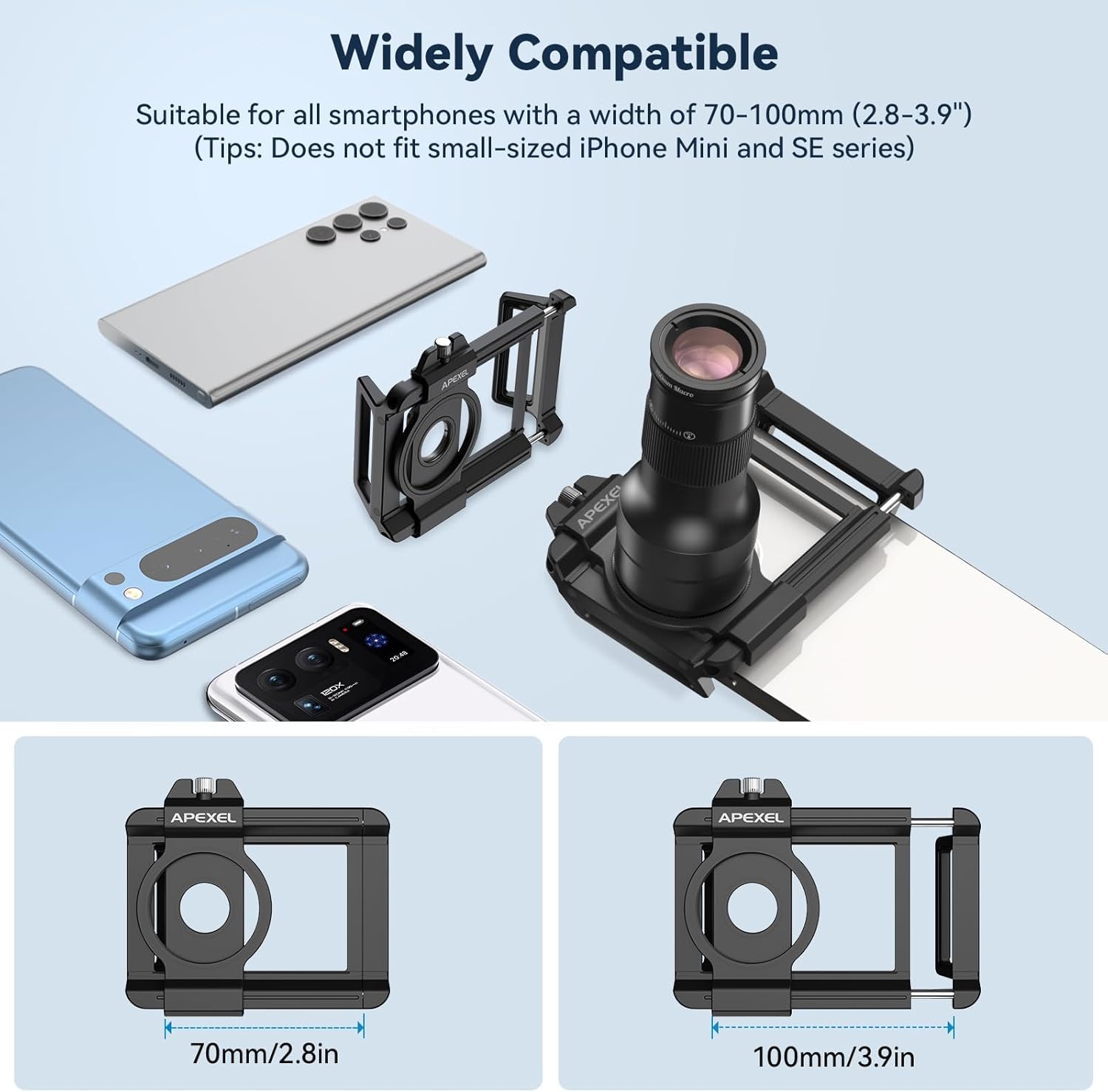
Image: This image illustrates the universal clip's adjustable width (70mm to 100mm) and its compatibility with a range of mainstream smartphones, excluding iPhone Mini and SE series.
5. Instruções de operação
Using the 6X Telephoto Lens
The 6X Telephoto Lens allows you to capture distant subjects with enhanced clarity. Its optimal focusing distance extends from 30cm to infinity.

Image: A comparison showing a distant bird in a tree as seen by the naked eye versus a magnified view captured with the 6X telephoto lens on an iPhone 15 Pro.
Focusing Tips for Telephoto:
- For best results, use a tripod to minimize camera shake, especially at higher magnifications.
- Adjust the focus ring on the lens until your subject appears sharp on your phone's screen.
- Experiment with your phone's digital zoom (e.g., 2x to 2.4x) in conjunction with the telephoto lens for optimal image quality and to reduce vignetting.
- Utilize your phone's camera timer function (e.g., 3-second delay) to avoid camera shake when pressing the shutter button.
Using the 150mm Macro Lens
The 150mm Macro Lens is designed for capturing extreme close-up details of small subjects. Its optimal focusing distance is between 15cm and 40cm (5.9-15.74 inches).

Image: A comparison showing small purple flowers as seen by the naked eye versus a highly magnified view captured with the 150mm macro lens on an iPhone 15 Pro.
Focusing Tips for Macro:
- Position the lens within the 15-40cm focusing range from your subject.
- Use the focus ring on the macro lens for precise adjustments until the subject is in sharp focus.
- A tripod is highly recommended for macro photography to ensure sharp images due to the shallow depth of field and high magnification.
- Ensure adequate and even lighting for your close-up subjects to reveal intricate details.
Using with 37mm Filters
The lens kit is compatible with standard 37mm filters using the included 25-37mm adapter ring. Simply screw the adapter ring onto the front of the telephoto lens, then attach your desired 37mm filter.
Video: This video demonstrates how to attach 37mm filters (such as CPL, Orange, and Red filters) to the telephoto lens and showcases the visual effects of each filter on different scenes.
6. Manutenção
- Limpeza de lentes: Use a soft, clean microfiber cloth specifically designed for optics to gently wipe the lens surfaces. Avoid using abrasive materials or harsh chemicals.
- Armazenar: Always store the lenses in their protective pouch or case when not in use to prevent scratches, dust accumulation, and accidental damage.
- Cuidados Ambientais: Avoid exposing the lenses to extreme temperatures, high humidity, or direct sunlight for prolonged periods, as this can affect optical performance.
7. Solução De Problemas
- Vinhetagem (cantos escuros): This can occur with some phone models or specific zoom settings. Try adjusting your phone's digital zoom to 2x or 2.4x to minimize or eliminate vignetting. Ensure the lens is perfectly centered over your phone's main camera.
- Imagens desfocadas: Ensure the lens is properly focused using its dedicated focus ring. Use a tripod to prevent camera shake, which is crucial for sharp telephoto and macro shots. Verify that the lens surfaces are clean and free from smudges or dust.
- Light Leakage: If you notice unwanted light affecting your photos, remove any thick or rugged phone cases before attaching the lens kit. Ensure the universal clip is flush against your phone's surface and that the EVA pads are correctly installed to seal any potential gaps.
- Dificuldade de alinhamento: If the lens is hard to align, ensure the top screw of the universal clip is loosened sufficiently to allow the slider to move freely for precise positioning over your phone's main camera.
8. Especificações
| Recurso | Detalhe |
|---|---|
| Dimensões do produto | 3.9 x 7.3 x 7.3 polegadas |
| Peso do item | 10.8 onças |
| Marca | ÁPICE |
| Tipo de lente | Telephoto, Macro |
| Telephoto Focal Length | 30cm~∞ |
| Macro Focal Length | 15cm~40cm (5.9-15.74 inches) |
| Montagens Compatíveis | Fill Light, Filter (37mm) |
| Tecnologia Ótica | 7-element, 10-glass design with FMC coatings |
9. Garantia e Suporte
For detailed warranty information, product registration, or technical support, please visit the official APEXEL website or contact customer service directly through your original retailer. Keep your purchase receipt as proof of purchase.


