Introdução
Thank you for choosing the Homary 72" Walnut TV Stand. This entertainment center is designed to accommodate TVs up to 75 inches and features modern aesthetics with functional storage. It includes arched glass doors, three drawers, two cabinets, and integrated LED lighting. This manual provides detailed instructions for assembly, operation, maintenance, and troubleshooting to ensure optimal use and longevity of your product.
Informações de segurança
- Leia todas as instruções cuidadosamente antes de montar e usar. Failure to follow these instructions may result in injury or product damage.
- Mantenha crianças e animais de estimação longe during assembly. Small parts can be a choking hazard.
- Assemble on a soft, clean surface para evitar arranhões.
- Certifique-se de que todas as conexões estão seguras before placing any items on the TV stand.
- Não sobrecarregue a unidade. Refer to the 'Specifications' section for weight capacities.
- Use the included anti-tip kit to secure the TV stand to the wall, preventing accidental tipping.
- Handle glass components with care to avoid breakage and injury.
Conteúdo da embalagem
Please verify that all parts and hardware are present before beginning assembly. If any items are missing or damaged, contact customer support.

Figura 1: Sobreview of all components and hardware included in the package.
Configuração e montagem
Follow these steps for proper assembly. It is recommended to have two people for assembly.
Guia de vídeo de montagem
1 vídeo: Detailed assembly instructions for the TV stand. This video demonstrates each step of the construction process.
Montagem passo a passo
- Preparar a base: Attach the side panels to the bottom frame using the provided screws and dowels. Ensure all connections are tight.
- Instalar os painéis traseiros: Secure the back panels into the designated grooves. These panels feature cable management holes.
- Fixe o painel superior: Place the top panel onto the assembled frame, aligning the pre-drilled holes. Fasten with screws.
- Montagem das gavetas: Construct the three drawers according to the diagram. Install the soft-close guide rails on the drawer sides and within the TV stand frame.
- Instalar portas de armário: Attach the hinges to the arched glass doors and then mount the doors to the cabinet sections. Adjust hinges for proper alignment.
- Mount Handles: Secure the gold-finished handles to the drawers and cabinet doors.
- Instalar prateleiras ajustáveis: Insert the shelf pins into the desired height positions within the cabinets and place the adjustable shelves.
- Conecte a iluminação LED: Follow the separate instructions provided with the LED lighting kit for installation and connection.
- Kit anti-tombamento de segurança: Attach the anti-tip hardware to the back of the TV stand and to a wall stud to prevent tipping.
Instruções de operação
Compartimentos de Armazenamento
- Gavetas: The three central drawers feature soft-close guide rails for smooth and quiet operation. Pull gently to open and push to close.
- Armários: The two side cabinets with arched glass doors provide enclosed storage. The internal shelves are adjustable to accommodate items of various heights.
Iluminação LED
The integrated LED lighting system can be controlled to create different ambient moods. Refer to the specific LED remote control or switch instructions for changing colors, brightness, and modes.

Figura 2: The LED lighting can be adjusted to various color temperatures, including warm, daylight, and cool light, to suit your preference.
Integrated Power Outlets
The TV stand may include integrated power outlets and USB ports on the top surface or within a compartment for convenient charging and powering of electronic devices. Connect the main power cord of the TV stand to a wall outlet.
Manutenção
- Limpeza: Limpe as superfícies com um pano macio, damp cloth. Avoid harsh chemicals or abrasive cleaners that may damage the finish. For glass doors, use a glass cleaner.
- Pó: Limpe regularmente o aparelho para evitar o acúmulo de poeira.
- Verificação de hardware: Verifique periodicamente todos os parafusos e conexões para garantir que permaneçam firmes. Aperte-os, se necessário.
- Evite luz solar direta: A exposição prolongada à luz solar direta pode causar desbotamento ou descoloração do acabamento da madeira.
- Proteger superfícies: Use coasters or mats under hot or wet items to prevent damage to the top surface.
Solução de problemas
- Suporte instável: Ensure all screws are tightened. Check that the unit is on a level surface. Adjust feet if applicable.
- Drawers Not Closing Smoothly: Check the alignment of the soft-close guide rails. Ensure no obstructions are in the drawer path.
- Luzes LED não funcionam: Verify the power connection to the LED strip and the wall outlet. Check the remote control battery.
- Cabinet Doors Misaligned: Adjust the hinges on the cabinet doors as needed. Refer to hinge adjustment instructions if provided with the hardware.
Especificações
| Recurso | Detalhe |
|---|---|
| Marca | Homary |
| Nome do modelo | TV stand |
| Número do modelo | JJ5B07879F |
| Cor | Noz |
| Material | Engineered Wood (Plywood with Ash Veneer) |
| Dimensões do produto (P x L x A) | 17.99"P x 72.05"L x 23.03"A |
| Peso do item | 138 libras |
| Tamanho de TV recomendado | Até 75 polegadas |
| Opções de armazenamento | 3 Drawers, 2 Cabinets with Adjustable Shelves |
| Características especiais | LED Lighting, Arched Glass Doors, Soft-Close Drawers, Cable Management |
| Montagem necessária | Sim |

Figura 3: Detailed product dimensions for planning your space.
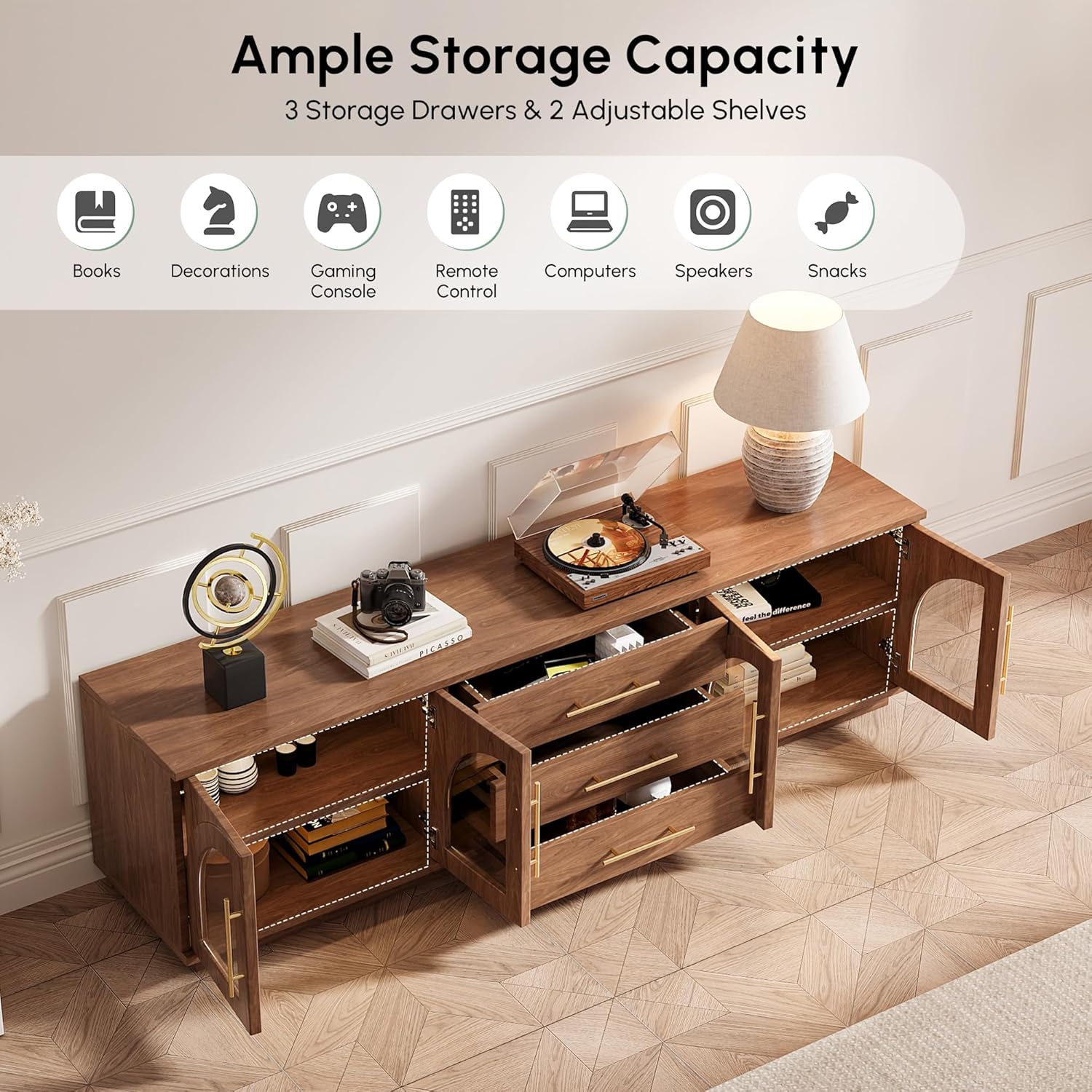
Figura 4: Ample storage capacity with three drawers and two adjustable shelves.

Figura 5: Key features including sensor lights, arched glass doors, soft-close drawers, and adjustable shelves.
Garantia e Suporte
For warranty information, please refer to the documentation included with your purchase or contact Homary customer service. If you encounter any issues or have questions regarding your TV stand, please reach out to Homary customer support for assistance.
Suporte ao cliente: service@homary.com
Please provide your order number when contacting support.


