1. Introdução
This manual provides comprehensive instructions for the setup, operation, and maintenance of your GOBOULT Mustang Racer Smart Watch. Please read this manual thoroughly before using the device to ensure proper functionality and to maximize your user experience. Keep this manual for future reference.
2. O que está na caixa
Verifique se todos os itens estão presentes na embalagem:
- GOBOULT Mustang Racer Smart Watch
- Cabo de carregamento
- Manual do usuário (este documento)
- Cartão de garantia
3. Produto acabadoview
Familiarize yourself with the key components of your GOBOULT Mustang Racer Smart Watch.
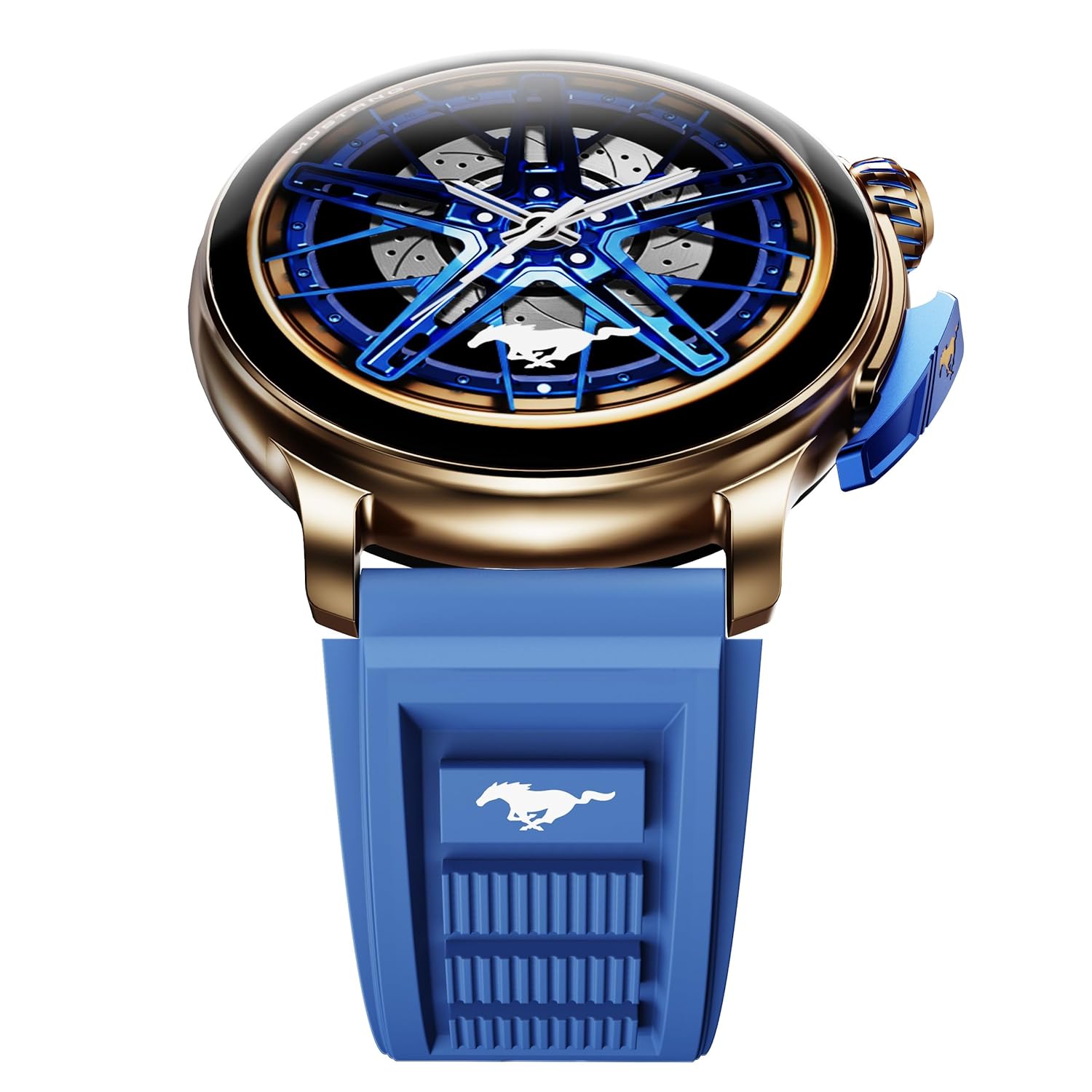
Image: The GOBOULT Mustang Racer Smart Watch, showcasing its 1.43-inch AMOLED display and overall design.
Display and Bezel
The watch features a 1.43-inch AMOLED display with 500 Nits brightness for clear visibility. The functional rotating bezel allows for intuitive navigation through menus and features.

Imagem: Uma imagem detalhada view of the smartwatch's 1.43-inch AMOLED display and the rotating bezel, highlighting its design and brightness.
Buttons and Crown
The watch includes a rotating tyre-tread crown for navigation and selection, along with a functional paddle shifter button for quick access to features.

Image: The smartwatch featuring its functional paddle shifter and rotating crown, designed for enhanced control.
4. Configuração
4.1. Carregando o relógio inteligente
Before initial use, fully charge your smartwatch. Connect the magnetic charging cable to the charging pins on the back of the watch and plug the USB end into a compatible power adapter (not included) or a computer's USB port. The watch will display a charging indicator. A full charge takes approximately 120 minutes.
4.2. Ligar / desligar
- Ligar: Press and hold the main power button (crown) for a few seconds until the GOBOULT logo appears.
- Desligar: From the watch face, swipe down to access quick settings, or navigate to the settings menu. Select "Power Off" and confirm. Alternatively, press and hold the main power button until the power-off option appears.
4.3. Emparelhando com seu smartphone
To unlock all features, pair your GOBOULT Mustang Racer Smart Watch with the companion app on your smartphone via Bluetooth.
- Download the official GOBOULT app from your smartphone's app store (iOS App Store or Google Play Store).
- Certifique-se de que o Bluetooth esteja ativado em seu smartphone.
- Open the GOBOULT app and follow the on-screen instructions to create an account or log in.
- In the app, select "Add Device" or similar option.
- Select "GOBOULT Mustang Racer" from the list of available devices.
- Confirme o pedido de emparelhamento tanto no seu smartphone quanto no smartwatch.
Após o emparelhamento, o relógio sincronizará os dados com o seu telefone e você poderá personalizar as configurações através do aplicativo.

Image: The smartwatch highlighting its Bluetooth V5.3 connectivity for quick syncing and IP67 water resistance.
5. Instruções de operação
5.1. Navegação
- Deslize para cima/baixo/esquerda/direita: Navigate through menus, notifications, and quick access panels.
- Tocar: Selecione um item ou confirme uma ação.
- Rotating Bezel/Crown: Rotate to scroll through lists or adjust settings. Press to select or return to the home screen.
- Paddle Shifter Button: Customizable shortcut for frequently used functions (e.g., sports modes).
5.2. Chamada Bluetooth
With integrated speaker and microphone, you can make and receive calls directly from your wrist after pairing with your smartphone.
- Certifique-se de que seu relógio esteja conectado ao seu telefone via Bluetooth.
- To make a call: Access the dialer or contacts list on your watch.
- To receive a call: An incoming call notification will appear on your watch. Tap to answer or decline.
5.3. Mostradores de relógio
Customize your watch's appearance with over 150 watch faces, including exclusive Mustang designs. Long-press the watch face to change it, or use the companion app for more options.

Imagem: O smartwatch mostraasing multiple watch face options, including exclusive Mustang designs.
5.4. Modos esportivos
The watch supports over 120 sports modes to track your physical activities. Access sports modes from the main menu or via the paddle shifter shortcut (if configured).
- Select your desired sport.
- Start the activity. The watch will record metrics such as duration, calories burned, and heart rate.
- End the activity to save data. Review your performance in the app.

Image: The smartwatch displaying a sports tracking interface, indicating its capability to monitor various physical activities.
5.5. Monitoramento de saúde
The GOBOULT Mustang Racer Smart Watch provides comprehensive health tracking features:
- Monitor de frequência cardíaca 24 horas por dia, 7 dias por semana: Monitora continuamente sua frequência cardíaca.
- SpO2 Blood Oxygen Saturation Monitor: Mede os níveis de oxigênio no sangue.
- Monitoramento do sono: Analyzes sleep patterns (deep sleep, light sleep, awake time).
- Monitor de estresse: Fornece informações sobre seus níveis de estresse.
- Pressão arterial: (Note: Smartwatch blood pressure measurements are for reference only and should not be used for medical diagnosis.)
Access these features from the watch's health menu or view Relatórios detalhados no aplicativo complementar.

Imagem: Uma imagem interna view of the smartwatch highlighting its health tracking sensors, with text indicating features like heart rate, SpO2, sleep, and stress monitoring.
5.6. Assistente de voz com IA
Activate the AI Voice Assistant on your watch to perform tasks, set reminders, or get information using voice commands. Ensure your watch is connected to your phone for this feature to function.
5.7. Notificações inteligentes
Receive notifications for calls, messages, and app alerts directly on your watch. Manage notification settings through the GOBOULT app.
5.8. Always On Display
The Always On Display feature allows the time and essential information to remain visible on the screen without needing to raise your wrist or press a button. This feature can be enabled or disabled in the watch settings to manage battery consumption.

Image: The smartwatch displaying the time and a car image, illustrating the Always On Display functionality.
6. Características e especificações
Principais características:
- 1.43" AMOLED Display with 500 Nits Brightness
- Bluetooth Calling (BT V5.3)
- Rotating Bezel for intuitive control
- 150+ Watch Faces, including exclusive Mustang designs
- Assistente de voz de IA
- Health Monitoring: SpO2, Heart Rate, Sleep, Stress, Blood Pressure
- Mais de 120 modalidades esportivas
- IP67 resistente à água
- Up to 7-day battery runtime with fast charging
Especificações técnicas:
| Marca | GOBOULT |
| Número do modelo | GOBOULT Mustang Racer |
| Tamanho da tela | 1.43 polegadas |
| Tipo sem fio | Bluetooth V5.3 |
| Tempo de carga da bateria | 120 minutos |
| Conteúdo energético da bateria | 1.11 watts-hora |
| Resistência à água | IP67 |
| Peso do item | 55 g |
| País de origem | China |
7. Manutenção
7.1. Limpando seu Smartwatch
A limpeza regular ajuda a manter a aparência e a funcionalidade do relógio:
- Limpe a tela e a carcaça com um pano macio e sem fiapos.
- Para manchas persistentes, aplique ligeiramenteampMolhe o pano com água. Evite usar produtos químicos agressivos ou materiais abrasivos.
- Clean the charging contacts periodically with a dry cloth to ensure proper charging.
7.2. Resistência à água (IP67)
The GOBOULT Mustang Racer Smart Watch is IP67 water resistant, meaning it can withstand immersion in up to 1 meter of fresh water for up to 30 minutes. It is suitable for daily use and light splashes. However, it is not recommended for swimming, showering with hot water, or diving. Avoid exposure to saltwater or chemicals, as this may damage the device.
7.3. Cuidados com a bateria
- Evite descarregar completamente a bateria com frequência.
- Guarde o relógio em local fresco e seco quando não estiver em uso por longos períodos.
- Use apenas o cabo de carregamento fornecido.
8. Solução De Problemas
| Problema | Solução possível |
|---|---|
| O relógio não liga. | Certifique-se de que o relógio esteja totalmente carregado. Conecte-o ao carregador por pelo menos 30 minutos. |
| Não foi possível emparelhar com o smartphone. |
|
| Dados de saúde imprecisos. |
|
| Bateria de curta duração. |
|
9. Garantia e Suporte
Your GOBOULT Mustang Racer Smart Watch comes with a warranty as specified on the included Warranty Card. Please refer to the card for details regarding warranty period, coverage, and terms and conditions.
For technical support, product inquiries, or warranty claims, please contact GOBOULT customer service through the contact information provided on your Warranty Card or visit the official GOBOULT website.
Componentes incluídos: Charging Cable, Mustang Racer Apex Blue Smart watch, User Manual, Warranty Card