

KEITHLEY Automated Characterization System Basic Edition Software

Especificações
| Número do documento | 077187601 |
|---|---|
| Data | Outubro de 2025 |
Instrumentos Keithley
Guia básico de instalação e resolução de problemas de inicialização do ACS
Introdução
This document provides information on installing the Automated Characterization System Basic Edition (ACS Basic) software and tips on troubleshooting installation and startup issues.
Administrator Authority
You must be able to run applications as an Administrator to install and run ACS Basic.
Instale o ACS Básico
To install ACS Basic:
No arquivo .exe file, clique com o botão direito do mouse e selecione Executar como administrador.

Run ACS Basic
To start ACS Basic if your Windows account has administrative privileges:
- Double-click the ACS Basic icon.
To start ACS Basic without administrative privileges:
- Right-click the ACS Basic icon and select Executar como administrador.
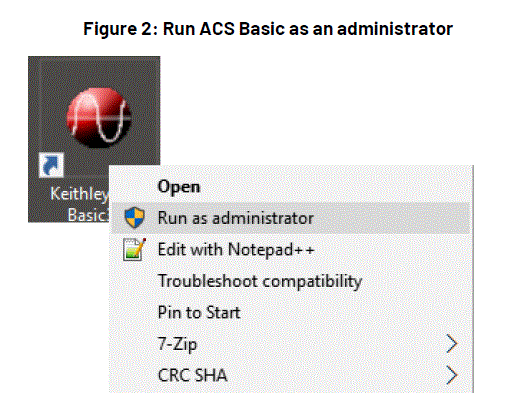
Set ACS Basic to Always Run as Administrator
- Right-click the ACS Basic icon and select Propriedades.
- Selecione o Compatibilidade aba.
- Selecione Run this program as an administrator.

GPIB Driver Installation
If you are using ACS Basic on a 4200A-SCS, do not install the NI GPIB driver. The KUSB-488B GPIB driver is installed by default.
If you are using ACS Basic on a computer that does not have a GPIB driver and want to use the KUSB-488 driver:
- During KUSB-488B GPIB driver installation, select Comando Keithley compatível.
- Selecione Próximo para continuar a instalação.
- If you are using ACS Basic on a computer that does not have a GPIB driver and want to use the NI GPIB driver, keep the default selections to complete the installation.
- If you are using ACS Basic on a computer that has a KUSB-488B GPIB driver and want to use the NI GPIB driver, after installing the NI GPIB driver, manually copy the file
C:\ACS_BASIC\HotFix\ieee_32m.dllpara dentro doC:\Windows\SysWOW64\pasta.

If you uninstall the KUSB-488B GPIB driver or NI GPIB driver after you install ACS Basic, you must reinstall ACS Basic. If you do not reinstall ACS Basic, it cannot be started because of the GPIB driver uninstall.
Windows Update Setting
- Disable Automatic Windows Update to prevent the interruption of ACS tests, or set the updates schedule outside testing hours.
- It’s recommended that the Windows system be updated on schedule to maintain security.
 Execute a atualização do Windows™ em tempo hábil.
Recomenda-se que o sistema Windows seja atualizado periodicamente para garantir sua segurança e mantê-la em dia.
Selecione o problema correspondente ao erro e as instruções de solução apropriadas serão exibidas.
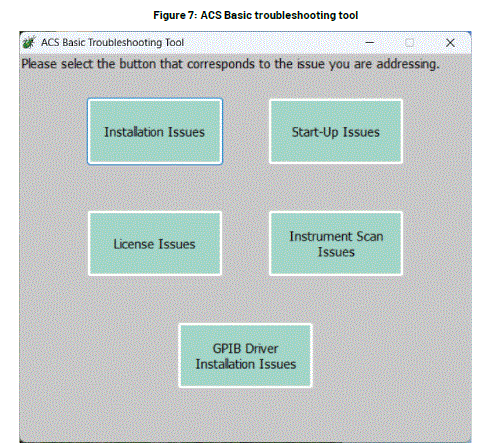
Problemas de instalação
Existem dois tipos de situações para problemas de instalação:
- Instalar o ACS pela primeira vez
- Atualize ou reinstale o ACS.
Selecione o problema correspondente ao erro e as instruções de solução apropriadas serão exibidas.
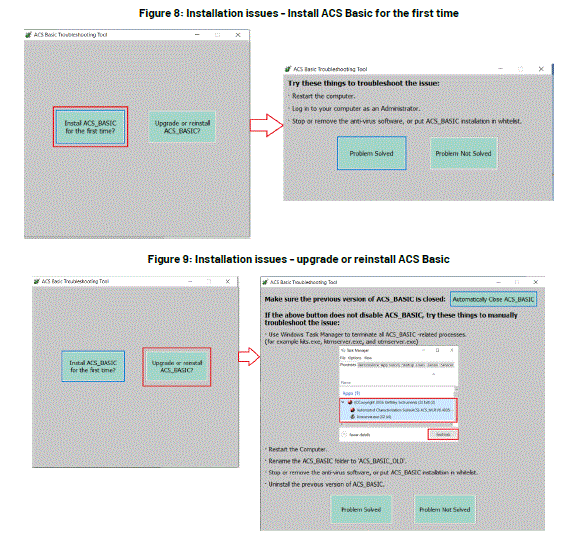
If the problem is solved, select the button Problema resolvido. The instruction window will be closed, and it goes back to the main window of the troubleshooting tool.
Problem Not Solved
If the problem is not solved, select the button Problem Not Solved. Support information will be packed as a zip file named with year_month_date_hour_minute_second in the path C:\ACS\KATS\support_info\. A notice will be shown asking you to contact your Field Application Engineer (FAE) and send this zip file.

Problemas de inicialização
There are two types of situations for Start-up Issues:
- Senha inválida ou projeto inválido File Problema
- Falha na inicialização
Select the button according to the situation, and the instructions of the solution will be shown.

Problemas de licença
Instructions for License Issues are shown in the following picture:

Instrument Scan Issues
Instructions for Instrument Scan Issues are shown in the following figure.
 Para problemas resolvidos ou não resolvidos, consulte as instruções na seção "Problemas de Instalação".
GPIB Driver Installation Issues
Instructions for Instrument Scan Issues are shown in the following figure:
 Para problemas resolvidos ou não resolvidos, consulte as instruções na seção "Problemas de Instalação".
Troubleshooting TekAMS License Issues
The ACS Basic license can become invalid if the Host ID of the computer changes. This can occur if the computer system or hardware is changed or if the computer is broken.
- Get a new license:
- Entre em contato com seu engenheiro de aplicação de campo (FAE). Para obter números de contato em todo o mundo, visite [link para o site]. tek.com/contact-tek.
- A FAE irá review Configure seu computador e obtenha o ID do host.
- The FAE will give the new host ID to the Customer Service Representative (CSR). The CSR will reset the license record on TEKAMS, get a new license file associado ao novo ID do host, e entregue-o ao FAE.
- The FAE will provide you with a new license file.
- Instale a nova licença. file Para resolver o problema:
- In ACS, select Ajuda, então selecione Licença.
- Selecione Instalar para selecionar a licença file.
Troubleshooting Antivirus Software Blocking Issues
- If the ACS Basic installation process is blocked by antivirus software, select Desbloquear in the dialog.
- Add ACS Basic to the trusted list in the antivirus software.
- If ACS Basic is blocked while running, identify the .exe files que são bloqueados pelo software antivírus e adicione esses .exe files na lista de softwares confiáveis do antivírus.
Troubleshooting an Invalid Password, Error Message, or Login Crashes
Se o KATS_Pref.ini file is corrupt, you may see one of the following issues when you log into ACS Basic:
- A mensagem de aviso “Senha inválida. Tente novamente!” é exibida constantemente, mesmo quando o nome de usuário e a senha estão corretos.
- A mensagem de erro “Projeto inválido” file" é exibido.
- ACS Basic crashes.
Para resolver esse problema:
- Rename or delete the
C:\ACS_BASIC\KATS\KATS_pref.inifile. - Restart ACS Basic to reset
KATS_Pref.ini.
Se isso não resolver o problema, entre em contato com seu engenheiro de aplicação de campo (FAE). Para obter números de contato em todo o mundo, visite [link para o site]. tek.com/contact-tek.
Troubleshooting Tool
When an error occurs while starting ACS, a troubleshooting button may appear in the error-reporting window.
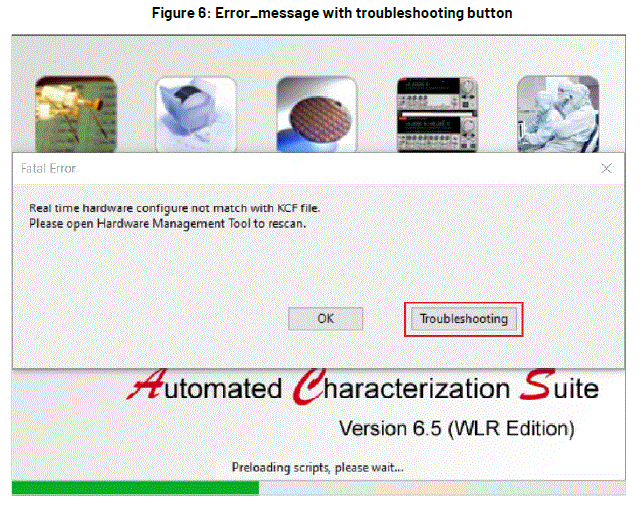
Selecione o botão e a ferramenta de resolução de problemas será iniciada. Cinco problemas podem ser detectados:
- Problemas de instalação
- Problemas iniciais
- Problemas com a licença
- Problemas de digitalização do instrumento
- problemas de instalação do driver GPIB
CONTATE-NOS
- 28775 Aurora Road
- Cleveland, Ohio 44139
- 1-800-833-9200
- tek.com/keithley
Perguntas frequentes
What should I do if ACS Basic does not start?
Ensure you are running the application as an administrator. If issues persist, use the troubleshooting tool to identify the problem.How do I resolve license issues?
Contact your field application engineer to get a new license file if the Host ID has changed.What if my antivirus software blocks ACS Basic?
Add ACS Basic to the trusted list in your antivirus software and unblock any .exe files that are blocked.How can I prevent Windows updates from interrupting ACS tests?
Disable automatic Windows updates or schedule them outside testing hours.
Documentos / Recursos
 | Automated Characterization System Basic Edition Software |
Referências
- Manual do usuáriomanual.tools